

Raycast AIガイド:Macの生産性を向上させる
macOSでRaycast AIを使いこなす:即時回答、文脈対応ライティング、プリセット、Zeabur AI Hubでカスタムモデル
 Kyle Chung
この記事は次の言語でもお読みいただけます: English、繁體中文、简体中文、Español、Bahasa Indonesia。
まだブラウザのタブを開いて、"chatgpt.com"と入力し、ページが読み込まれるのを待つという方法で簡単な質問をしているなら、それは非効率的です。コンテキストスイッチング—コードエディタからブラウザへ、そして戻る—は、フロー状態の静かな殺し屋です。
Raycast AIをご紹介します。これは単なるチャットボットではありません。オペレーティングシステムの上に存在するインテリジェントなレイヤーです。Webベースのツールとは異なり、Macを制御し、今日最も強力なMac向けAI生産性ツールの一つとなっています。
このガイドでは、Raycast AI機能の使い方、競合製品との比較、Zeaburを使用したカスタムモデルの設定に関するプロレベルのチュートリアルをカバーします。
Raycast AIは実際に何ができるのか?(コア機能)
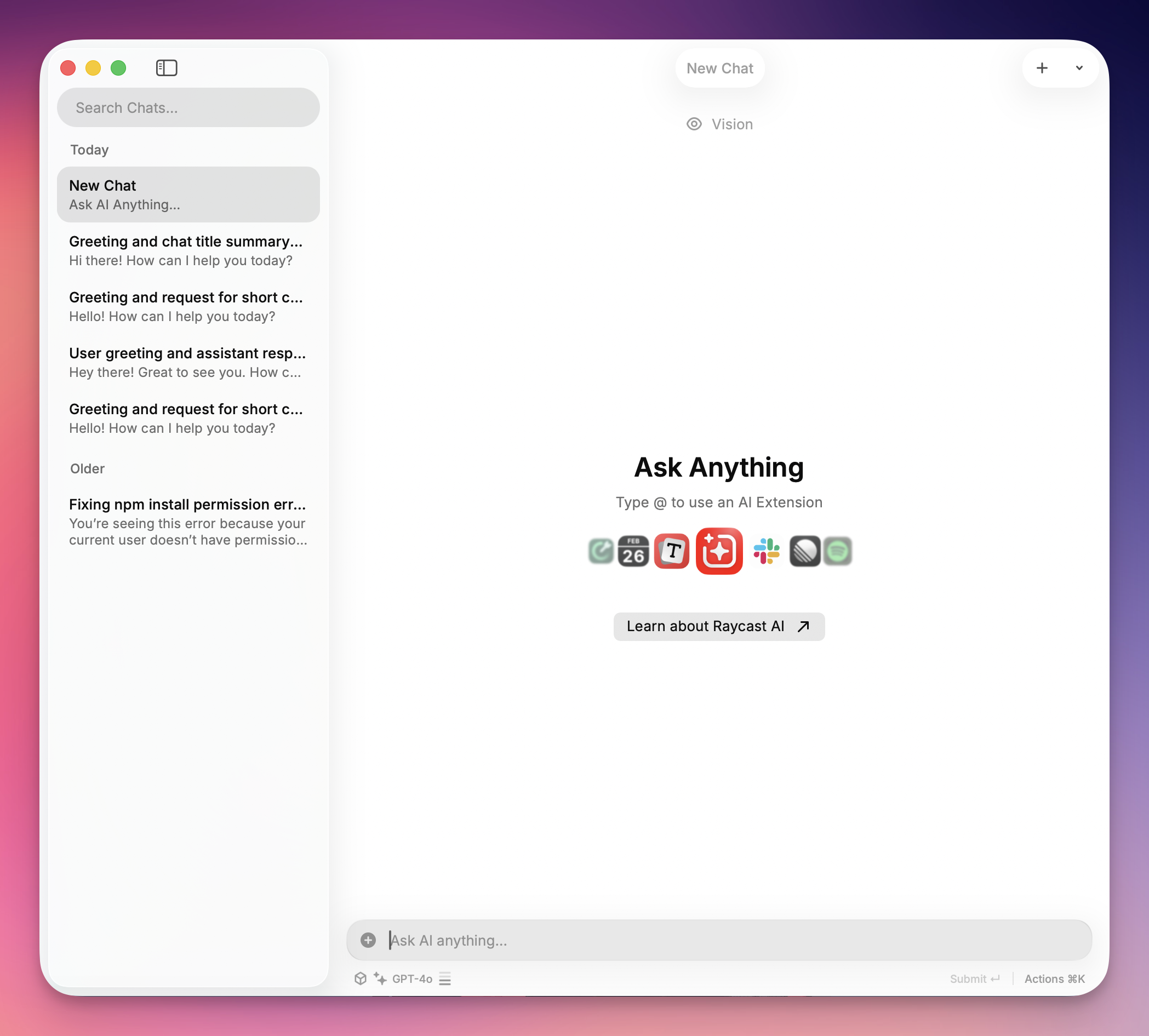
RaycastはネイティブのMac Spotlight検索(⌘ + スペース)を置き換えますが、AI統合がその強力さの源です。ネイティブアプリであるため、メールで選択した段落やVS Codeのコードなど、現在のコンテキストを「読み取る」ことができます。
最初に試すべき4つの機能は次のとおりです:
1. "Quick AI"(Tabキーのトリック)
これは、フローを中断することなく、どのコンピュータでも最も速く答えを得る方法です。
- ワークフロー: Raycastを開き、短い質問を入力(例:「vlookupのExcel数式」)し、
TABを押します。 - 結果: 答えが検索バーに即座に読み込まれます。チャットウィンドウも履歴の混乱もありません—コピーする準備ができた答えだけです。
モデル推奨: 信頼性と安定性の高いパフォーマンスのために、カスタムプロバイダーを設定する際にGPT-4oの使用を推奨します。優れた応答時間と、クイッククエリに対する一貫した結果を提供します。
2. AIチャットプリセット
文法を修正したり、メールを書き直したりするために、テキストをWebボットにコピー&ペーストする必要はありません。ライティングアシスタンスにより、任意のアプリでテキストをハイライトし、その場で書き直すことができます。
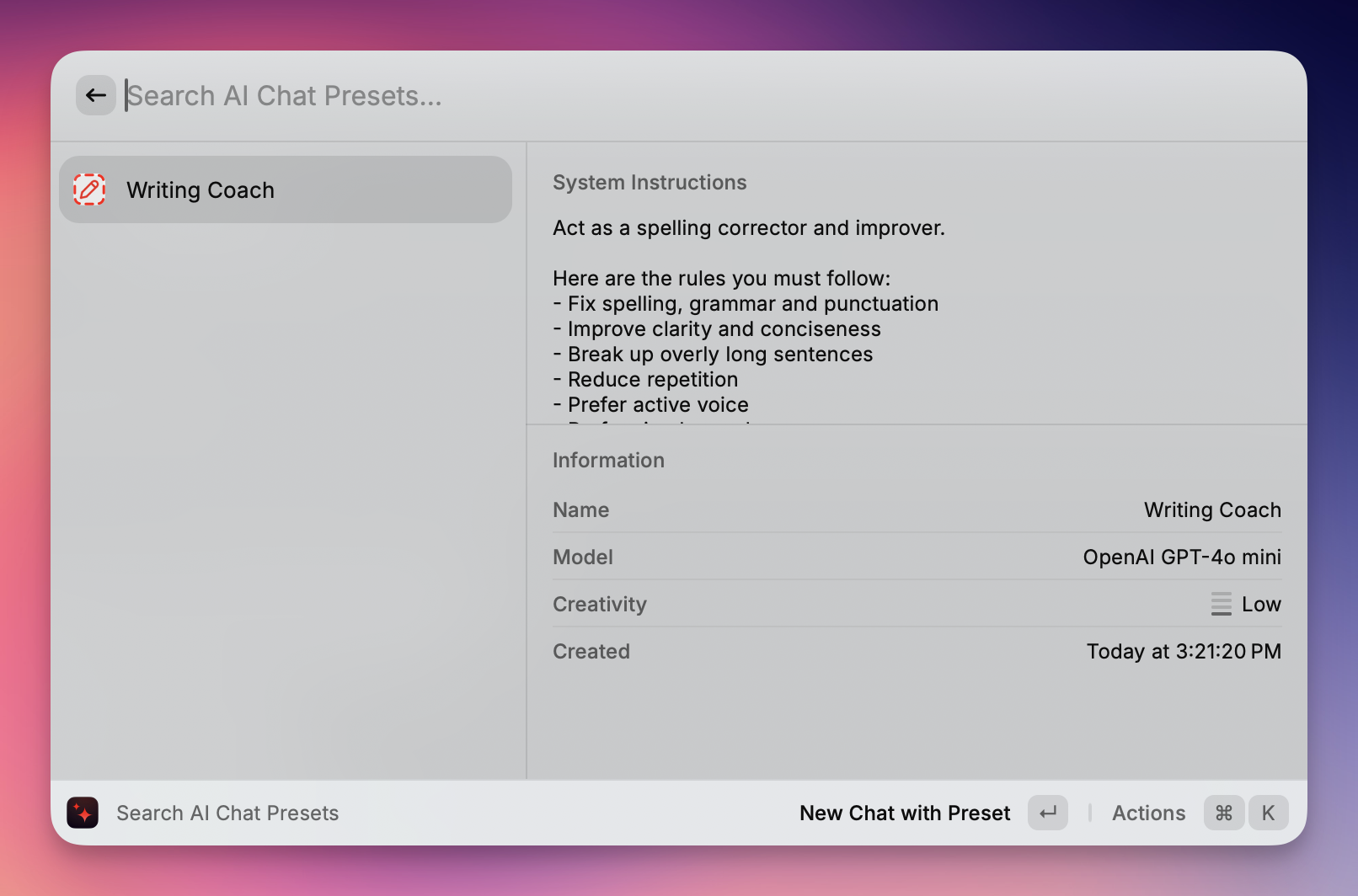
- ワークフロー:任意のアプリ(Slack、Notes、Word)でテキストをハイライトします。Raycastを開き、「文法を修正」や「トーンをフレンドリーに変更」などのコマンドを入力します。
- 結果:Raycastがテキストをその場で書き直し、下書きを削除して、磨かれたバージョンを直接ドキュメントに貼り付けます。
モデル推奨: 最高のライティング品質のために、カスタムプロバイダーを設定する際にGPT-5の使用を推奨します。その高度な言語理解は、文法修正、トーン調整、コンテキスト書き換えに優れています。
3. AIコマンドエコシステム
Raycastは単なるツールではありません。プラットフォームです。Raycastストアには、特定のタスクにAIを活用するコミュニティ構築の拡張機能が満載です。
- ワークフロー: ストアで**「AI画像ジェネレーター」または「翻訳者」**を検索します。
- 結果: Dall-E 3画像の生成やJSONファイルのローカル翻訳など、専門的な機能をアンロックします—コマンドバーから直接、多くの場合、すでに設定した同じAPIキーを使用します。
モデル推奨: AIコマンドと拡張機能での安定した信頼性の高いパフォーマンスのために、カスタムプロバイダーを設定する際にGPT-4oの使用を推奨します。一貫した結果と、さまざまなAI駆動ツールとの優れた互換性を提供します。
いくつかのクールな機能:
@spotify-player(Spotifyコントロール)
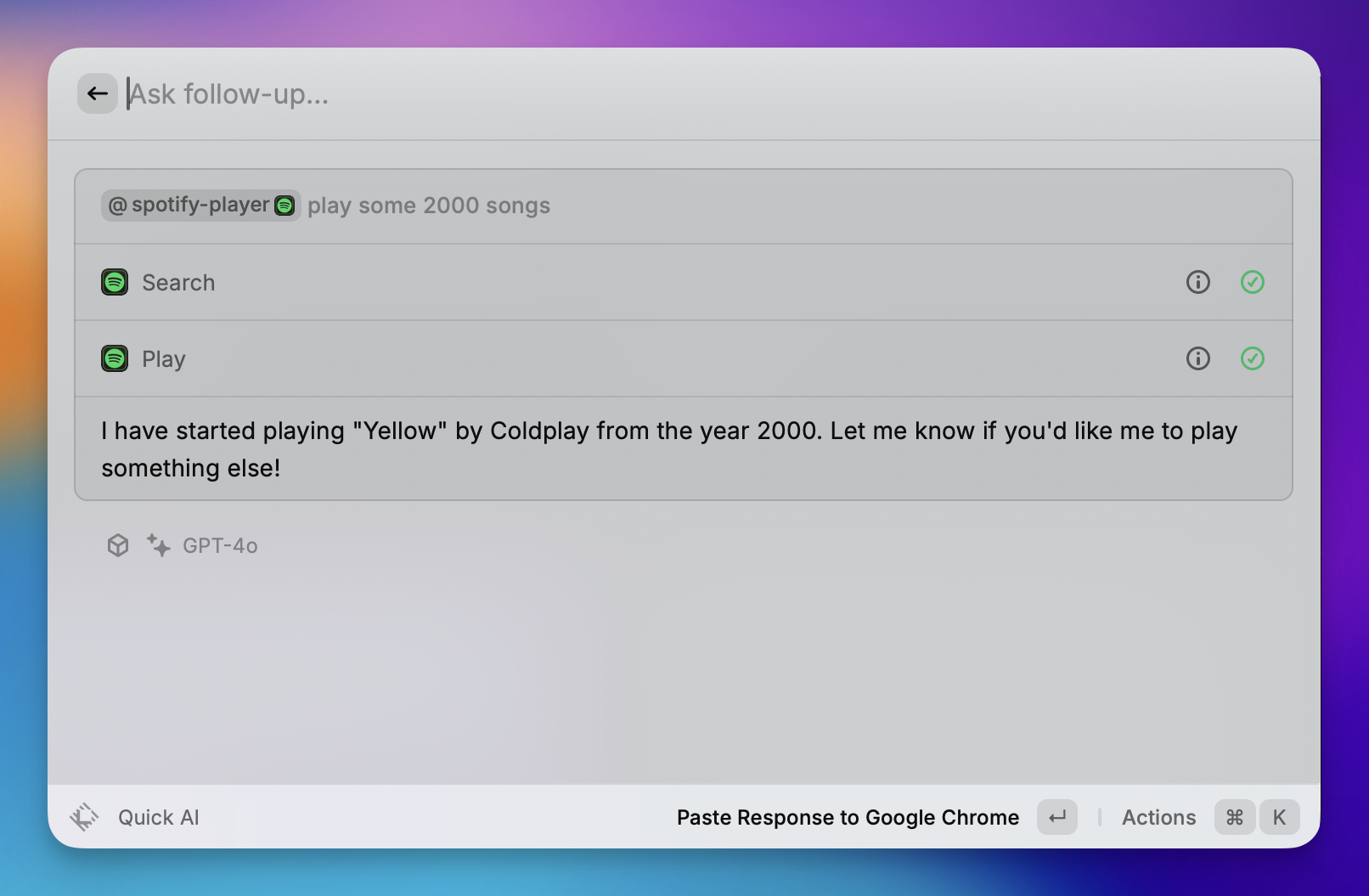
Spotifyのキーボード中心のリモートコントロールとして機能します。
- 再生制御: Spotifyウィンドウを開かずに、再生、一時停止、スキップ、前へ、シャッフルトラックを実行します。
- 検索: コマンドバーから直接、特定の曲、アルバム、またはプレイリストを検索して開始します。
- ライブラリ管理: 現在再生中の曲を「いいね」して、お気に入りの曲に追加します。
@calculator(電卓と変換)

検索バーで即座に計算と変換を実行します(Enterキーは不要)。
- 計算: 基本的な算術(例:
500 * 12)と複雑な式。 - 変換: 通貨(例:
100 usd in eur)、単位(例:5 ft in cm)、タイムゾーン(例:5pm london in tokyo)を即座に変換します。 - 日付計算: 時間差を計算します(例:
days until christmas)。
@calendar(マイスケジュール)
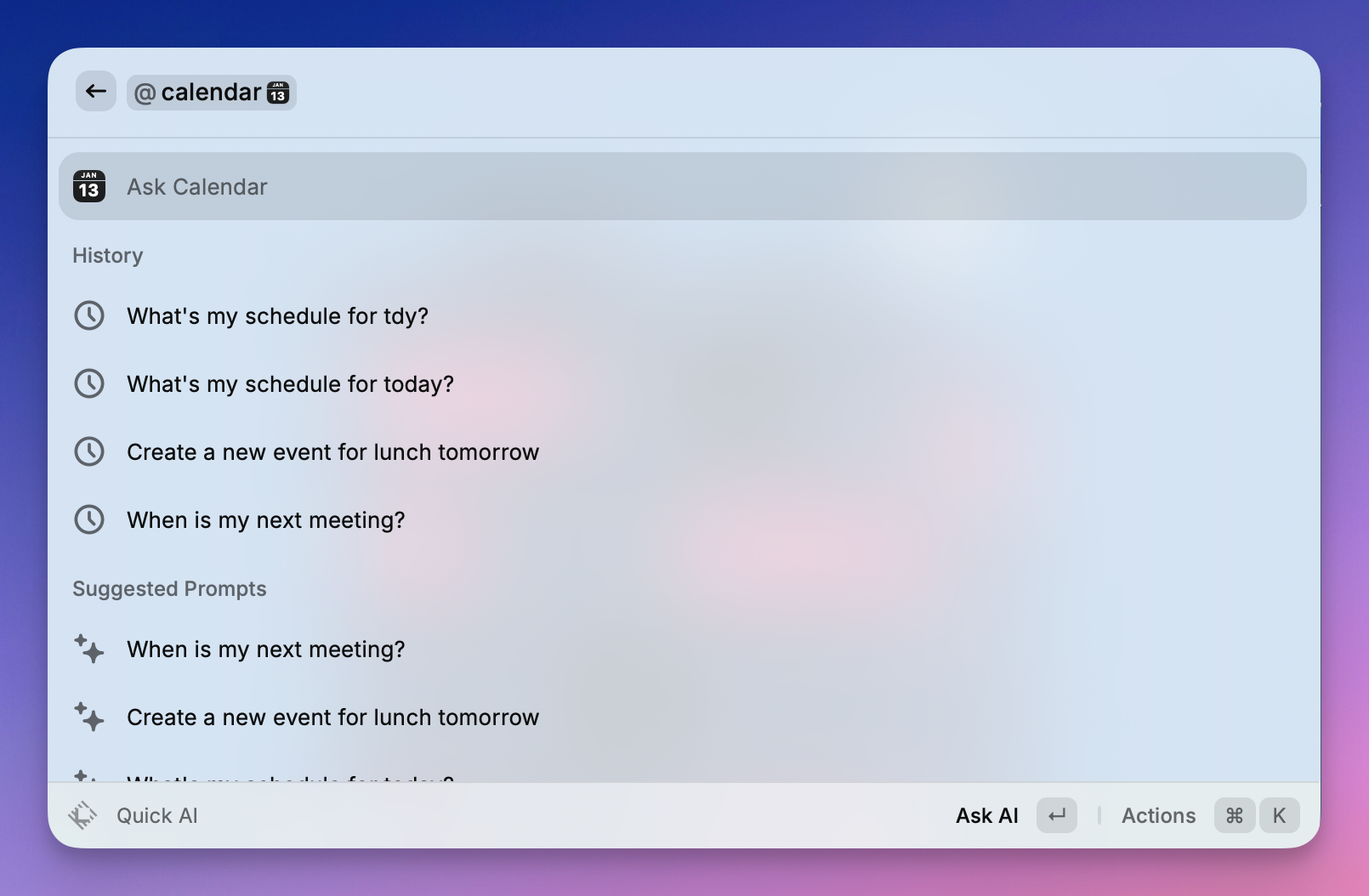
システムカレンダーを統合して、1日を管理します。
- クイック参加: 「キラー機能」—今後のイベントでEnterを押すと、ビデオ会議リンク(Zoom、Meet、Teams)が即座に開きます。
- アジェンダビュー: 今後の会議とイベントのリストを表示します。
- 時間管理: 現在の会議に残っている時間、または次の会議が始まるまでの時間を確認します。
APIキーについて心配する必要はありません。Zeabur AI Hubは使用可能です。
Raycast Proサブスクリプションは素晴らしいですが、多くのユーザーは独自のAPIキーを使用した「従量課金」アプローチを好むか、単に複数のAIモデル(Gemini、Claude、GPTなど)を1か所で管理する自由を望んでいます。
この方法により、誰でも RaycastをZeabur AI Hubに接続できます。プレミアムモデルを自分の条件で使用する強力な方法—お金を節約し、必要な正確なAIツールへのアクセスを提供します。
ステップ1:Zeabur APIキーを取得する
- Zeaburダッシュボードにログインします。
- AI Hubページに移動します。
- 新しいAPIキーを生成し、後で使用するためにコピーします。
ステップ2:Raycast設定を開く
- Raycast検索バーを開きます。
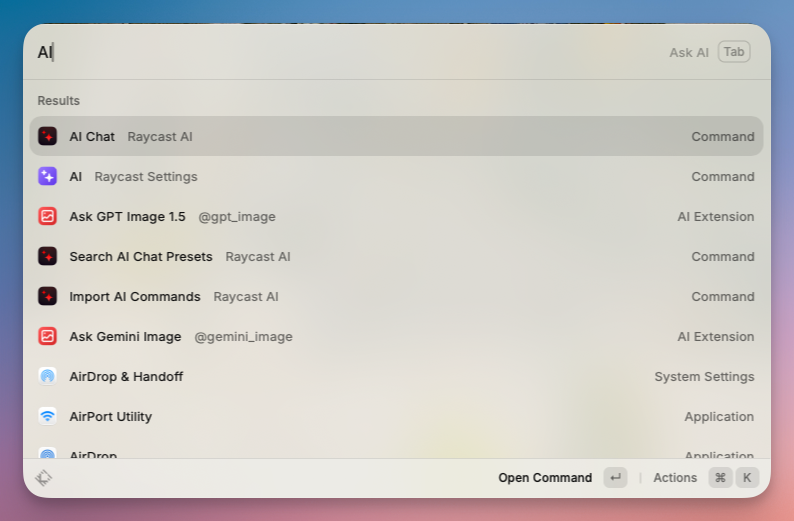
AIと入力し、AI Raycast設定を選択します。- 右側のパネルの下部までスクロールして、カスタムプロバイダーを見つけて有効にします。
- プロバイダー設定を表示をクリックします。これにより、Finderで設定フォルダが開きます。
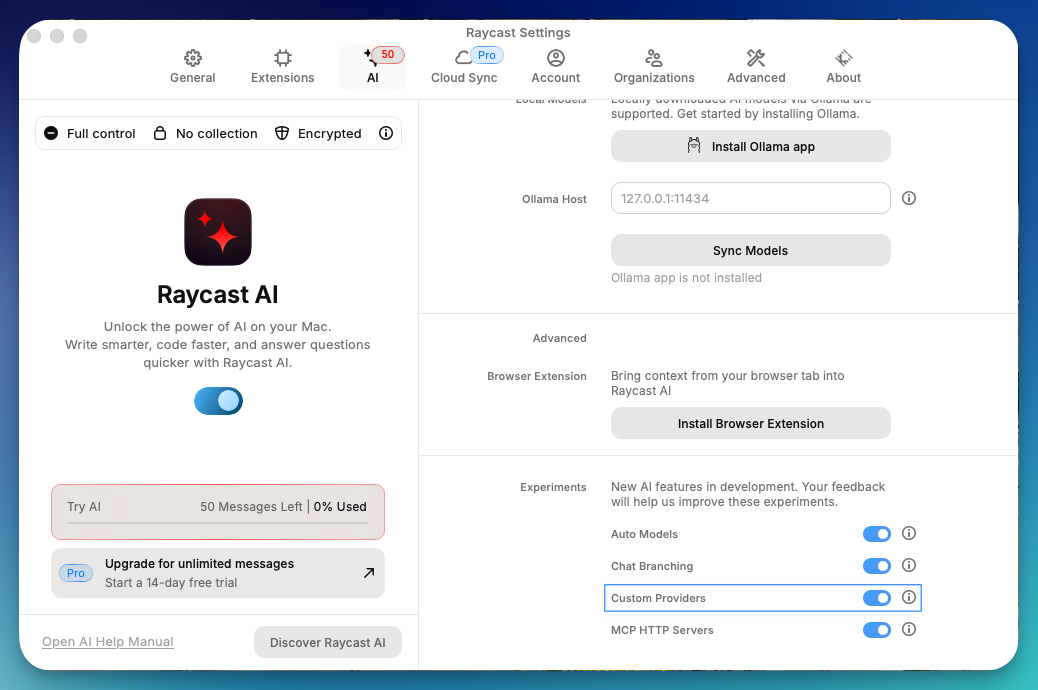
ステップ3:providers.yaml設定ファイルを編集する
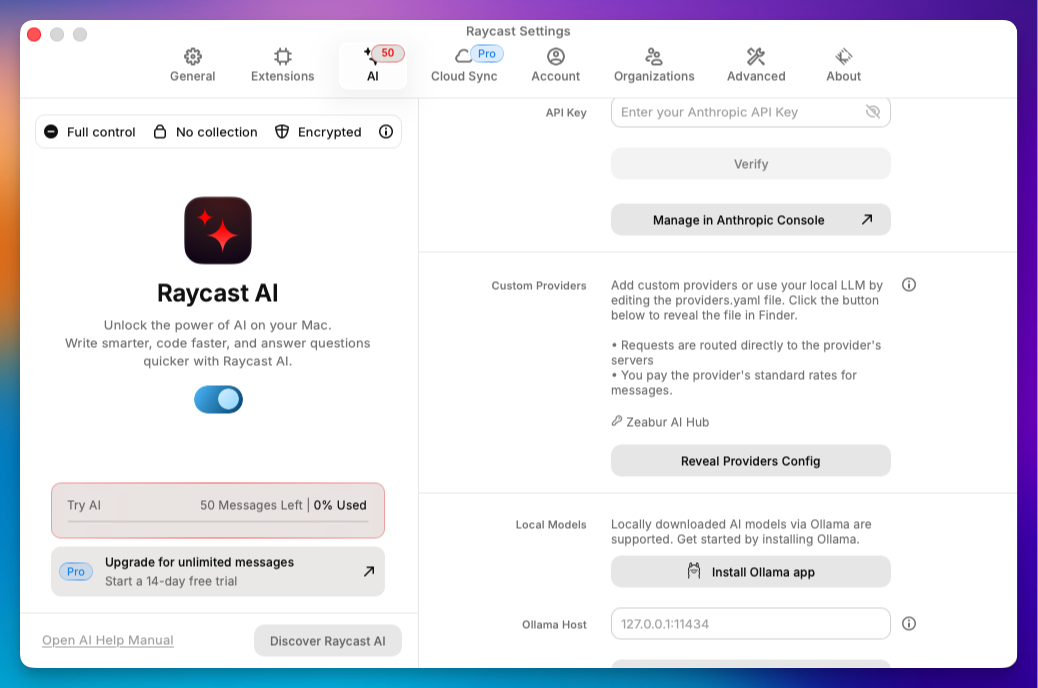
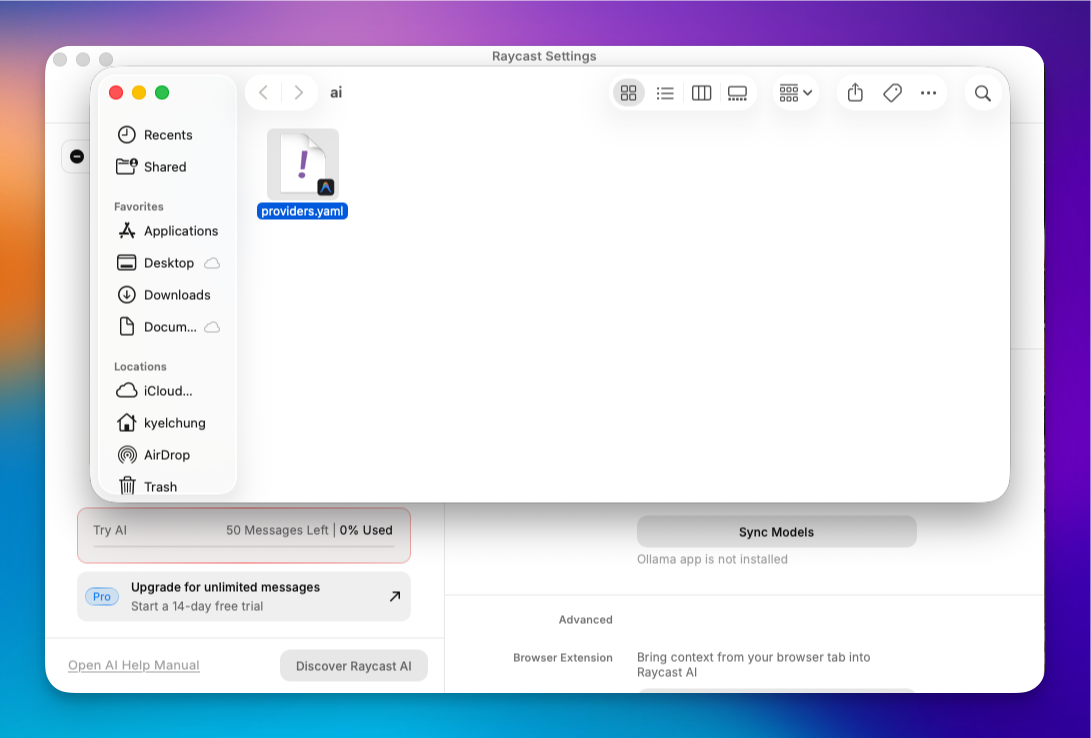
- Finderで
AIフォルダを開きます。 providers.template.yamlを見つけて、コードエディタ(VS Codeなど)で開きます。- 以下の形式に一致するようにコンテンツを変更します(
YOUR_API_KEYをステップ1のキーに置き換えます):
# Template for providers.yaml
#
# You can add any OpenAI API compatible provider to the "providers" list.
# For each provider you must also specify a list of models, along with model abilities.
#
# All fields are required unless marked as optional.
#
# Refer to your provider's API documentation for specific
# details such as model identifiers, capabilities etc
#
# Note: Since the OpenAI API is not a standard we can't guarantee that all
# providers will work correctly with Raycast AI.
#
# To use this template rename as `providers.yaml`
#
providers:
  - id: zeabur_ai_hub
    name: Zeabur AI Hub
    base_url: https://hnd1.aihub.zeabur.ai/ # 也可選擇舊金山節點:https://sfo1.aihub.zeabur.ai/
    api_keys:
      zeabur-ai-hub-key: sk-xxxxxxxxxx
    models:
      - id: claude-sonnet-4-5
        name: "Claude Sonnet 4.5"
        context: 200000
        provider: zeabur-ai-hub-key
        abilities:
          temperature:
            supported: true
          vision:
            supported: true
          system_message:
            supported: true
          tools:
            supported: true
      - id: claude-haiku-4-5
        name: "Claude Haiku 4.5"
        context: 200000
        provider: zeabur-ai-hub-key
        abilities:
          temperature:
            supported: true
          vision:
            supported: true
          system_message:
            supported: true
          tools:
            supported: true
      - id: gemini-3-pro-preview
        name: "Gemini 3 Pro Preview"
        context: 2000000
        provider: zeabur-ai-hub-key
        abilities:
          temperature:
            supported: true
          vision:
            supported: true
          system_message:
            supported: true
          tools:
            supported: true
      - id: gemini-3-flash-preview
        name: "Gemini 3 Flash Preview"
        context: 2000000
        provider: zeabur-ai-hub-key
        abilities:
          temperature:
            supported: true
          vision:
            supported: true
          system_message:
            supported: true
          tools:
            supported: true
      - id: gemini-2.5-pro
        name: "Gemini 2.5 Pro"
        context: 2000000
        provider: zeabur-ai-hub-key
        abilities:
          temperature:
            supported: true
          vision:
            supported: true
          system_message:
            supported: true
          tools:
            supported: true
      - id: gemini-2.5-flash
        name: "Gemini 2.5 Flash"
        context: 2000000
        provider: zeabur-ai-hub-key
        abilities:
          temperature:
            supported: true
          vision:
            supported: true
          system_message:
            supported: true
          tools:
            supported: true
      - id: gemini-2.5-flash-lite
        name: "Gemini 2.5 Flash Lite"
        context: 2000000
        provider: zeabur-ai-hub-key
        abilities:
          temperature:
            supported: true
          vision:
            supported: true
          system_message:
            supported: true
          tools:
            supported: true
      - id: gpt-5
        name: "GPT-5"
        context: 200000
        provider: zeabur-ai-hub-key
        abilities:
          temperature:
            supported: true
          vision:
            supported: true
          system_message:
            supported: true
          tools:
            supported: true
      - id: gpt-5-mini
        name: "GPT-5 mini"
        context: 200000
        provider: zeabur-ai-hub-key
        abilities:
          temperature:
            supported: true
          vision:
            supported: true
          system_message:
            supported: true
          tools:
            supported: true
      - id: gpt-4.1
        name: "GPT-4.1"
        context: 200000
        provider: zeabur-ai-hub-key
        abilities:
          temperature:
            supported: true
          vision:
            supported: true
          system_message:
            supported: true
          tools:
            supported: true
      - id: gpt-4.1-mini
        name: "GPT-4.1 mini"
        context: 200000
        provider: zeabur-ai-hub-key
        abilities:
          temperature:
            supported: true
          vision:
            supported: true
          system_message:
            supported: true
          tools:
            supported: true
      - id: gpt-4o
        name: "GPT-4o"
        context: 200000
        provider: zeabur-ai-hub-key
        abilities:
          temperature:
            supported: true
          vision:
            supported: true
          system_message:
            supported: true
          tools:
            supported: true
      - id: gpt-4o-mini
        name: "GPT-4o mini"
        context: 200000
        provider: zeabur-ai-hub-key
        abilities:
          temperature:
            supported: true
          vision:
            supported: true
          system_message:
            supported: true
          tools:
            supported: true
      - id: gpt-oss-120b
        name: "GPT OSS 120B"
        context: 128000
        provider: zeabur-ai-hub-key
        abilities:
          temperature:
            supported: true
          vision:
            supported: false
          system_message:
            supported: true
          tools:
            supported: true
      - id: grok-4-fast-non-reasoning
        name: "Grok 4 Fast"
        context: 128000
        provider: zeabur-ai-hub-key
        abilities:
          temperature:
            supported: true
          vision:
            supported: true
          system_message:
            supported: true
          tools:
            supported: false
      - id: deepseek-v3.2
        name: "DeepSeek v3.2"
        context: 128000
        provider: zeabur-ai-hub-key
        abilities:
          temperature:
            supported: true
          vision:
            supported: false
          system_message:
            supported: true
          tools:
            supported: true
      - id: llama-3.3-70b
        name: "Llama 3.3 70B"
        context: 128000
        provider: zeabur-ai-hub-key
        abilities:
          temperature:
            supported: true
          vision:
            supported: false
          system_message:
            supported: true
          tools:
            supported: true
      - id: qwen-3-32
        name: "Qwen 3 32B"
        context: 128000
        provider: zeabur-ai-hub-key
        abilities:
          temperature:
            supported: true
          vision:
            supported: false
          system_message:
            supported: true
          tools:
            supported: true
      - id: qwen3-next
        name: "Qwen 3 Next 80B"
        context: 128000
        provider: zeabur-ai-hub-key
        abilities:
          temperature:
            supported: true
          vision:
            supported: false
          system_message:
            supported: true
          tools:
            supported: true
      - id: kimi-k2-thinking
        name: "Kimi K2 Thinking"
        context: 200000
        provider: zeabur-ai-hub-key
        abilities:
          temperature:
            supported: true
          vision:
            supported: false
          system_message:
            supported: true
          tools:
            supported: true
      - id: glm-4.6
        name: "GLM 4.6"
        context: 200000
        provider: zeabur-ai-hub-key
        abilities:
          temperature:
            supported: true
          vision:
            supported: true
          system_message:
            supported: true
          tools:
            supported: true
      - id: gemini-2.5-flash-image
        name: "Nano Banana"
        context: 200000
        provider: zeabur-ai-hub-key
        abilities:
          temperature:
            supported: true
          vision:
            supported: true
          system_message:
            supported: true
          tools:
supported: true- 保存して名前を変更: ファイルを保存し、
providers.yamlに名前を変更します(.templateを削除)。
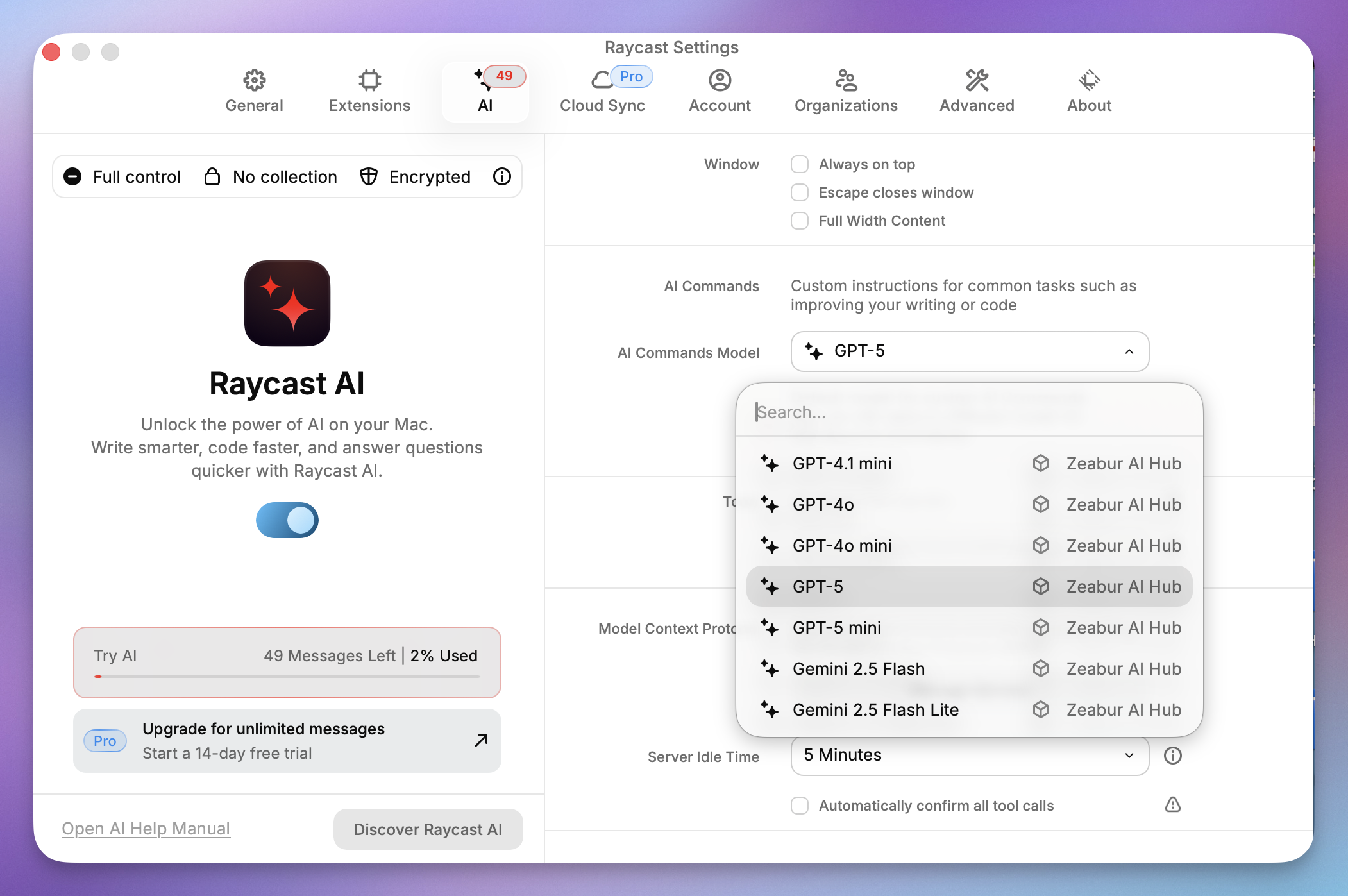
ステップ4:新しいモデルを選択する
Raycastに戻り、AIチャットでモデルドロップダウンを開き、Zeabur AI Hubを選択できます。これで、デフォルトのサブスクリプションモデルをバイパスし、独自の管理ハブを使用しています!
Raycast AI vs. 競合製品
Raycast AI vs ChatGPTアプリ
Mac向けのネイティブChatGPTアプリはブラウザよりも改善されていますが、管理する必要がある「ウィンドウ」です。
- ChatGPTアプリ: 長い会話セッションに適しています。
- Raycast AI: 「出入り」ユーティリティ向けに設計されています。別のウィンドウにコピー&ペーストすることを強制するのではなく、あなたがいる場所(IDE、メール、Slack)でテキストを変更します。
Raycast vs. Spotlight
Spotlightはファイルを検索します。Raycastはアクションを実行します。違いは雲泥の差です。RaycastにAIを追加すると、Spotlightは過去の遺物のように感じられます。
結論
Raycast AIは、Macランチャーを生産性エンジンに変えます。クイックな答えを探すカジュアルユーザーでも、Zeaburを介して複雑なパイプラインを設定する開発者でも、Webブラウザが単に一致できない速度レベルを提供します。
ワークフローをアップグレードする準備はできていますか? 無料でRaycastをダウンロードして始めるか、Pro機能に飛び込んで、MacでAIの全ポテンシャルをアンロックしてください。