# yaml-language-server: $schema=https://schema.zeabur.app/template.json
apiVersion: zeabur.com/v1
kind: Template
metadata:
name: Redis
spec:
description: Redis is an in-memory database that persists on disk.
icon: https://service-icons.zeabur.com/marketplace/redis.svg
tags:
- Database
readme: |-
## What is Redis?
Redis is often referred to as a data structures server. What this means is that Redis provides access to mutable data structures via a set of commands, which are sent using a server-client model with TCP sockets and a simple protocol. So different processes can query and modify the same data structures in a shared way.
Data structures implemented into Redis have a few special properties:
- Redis cares to store them on disk, even if they are always served and modified into the server memory. This means that Redis is fast, but that it is also non-volatile.
- The implementation of data structures emphasizes memory efficiency, so data structures inside Redis will likely use less memory compared to the same data structure modelled using a high-level programming language.
- Redis offers a number of features that are natural to find in a database, like replication, tunable levels of durability, clustering, and high availability.
## Environment Variables
- `${REDIS_CONNECTION_STRING}`: The connection string for the Redis service.
- `${REDIS_HOST}`: The hostname of the Redis service.
- `${REDIS_PORT}`: The port of the Redis service.
- `${REDIS_PASSWORD}`: The password for the Redis service.
After you deploy the Redis service, Zeabur will automatically inject the relevant environment variables into other services.
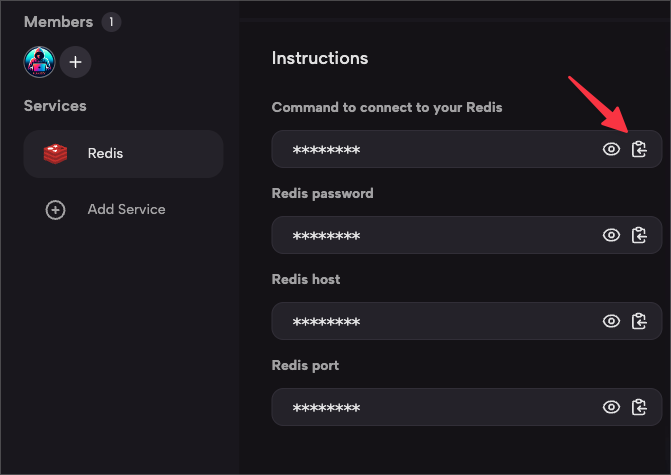
You can also find the connection information in the “Instructions” section on the console.
## Connecting to the Database
- [Redis CLI](https://docs.redis.com/latest/rs/references/cli-utilities/redis-cli/)
### redis-cli
[redis-cli](https://www.mongodb.com/docs/mongodb-shell/) is a command-line tool that allows you to interact with the Redis database. Using redis-cli, you can execute Redis commands in the command-line terminal or interactive mode.
After downloading and installing according to the documentation, return to Zeabur. Click on the Instructions tab in the Redis service, and click the copy button for `Command to connect to your Redis` to copy the connection address.
Paste the copied command into the terminal and enter `PING` to test if the connection is successful:
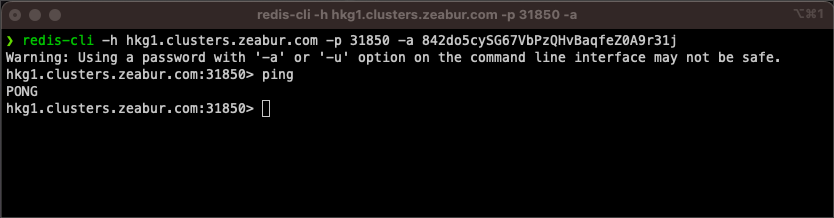
At this point, you can start operating Redis.
services:
- name: redis
icon: https://raw.githubusercontent.com/zeabur/service-icons/main/marketplace/redis.svg
template: PREBUILT
spec:
source:
image: redis/redis-stack-server:latest
ports:
- id: database
port: 6379
type: TCP
volumes:
- id: data
dir: /data
instructions:
- title: Command to connect to your Redis
content: redis-cli -h ${PORT_FORWARDED_HOSTNAME} -p ${DATABASE_PORT_FORWARDED_PORT} -a ${REDIS_PASSWORD}
- title: Redis Connection String
content: redis://:${REDIS_PASSWORD}@${PORT_FORWARDED_HOSTNAME}:${DATABASE_PORT_FORWARDED_PORT}
- title: Redis password
content: ${REDIS_PASSWORD}
- title: Redis host
content: ${PORT_FORWARDED_HOSTNAME}
- title: Redis port
content: ${DATABASE_PORT_FORWARDED_PORT}
env:
CONFFILE:
default: /etc/redis-stack.conf
REDIS_ARGS:
default: --requirepass ${REDIS_PASSWORD}
REDIS_CONNECTION_STRING:
default: redis://:${REDIS_PASSWORD}@${REDIS_HOST}:${REDIS_PORT}
expose: true
REDIS_HOST:
default: ${CONTAINER_HOSTNAME}
expose: true
REDIS_PASSWORD:
default: ${PASSWORD}
expose: true
REDIS_PORT:
default: ${DATABASE_PORT}
expose: true
REDIS_URI:
default: ${REDIS_CONNECTION_STRING}
expose: true
configs:
- path: /etc/redis-stack.conf
template: |
port 6379
daemonize no
permission: null
envsubst: null
localization:
zh-CN:
description: Redis 是一个将数据存储在内存,并可持久化到硬盘的数据库。
readme: |
## Redis 是什么?
Redis 通常被称为数据结构服务器。这意味着 Redis 通过一组命令提供对可变数据结构的访问,这些命令通过 TCP socket 和简单的协议,以服务器-客户端模式传送。因此不同的程序可以共同查询和修改相同的数据结构。
Redis 实现的数据结构具有以下特点:
- Redis 会将数据存储在硬盘上,即使这些数据始终在服务器内存中被访问和修改。这意味着 Redis 不仅快速,而且具有持久性。
- 数据结构的实现注重内存效率,所以 Redis 内部的数据结构相比使用高级编程语言建模的相同数据结构,会使用更少的内存。
- Redis 提供许多数据库常见的功能,如复制、可调整的持久性级别、集群和高可用性。
## 环境变量
- `${REDIS_CONNECTION_STRING}`: Redis 服务的连接字符串。
- `${REDIS_HOST}`: Redis 服务的主机名称。
- `${REDIS_PORT}`: Redis 服务的端口。
- `${REDIS_PASSWORD}`: Redis 服务的密码。
当你部署 Redis 服务后,Zeabur 会自动将相关的环境变量注入到其他服务中。
你也可以在控制台的"操作指南"区块中找到连接信息。
## 连接到数据库
- [Redis CLI](https://docs.redis.com/latest/rs/references/cli-utilities/redis-cli/)
### redis-cli
[redis-cli](https://www.mongodb.com/docs/mongodb-shell/) 是一个命令行工具,让你能够与 Redis 数据库交互。使用 redis-cli,你可以在命令行终端或交互模式中执行 Redis 命令。
按照文档下载安装后,回到 Zeabur。点击 Redis 服务中的操作指南标签,点击"连接到你的 Redis 的命令"的复制按钮来复制连接地址。

将复制的命令粘贴到终端中,输入 `PING` 测试是否连接成功:

这时候你就可以开始操作 Redis 了。
zh-TW:
description: Redis 是一個將資料儲存在記憶體,並可持久化到硬碟的資料庫。
readme: |
## Redis 是什麼?
Redis 常被稱為資料結構伺服器。這意味著 Redis 透過一組指令提供對可變資料結構的存取,這些指令是透過 TCP socket 和簡單的協定,以伺服器-客戶端模式傳送。因此不同的程序可以共同查詢和修改相同的資料結構。
Redis 實作的資料結構具有以下特性:
- Redis 會將資料儲存在硬碟上,即使這些資料總是在伺服器記憶體中被存取和修改。這代表 Redis 不僅快速,而且具有持久性。
- 資料結構的實作著重在記憶體效率,所以 Redis 內部的資料結構相較於使用高階程式語言建模的相同資料結構,會使用較少的記憶體。
- Redis 提供許多資料庫常見的功能,如複製、可調整的持久性層級、叢集和高可用性。
## 環境變數
- `${REDIS_CONNECTION_STRING}`: Redis 服務的連線字串。
- `${REDIS_HOST}`: Redis 服務的主機名稱。
- `${REDIS_PORT}`: Redis 服務的連接埠。
- `${REDIS_PASSWORD}`: Redis 服務的密碼。
當你部署 Redis 服務後,Zeabur 會自動將相關的環境變數注入到其他服務中。
你也可以在控制台的「操作指南」區塊中找到連線資訊。
## 連線到資料庫
- [Redis CLI](https://docs.redis.com/latest/rs/references/cli-utilities/redis-cli/)
### redis-cli
[redis-cli](https://www.mongodb.com/docs/mongodb-shell/) 是一個命令列工具,讓你能夠與 Redis 資料庫互動。使用 redis-cli,你可以在命令列終端機或互動模式中執行 Redis 指令。
依照文件下載安裝後,回到 Zeabur。點擊 Redis 服務中的操作指南分頁,點擊「連線到你的 Redis 的指令」的複製按鈕來複製連線位址。

將複製的指令貼到終端機中,輸入 `PING` 測試是否連線成功:

這時候你就可以開始操作 Redis 了。