

Raycast AI 使用指南:提高 Mac 工作效率
精通 Mac 上的 Raycast AI:即時答案、上下文感知寫作、預設,以及通過 Zeabur AI Hub 使用自定義模型
 Kyle Chung
本文亦提供 English、简体中文、日本語、Español和Bahasa Indonesia。
如果你還在每次有快速問題時打開瀏覽器標籤頁,輸入 "chatgpt.com",然後等待頁面載入,那你就是在用最麻煩的方式。上下文切換——從程式碼編輯器切換到瀏覽器再回來——是工作流狀態的無聲殺手。
進入 Raycast AI。它不僅僅是另一個聊天機器人;它是一個智能層,位於你的作業系統之上。與基於 Web 的工具不同,它控制你的 Mac,使其成為當今最強大的 Mac AI 生產力工具之一。
在本指南中,我們將介紹如何使用 Raycast AI 功能,將其與競爭對手進行比較,並深入探討使用 Zeabur 設置自定義模型的專業級教程。
Raycast AI 實際能做什麼?(核心功能)
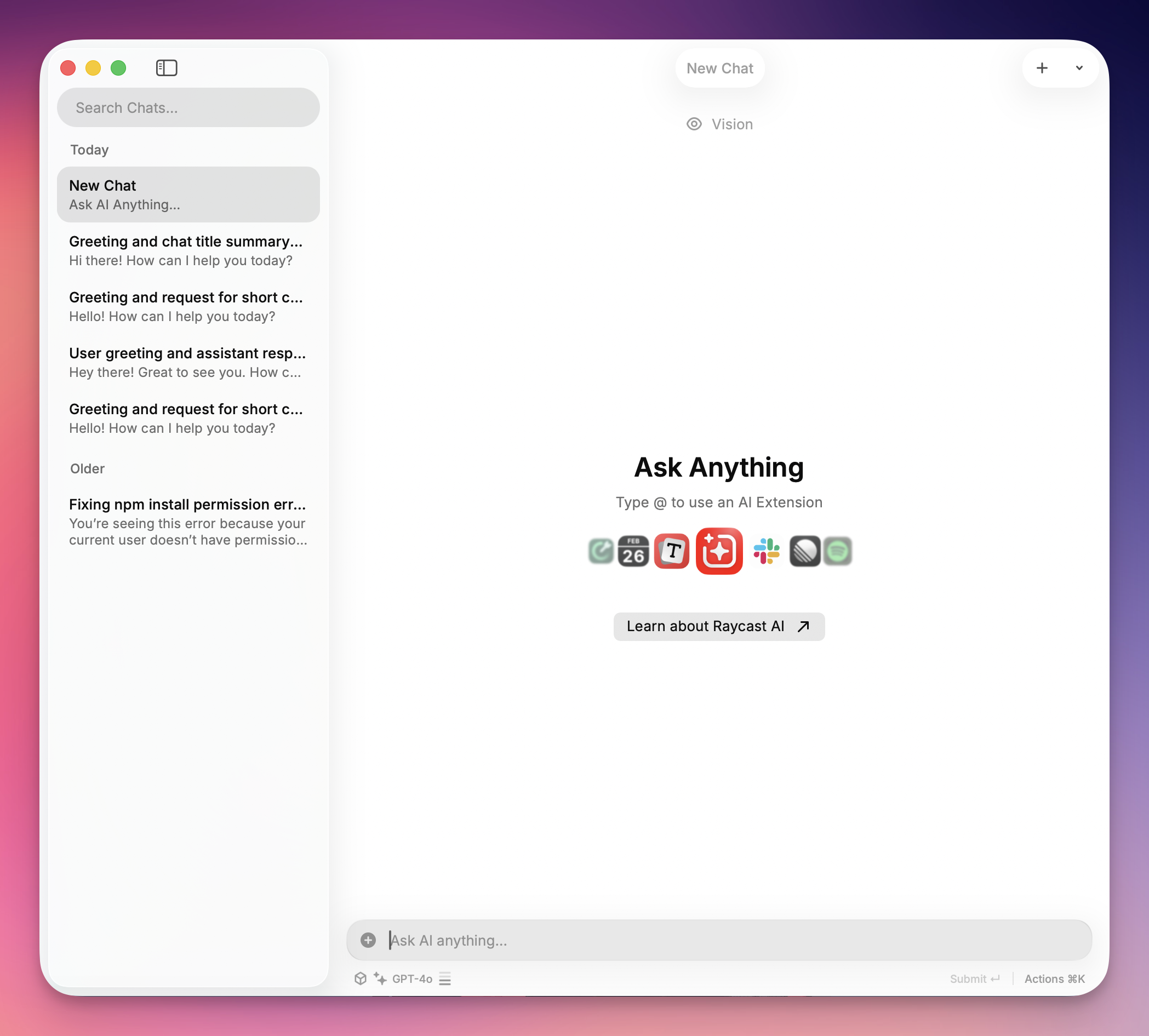
Raycast 取代了原生 Mac Spotlight 搜尋(⌘ + 空格),但其 AI 整合才是它的強大之處。由於它是原生應用,它可以"讀取"你當前的上下文——無論是郵件中選中的段落還是 VS Code 中的程式碼。
以下是你應該首先嘗試的 4 個功能:
1. "Quick AI"(Tab 鍵技巧)
這是在任何電腦上獲得答案的最快方式,不會打斷你的工作流。
- 工作流程: 打開 Raycast,輸入簡短問題(例如,"Excel vlookup 公式"),然後按
TAB。 - 結果: 答案立即載入到搜尋欄中。沒有聊天視窗,沒有歷史記錄混亂——只有準備好複製的答案。
模型推薦: 為了獲得可靠且穩定的效能,我們建議在設置自定義提供商時使用 GPT-4o。它提供出色的響應時間和一致的快速查詢結果。
2. AI 聊天預設
你不需要將文字複製貼上到 Web 機器人中來修復語法或重寫郵件。寫作助手讓你可以任何應用中高亮顯示文字並在原地重寫。
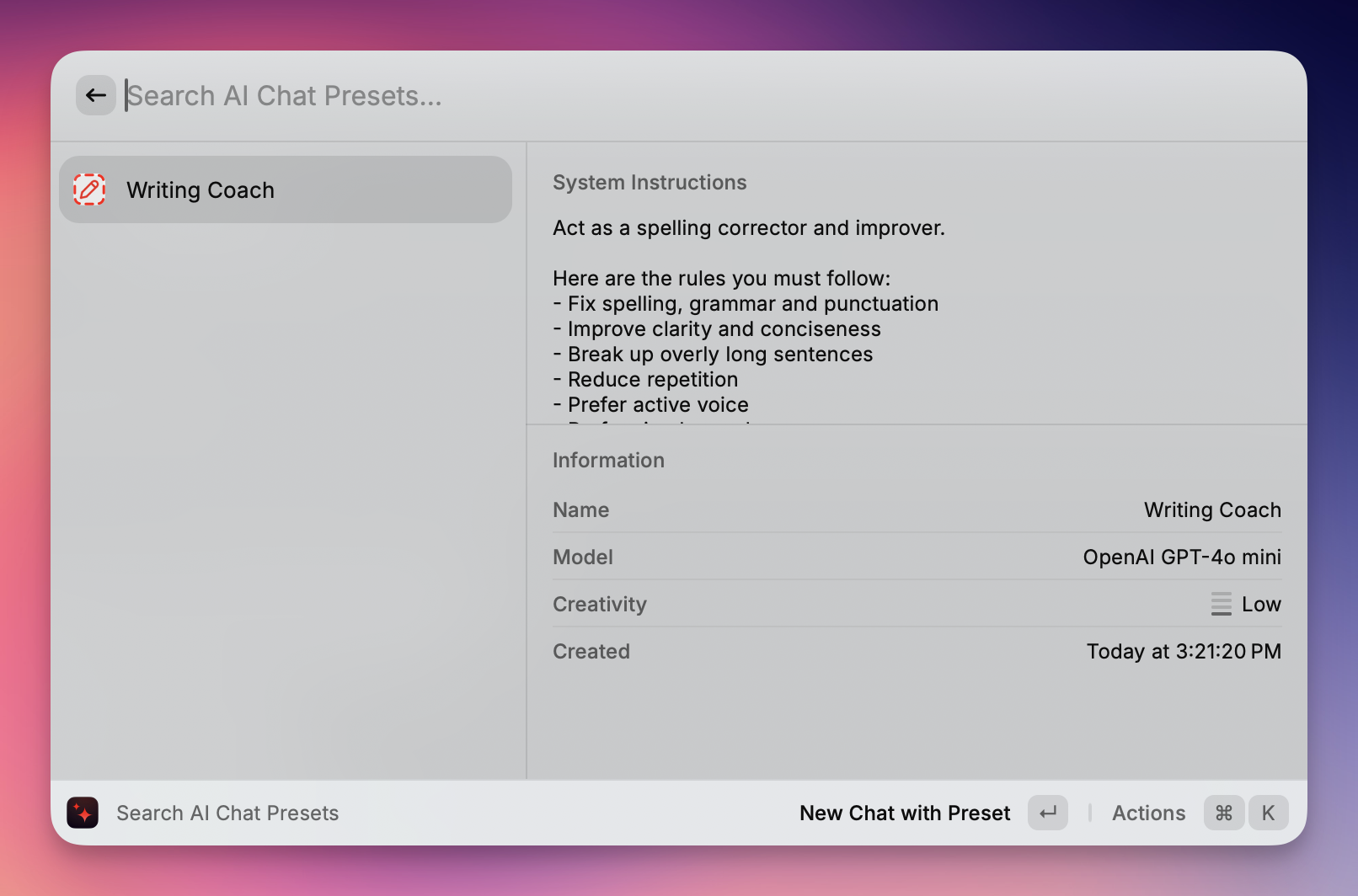
- 工作流程:在任何應用(Slack、Notes、Word)中高亮顯示文字。打開 Raycast 並輸入命令,如"修復語法"或"將語氣改為友好"。
- 結果:Raycast 在原地重寫文字,刪除你的草稿,並將潤色後的版本直接貼上到你的文件中。
模型推薦: 為了獲得最佳的寫作品質,我們建議在設置自定義提供商時使用 GPT-5。其先進的語言理解能力在語法糾正、語氣調整和上下文重寫方面表現出色。
3. AI 命令生態系統
Raycast 不僅僅是一個工具;它是一個平台。Raycast Store 充滿了社群構建的擴展,這些擴展利用 AI 來完成特定任務。
- 工作流程: 在 Store 中搜尋 "AI 圖像生成器" 或 "翻譯器"。
- 結果: 你解鎖了專業功能——如生成 Dall-E 3 圖像或在本地翻譯 JSON 檔案——直接從你的命令欄,通常使用你已經設置的相同 API 金鑰。
模型推薦: 為了在 AI 命令和擴展中獲得穩定可靠的效能,我們建議在設置自定義提供商時使用 GPT-4o。它提供一致的結果,並與各種 AI 驅動的工具具有出色的相容性。
一些很酷的功能:
@spotify-player(Spotify 控制)
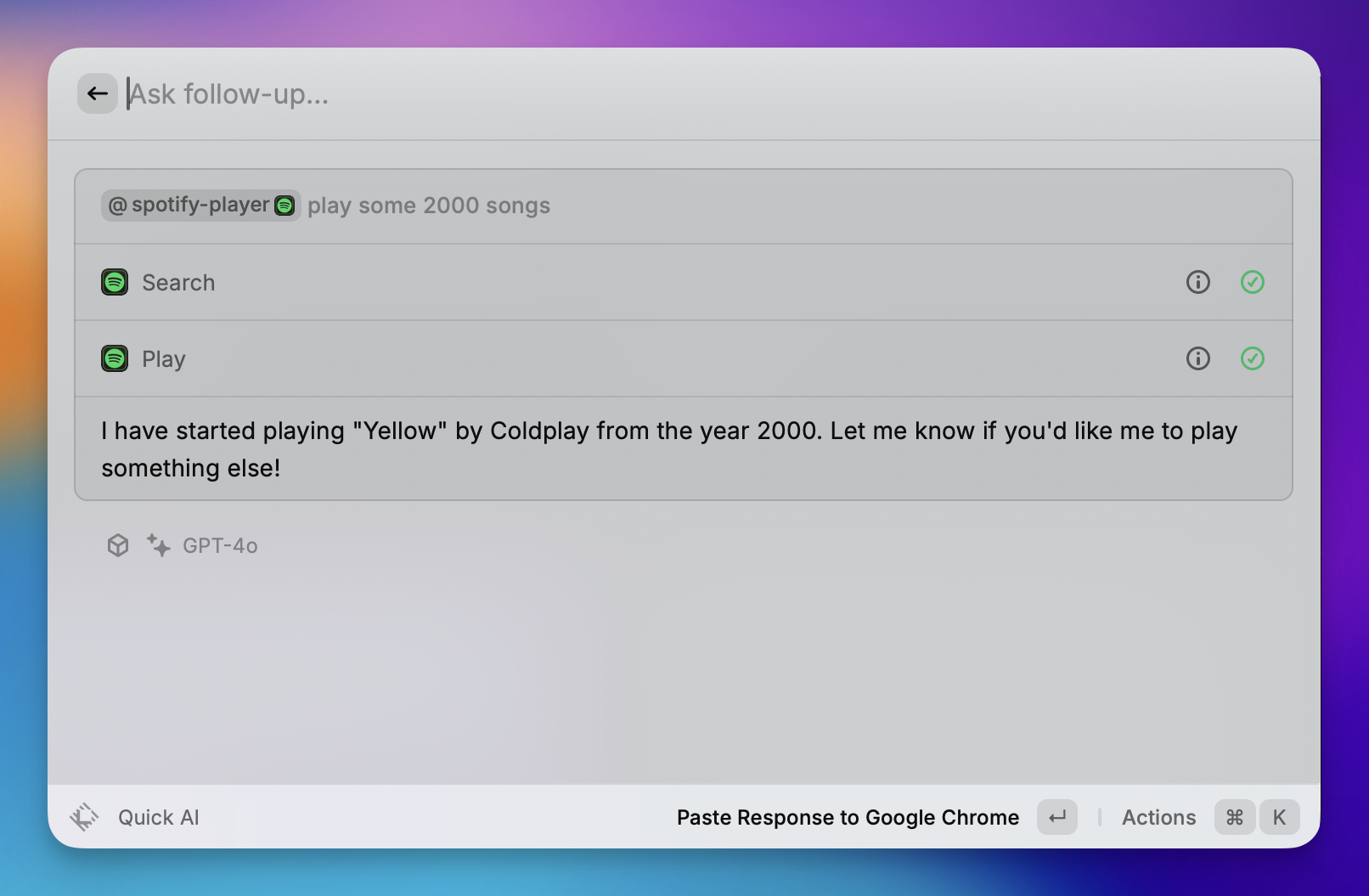
作為 Spotify 的鍵盤中心遙控器。
- 播放控制: 播放、暫停、跳過、上一首和隨機播放曲目,無需打開 Spotify 視窗。
- 搜尋: 直接從命令欄搜尋並開始播放特定歌曲、專輯或播放清單。
- 庫管理: "喜歡"當前播放的歌曲,將其添加到你的"喜歡的歌曲"中。
@calculator(計算器和轉換)

在搜尋欄中立即執行數學計算和轉換(無需按 Enter 鍵)。
- 數學: 基本算術(例如,
500 * 12)和複雜表達式。 - 轉換: 即時轉換貨幣(例如,
100 usd in eur)、單位(例如,5 ft in cm)和時區(例如,5pm london in tokyo)。 - 日期計算: 計算時間差(例如,
days until christmas)。
@calendar(我的日程)
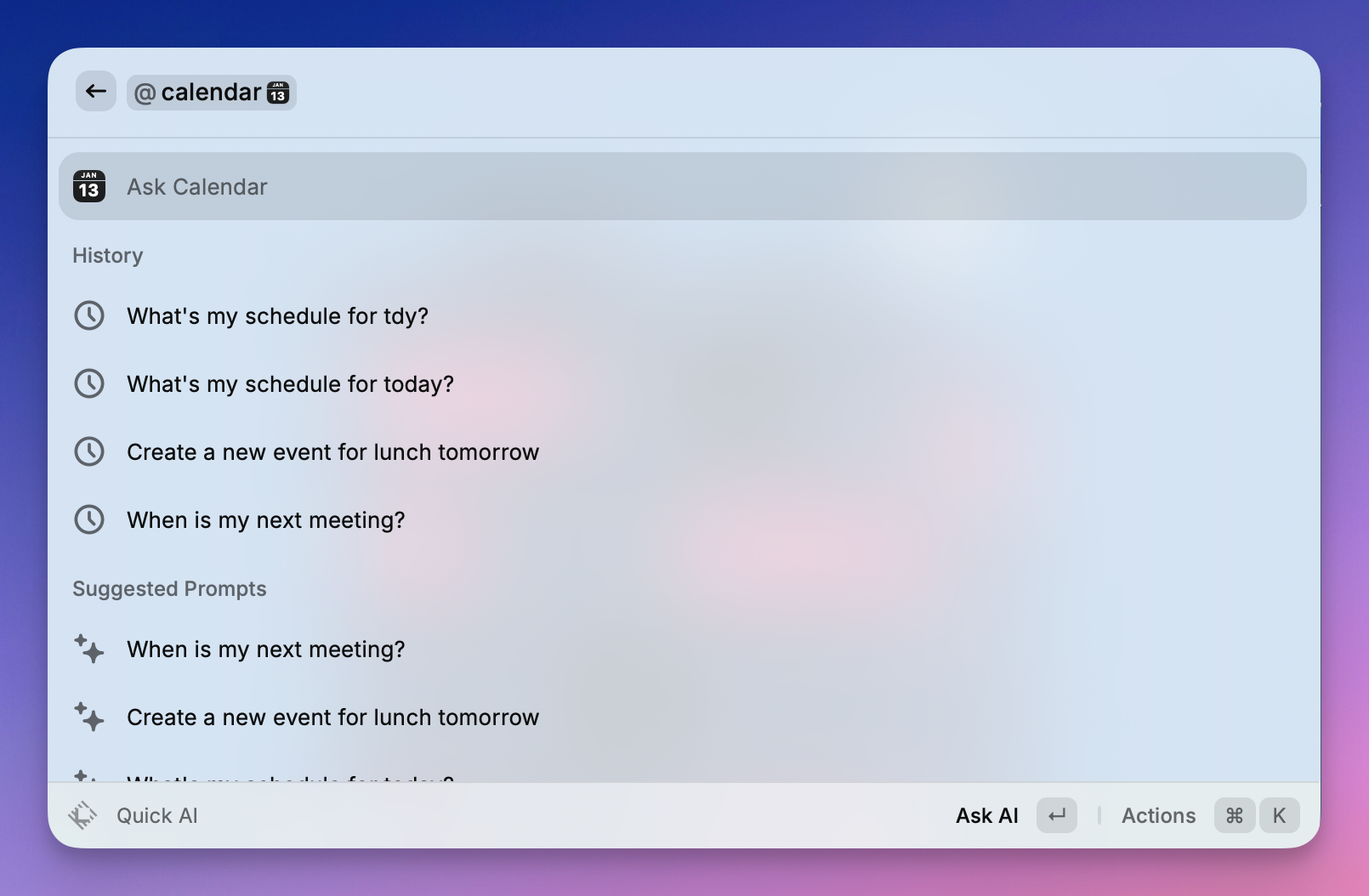
整合你的系統日曆來管理你的一天。
- 快速加入: "殺手級功能"—在即將到來的活動上按 Enter 鍵,立即打開視訊會議連結(Zoom、Meet、Teams)。
- 日程視圖: 查看你即將舉行的會議和活動清單。
- 時間管理: 查看當前會議還剩多少時間,或距離下一個會議開始還有多長時間。
不用擔心 API 金鑰,Zeabur AI Hub 已準備就緒。
雖然 Raycast Pro 訂閱很棒,但許多用戶更喜歡使用自己的 API 金鑰的"按需付費"方法,或者只是想要在一個地方管理多個 AI 模型(如 Gemini、Claude 和 GPT)的自由。
此方法允許任何人將 Raycast 連接到 Zeabur AI Hub。這是一種強大的方式,可以按自己的條件使用高級模型——可能節省資金,並讓你訪問所需的確切 AI 工具。
步驟 1:獲取你的 Zeabur API 金鑰
- 登入 Zeabur 儀表板。
- 導航到 AI Hub 頁面。
- 生成新的 API 金鑰並複製以供以後使用。
步驟 2:打開 Raycast 設置
- 打開 Raycast 搜尋欄。
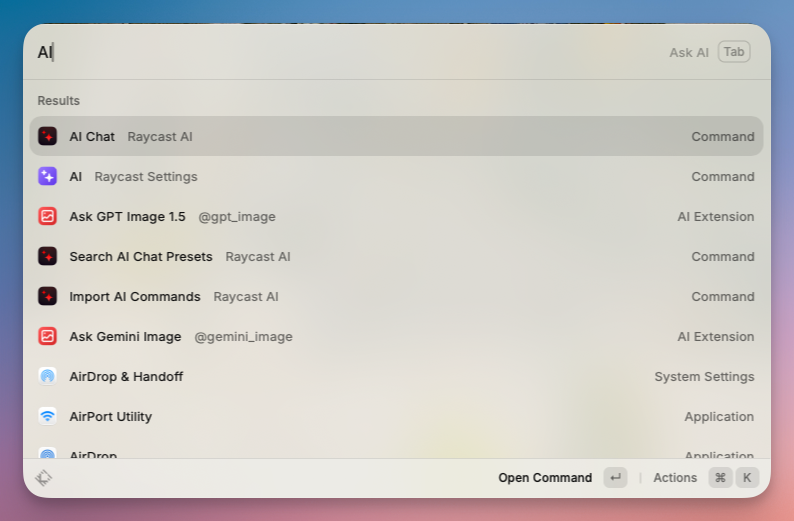
- 輸入
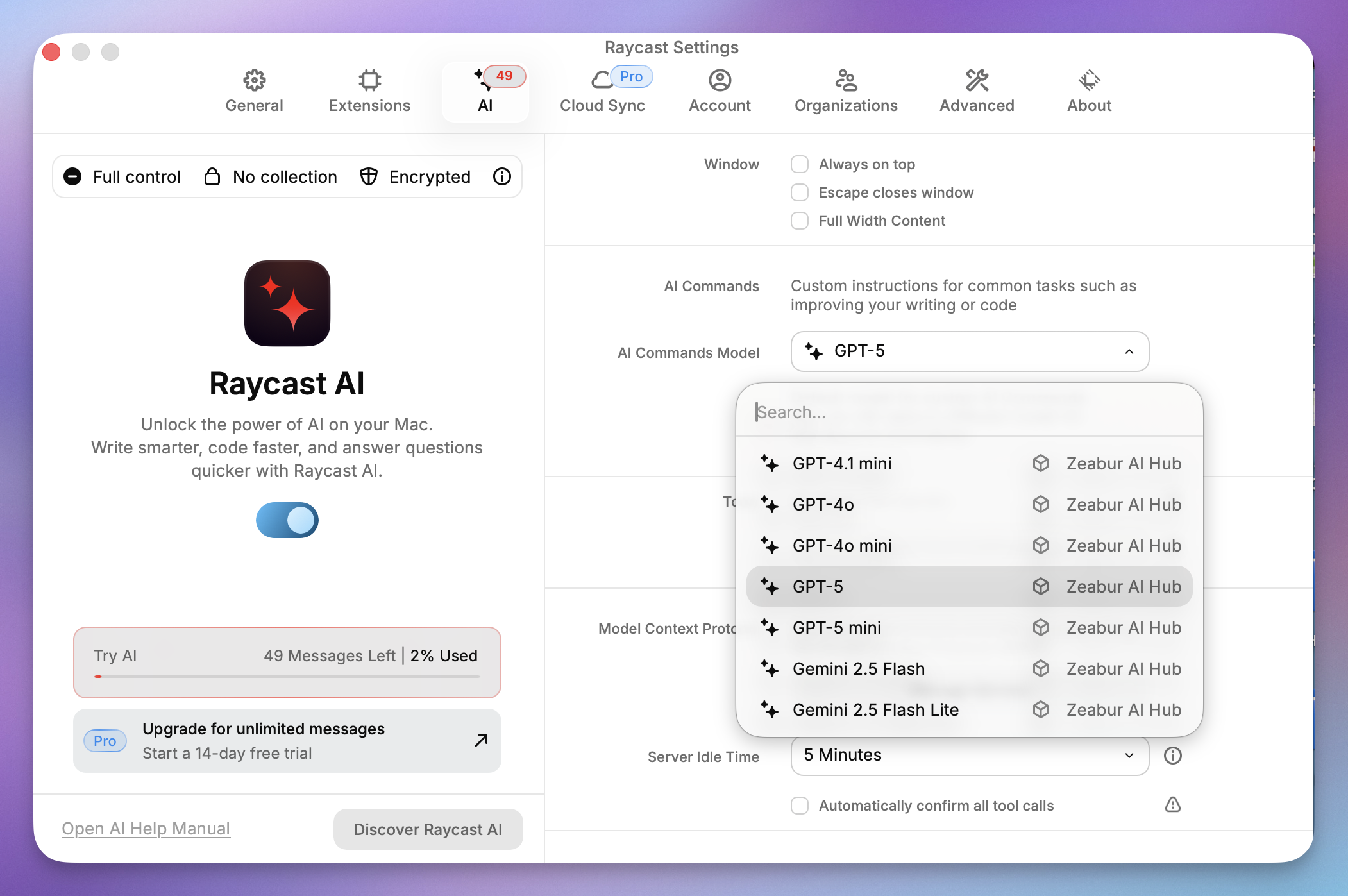
AI並選擇 AI Raycast 設置。 - 滾動到右側面板的底部,找到 自定義提供商 並啟用它。
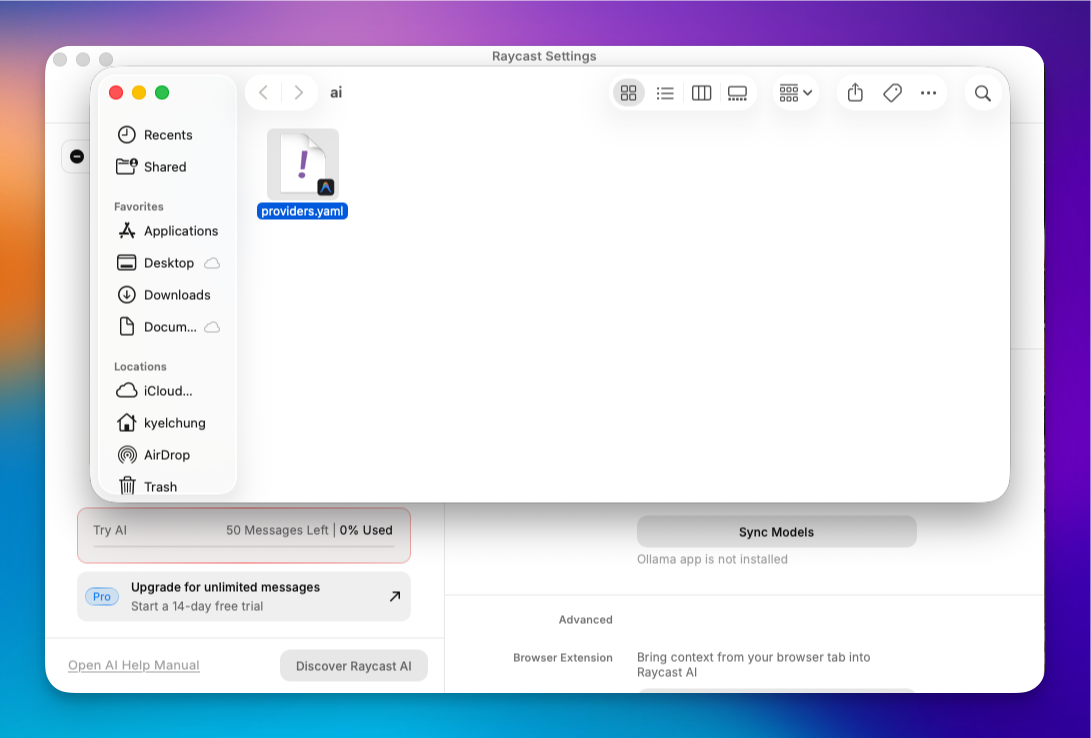
- 單擊 顯示提供商配置。這會在 Finder 中打開配置資料夾。
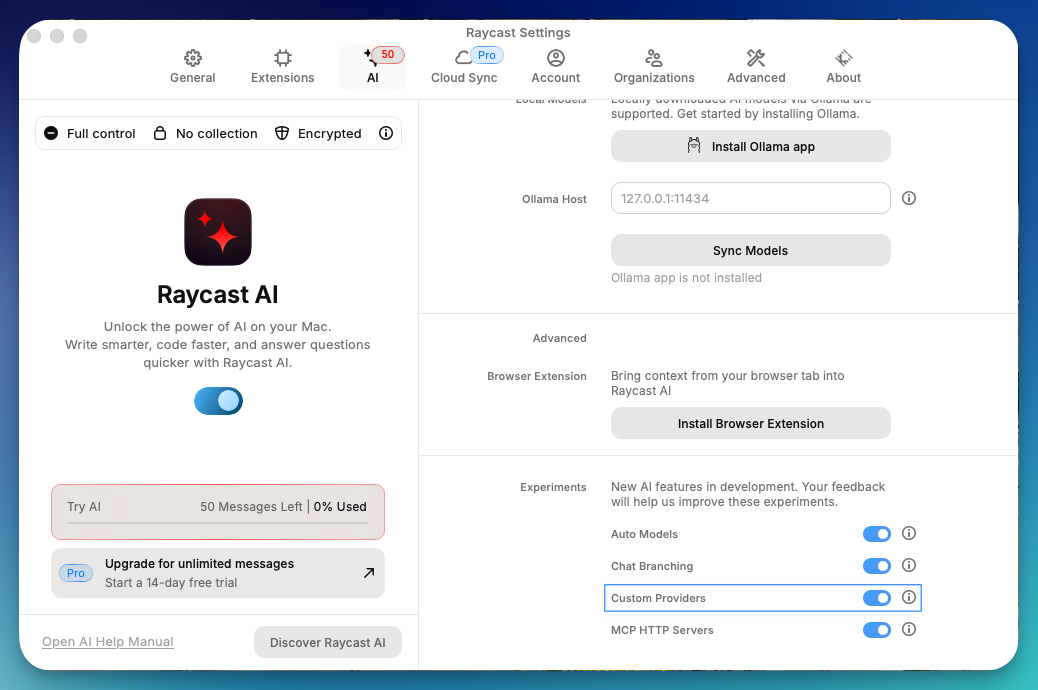
步驟 3:編輯 providers.yaml 配置文件
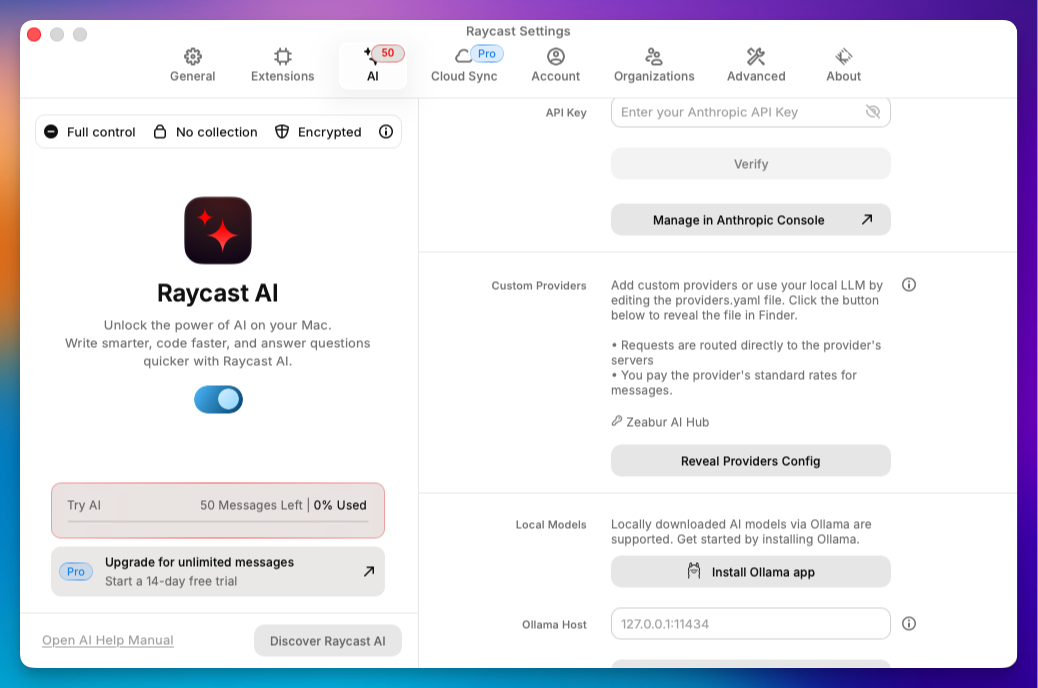
- 在 Finder 中打開
AI資料夾。 - 找到
providers.template.yaml並使用程式碼編輯器(如 VS Code)打開它。 - 修改內容以匹配以下格式(將
YOUR_API_KEY替換為步驟 1 中的金鑰):
# Template for providers.yaml
#
# You can add any OpenAI API compatible provider to the "providers" list.
# For each provider you must also specify a list of models, along with model abilities.
#
# All fields are required unless marked as optional.
#
# Refer to your provider's API documentation for specific
# details such as model identifiers, capabilities etc
#
# Note: Since the OpenAI API is not a standard we can't guarantee that all
# providers will work correctly with Raycast AI.
#
# To use this template rename as `providers.yaml`
#
providers:
  - id: zeabur_ai_hub
    name: Zeabur AI Hub
    base_url: https://hnd1.aihub.zeabur.ai/ # 也可選擇舊金山節點:https://sfo1.aihub.zeabur.ai/
    api_keys:
      zeabur-ai-hub-key: sk-xxxxxxxxxx
    models:
      - id: claude-sonnet-4-5
        name: "Claude Sonnet 4.5"
        context: 200000
        provider: zeabur-ai-hub-key
        abilities:
          temperature:
            supported: true
          vision:
            supported: true
          system_message:
            supported: true
          tools:
            supported: true
      - id: claude-haiku-4-5
        name: "Claude Haiku 4.5"
        context: 200000
        provider: zeabur-ai-hub-key
        abilities:
          temperature:
            supported: true
          vision:
            supported: true
          system_message:
            supported: true
          tools:
            supported: true
      - id: gemini-3-pro-preview
        name: "Gemini 3 Pro Preview"
        context: 2000000
        provider: zeabur-ai-hub-key
        abilities:
          temperature:
            supported: true
          vision:
            supported: true
          system_message:
            supported: true
          tools:
            supported: true
      - id: gemini-3-flash-preview
        name: "Gemini 3 Flash Preview"
        context: 2000000
        provider: zeabur-ai-hub-key
        abilities:
          temperature:
            supported: true
          vision:
            supported: true
          system_message:
            supported: true
          tools:
            supported: true
      - id: gemini-2.5-pro
        name: "Gemini 2.5 Pro"
        context: 2000000
        provider: zeabur-ai-hub-key
        abilities:
          temperature:
            supported: true
          vision:
            supported: true
          system_message:
            supported: true
          tools:
            supported: true
      - id: gemini-2.5-flash
        name: "Gemini 2.5 Flash"
        context: 2000000
        provider: zeabur-ai-hub-key
        abilities:
          temperature:
            supported: true
          vision:
            supported: true
          system_message:
            supported: true
          tools:
            supported: true
      - id: gemini-2.5-flash-lite
        name: "Gemini 2.5 Flash Lite"
        context: 2000000
        provider: zeabur-ai-hub-key
        abilities:
          temperature:
            supported: true
          vision:
            supported: true
          system_message:
            supported: true
          tools:
            supported: true
      - id: gpt-5
        name: "GPT-5"
        context: 200000
        provider: zeabur-ai-hub-key
        abilities:
          temperature:
            supported: true
          vision:
            supported: true
          system_message:
            supported: true
          tools:
            supported: true
      - id: gpt-5-mini
        name: "GPT-5 mini"
        context: 200000
        provider: zeabur-ai-hub-key
        abilities:
          temperature:
            supported: true
          vision:
            supported: true
          system_message:
            supported: true
          tools:
            supported: true
      - id: gpt-4.1
        name: "GPT-4.1"
        context: 200000
        provider: zeabur-ai-hub-key
        abilities:
          temperature:
            supported: true
          vision:
            supported: true
          system_message:
            supported: true
          tools:
            supported: true
      - id: gpt-4.1-mini
        name: "GPT-4.1 mini"
        context: 200000
        provider: zeabur-ai-hub-key
        abilities:
          temperature:
            supported: true
          vision:
            supported: true
          system_message:
            supported: true
          tools:
            supported: true
      - id: gpt-4o
        name: "GPT-4o"
        context: 200000
        provider: zeabur-ai-hub-key
        abilities:
          temperature:
            supported: true
          vision:
            supported: true
          system_message:
            supported: true
          tools:
            supported: true
      - id: gpt-4o-mini
        name: "GPT-4o mini"
        context: 200000
        provider: zeabur-ai-hub-key
        abilities:
          temperature:
            supported: true
          vision:
            supported: true
          system_message:
            supported: true
          tools:
            supported: true
      - id: gpt-oss-120b
        name: "GPT OSS 120B"
        context: 128000
        provider: zeabur-ai-hub-key
        abilities:
          temperature:
            supported: true
          vision:
            supported: false
          system_message:
            supported: true
          tools:
            supported: true
      - id: grok-4-fast-non-reasoning
        name: "Grok 4 Fast"
        context: 128000
        provider: zeabur-ai-hub-key
        abilities:
          temperature:
            supported: true
          vision:
            supported: true
          system_message:
            supported: true
          tools:
            supported: false
      - id: deepseek-v3.2
        name: "DeepSeek v3.2"
        context: 128000
        provider: zeabur-ai-hub-key
        abilities:
          temperature:
            supported: true
          vision:
            supported: false
          system_message:
            supported: true
          tools:
            supported: true
      - id: llama-3.3-70b
        name: "Llama 3.3 70B"
        context: 128000
        provider: zeabur-ai-hub-key
        abilities:
          temperature:
            supported: true
          vision:
            supported: false
          system_message:
            supported: true
          tools:
            supported: true
      - id: qwen-3-32
        name: "Qwen 3 32B"
        context: 128000
        provider: zeabur-ai-hub-key
        abilities:
          temperature:
            supported: true
          vision:
            supported: false
          system_message:
            supported: true
          tools:
            supported: true
      - id: qwen3-next
        name: "Qwen 3 Next 80B"
        context: 128000
        provider: zeabur-ai-hub-key
        abilities:
          temperature:
            supported: true
          vision:
            supported: false
          system_message:
            supported: true
          tools:
            supported: true
      - id: kimi-k2-thinking
        name: "Kimi K2 Thinking"
        context: 200000
        provider: zeabur-ai-hub-key
        abilities:
          temperature:
            supported: true
          vision:
            supported: false
          system_message:
            supported: true
          tools:
            supported: true
      - id: glm-4.6
        name: "GLM 4.6"
        context: 200000
        provider: zeabur-ai-hub-key
        abilities:
          temperature:
            supported: true
          vision:
            supported: true
          system_message:
            supported: true
          tools:
            supported: true
      - id: gemini-2.5-flash-image
        name: "Nano Banana"
        context: 200000
        provider: zeabur-ai-hub-key
        abilities:
          temperature:
            supported: true
          vision:
            supported: true
          system_message:
            supported: true
          tools:
supported: true- 儲存並重新命名: 儲存檔案並將其重新命名為
providers.yaml(刪除.template)。
步驟 4:選擇新模型
回到 Raycast,你現在可以在 AI 聊天中打開模型下拉選單並選擇 Zeabur AI Hub。你現在繞過了默認的訂閱模型,使用你自己管理的中心!
Raycast AI vs. 競爭對手
Raycast AI vs ChatGPT 應用
Mac 的原生 ChatGPT 應用比瀏覽器有所改進,但它仍然是一個需要管理的"視窗"。
- ChatGPT 應用: 適合長時間對話會話。
- Raycast AI: 專為"進出"實用工具而設計。它在你所在的位置(IDE、郵件、Slack)修改文字,而不是強迫你複製貼上到單獨的視窗中。
Raycast vs. Spotlight
Spotlight 搜尋檔案。Raycast 執行操作。差異是巨大的。一旦你將 AI 添加到 Raycast,Spotlight 就會感覺像是過去的遺物。
結論
Raycast AI 將你的 Mac 啟動器轉變為生產力引擎。無論你是尋找快速答案的普通用戶,還是通過 Zeabur 設置複雜管道的開發人員,它都提供了 Web 瀏覽器根本無法匹配的速度水平。
準備好升級你的工作流程了嗎? 免費下載 Raycast 開始使用,或深入了解 Pro 功能,釋放 Mac 上 AI 的全部潛力。