


PostgreSQL HA
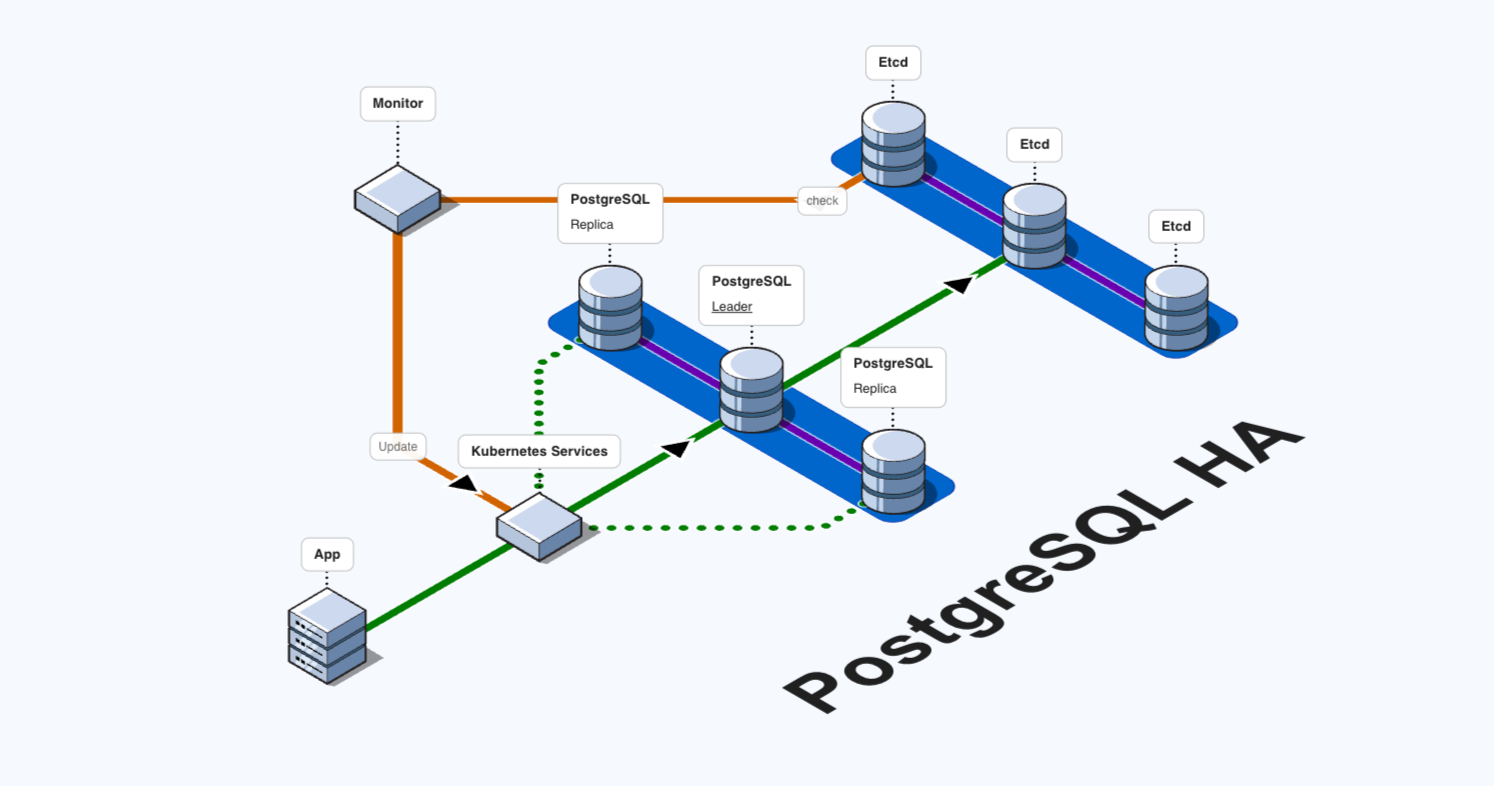
High Availability PostgreSQL cluster with Patroni and etcd. Provides automatic failover and replication for production-grade database deployments.

 Zeabur
PostgreSQL High Availability Cluster
This template deploys a highly available PostgreSQL cluster using:
- Patroni: PostgreSQL HA solution with automatic failover
- Spilo: Docker image combining PostgreSQL and Patroni
- etcd: Distributed configuration and service discovery
Architecture
- 3x etcd cluster nodes for distributed consensus
- 3x PostgreSQL nodes with Patroni for automatic failover
- Built-in replication and health monitoring
Connection Information
Use any of the Patroni nodes to connect to the cluster:
- Host: Use the hostname of patroni1, patroni2, or patroni3
- Port: 5432
- Username: postgres (superuser) or admin
- Password: Check the environment variables in Zeabur dashboard
Patroni will automatically route connections to the master node.
User Accounts
| Account | Username | Privileges | Use Case |
|---|---|---|---|
| Superuser | postgres | Full system privileges | System administration, backup/restore |
| Admin | admin | CREATEDB, CREATEROLE | Application connections, daily development |
Security: Use
adminor create dedicated users for applications. Avoid usingsuperuserdirectly.
Features
- Automatic Failover: If the master fails, Patroni automatically promotes a replica
- Synchronous Replication: Data consistency across nodes
- Health Monitoring: REST API on port 8008 for each node
- Rolling Updates: Update nodes without downtime
- Horizontal Scaling: Easily add or remove nodes
Cluster Sizing
This 3-node configuration provides standard production HA (tolerates 1 node failure).
| Nodes | Fault Tolerance | Use Case |
|---|---|---|
| 3 | 1 failure | ✅ Production (standard) |
| 5 | 2 failures | ✅ Production (high availability) |
Scaling the Cluster
Adding Nodes (Scale to 5 Nodes)
To scale from 3 to 5 nodes for higher availability:
-
Add etcd nodes:
-
Add Patroni nodes:
-
Update existing Patroni
ETCD3_HOSTSto include new etcd nodes:etcd1:2379,etcd2:2379,etcd3:2379,etcd4:2379,etcd5:2379
Removing Nodes
To scale down the cluster:
- Remove Patroni replica nodes (never remove the master)
- Remove etcd nodes after updating cluster configuration
- Always maintain odd number of nodes (3, 5, etc.)
⚠️ Important: Never reduce below 3 nodes in production to maintain HA.
📖 Full Guide: See the complete README for step-by-step removal instructions.
Management
Run inside any Patroni container:
# Cluster status
patronictl list pg-ha

# Show cluster configuration
patronictl show-config pg-ha
Troubleshooting
Common operations:
# Check etcd cluster health
curl http://etcd1:2379/health

# List etcd members
curl -X POST http://etcd1:2379/v3/cluster/member/list

# Check Patroni cluster status (run inside patroni container)
patronictl list pg-ha

# Check PostgreSQL replication
psql -U postgres -c "SELECT * FROM pg_stat_replication;"
📖 Full Troubleshooting Guide: See the complete README.
Changing Passwords
To change passwords after deployment:
- Change in PostgreSQL:
ALTER USER postgres PASSWORD 'new_password'; - Update environment variables in ALL Patroni services
- Rolling restart all Patroni services
📖 Full Guide: See Password Change Guide
Related Templates
etcd Expansion:
Patroni Expansion: