
Features
Resources


Clawdbot Review: The Ultimate Open Source AI Assistant Guide
How to turn your computer into a proactive, self-hosted agent that manages your life.
 Kyle Chung
Clawdbot Review: The Ultimate Open Source AI Assistant Guide
Imagine an AI assistant that knows your schedule, reads your emails, and actually executes tasks—not just chats about them. This is Clawdbot, the open-source AI assistant that is rapidly becoming what Siri should have been.
In the evolving landscape of artificial intelligence, users are often forced to choose between capability (giving an AI useful access) and security (protecting their personal devices). Clawdbot bridges this gap, acting as a self-hosted agent that you can interact with via WhatsApp, Telegram, Slack, or Signal, effectively giving you a "second brain" that never sleeps.
However, a major bottleneck has emerged: Hardware. To get the most out of Clawdbot, it needs to run 24/7. This has led many enthusiasts to purchase dedicated Mac Minis just to keep their agent online.
There is a better way. In this comprehensive review, we will explore why Zeabur is the ultimate home for your Clawdbot. By deploying on Zeabur, you get the power of an "always-on" agent and the safety of a Cloud Sandbox, eliminating the need for expensive hardware while keeping your personal data secure.
What is Clawdbot?
Clawdbot is an open-source AI assistant designed to be the interface layer between your chat apps and an operating system.
It wraps the power of advanced coding agents (like Claude Code or Cursor) into a personal assistant wrapper. Traditionally, users install this on their MacBook Pro or Windows desktop. However, this comes with two massive flaws:
- Downtime: When your laptop sleeps, your assistant dies. It can't run cron jobs or check emails overnight.
- Risk: You are giving an AI "root access" to your personal file system.
The Zeabur Advantage: Why "Cloud Native" Wins
Instead of buying a $600 Mac Mini to solve these problems, smart users are deploying Clawdbot to Zeabur’s containerized cloud.
- 24/7 Autonomy: Your agent runs on our servers, meaning it can scrape the web, manage files, and negotiate emails while you sleep or commute.
- Security by Design: We run your bot in an isolated container. If the AI makes a mistake or "hallucinates" a delete command, it happens in a disposable sandbox—not on your personal hard drive.
- One-Click Intelligence: With the Zeabur AI Hub, you skip the API key management hell. One key gives your bot access to GPT-4, Claude 3.5, and Gemini instantly.
Clawdbot on Zeabur isn't just an assistant; it's a secure, autonomous employee that lives in the cloud but answers to your phone.
Deploy Clawdbot on Zeabur with just one click.
Why is Everyone Buying Mac Minis?

There is a growing trend in the AI community of purchasing dedicated Mac Minis specifically to host Clawdbot. Users want an isolated, always-on environment where the bot can operate 24/7 without interfering with their main workstation, yet still have access to essential cloud credentials. This setup creates a dedicated "brain" that lives in your home but is accessible from anywhere in the world via your phone.
Core Features That Change the Game
Clawdbot isn't just a chatbot; it is a fully autonomous agent with permission to act. While the official documentation touts "Running on Your Machine," we believe the true potential is unlocked when it runs on your private cloud container.
Here is why deploying Clawdbot on Zeabur upgrades these core features from "cool experiments" to enterprise-grade tools.
1. Persistent Memory (Your "Second Brain")
Most AI chats wipe the slate clean when you close the tab. Clawdbot utilizes persistent memory, stored in a memory.md file that evolves with every interaction.
- Contextual Awareness: It learns that you are an early bird, that you hate verbose emails, and that "The Project" refers to your Q3 marketing launch.
- The Zeabur Advantage: By hosting this on Zeabur’s persistent volumes, your AI’s memory is never lost to a hardware crash or a laptop reboot. It effectively becomes a digital extension of your mind that lives in the cloud, always remembering where you left off.
2. Full System Access & Browser Control (Safely Sandboxed)
This is Clawdbot’s most powerful—and typically most dangerous—feature. It can access the terminal, write code, execute scripts, and control a headless browser to scrape the web or fill out forms.
- The Risk: Running this on your personal MacBook gives an AI root access to your family photos and banking passwords.
- The Zeabur Solution: When you deploy on Zeabur, you give Clawdbot Full System Access to a Sandbox. It can go wild, write files, and execute complex scripts in an isolated container. If it breaks something, your personal device remains untouched. You get all the power of an autonomous agent with zero risk to your hardware.
3. Proactive Cron Jobs (True 24/7 Automation)
Clawdbot doesn't just wait for you to speak; it acts on a schedule.
- Example: "Every 10 minutes, check my email for urgent messages from VIP clients and draft a reply."
- Example: "Scrape this news site every morning at 6 AM and Slack me a summary."
- The Reality Check: If you run this on a laptop, these tasks fail the moment you close the lid or lose Wi-Fi. On Zeabur, your agent never sleeps. It works while you rest, ensuring your briefings are ready the moment you wake up.
4. Simplified Intelligence via Zeabur AI Hub
Clawdbot is model agnostic, usually requiring you to juggle API keys from Anthropic, OpenAI, and Google.
We have a better way. We strongly recommend connecting Clawdbot to the Zeabur AI Hub. Instead of managing five different billing accounts, we provide you with a Single API Key that unlocks access to:
- OpenAI (GPT-4o)
- Google (Gemini 1.5 Pro)
- Anthropic (Claude 3.5 Sonnet/Opus)
- xAI (Grok)
You can switch between models instantly based on the task complexity, all managed through one streamlined dashboard.
Access leading AI models with transparent pricing on Zeabur AI Hub.
5. Universal Chat Interface
Finally, Clawdbot meets you where you already are. You don't need a new app. Whether you use WhatsApp, Telegram, Signal, Slack, or Discord, Clawdbot integrates natively.
- Seamless Hand-off: Start a task via Telegram on your phone while commuting, and have Clawdbot execute the heavy lifting on your Zeabur server instantly. It connects your mobile life to your cloud infrastructure seamlessly.
Installation and Setup: The Easiest Way to Run Clawdbot
While many users buy dedicated Mac Minis to run Clawdbot 24/7, there is a smarter, cloud-native alternative. By deploying on Zeabur, you get an always-on, self-hosted AI agent without the hardware cost or configuration headaches.
We have streamlined the entire process into a Pre-Configured Template. We handle the Docker containers, networking, and environment setup so you can click once and go.
Prerequisites
- A Zeabur Account
- Recommended: Upgrade to the Developer Plan. To ensure Clawdbot runs smoothly with adequate memory for reasoning tasks and file processing, we strongly recommend scaling the instance to 2.0 vCPU and 4096 MB RAM.
Step 1: One-Click Deployment
Skip the complex CLI installation. Simply use our template to deploy the Clawdbot container instantly.
Deploy Clawdbot on Zeabur with just one click.
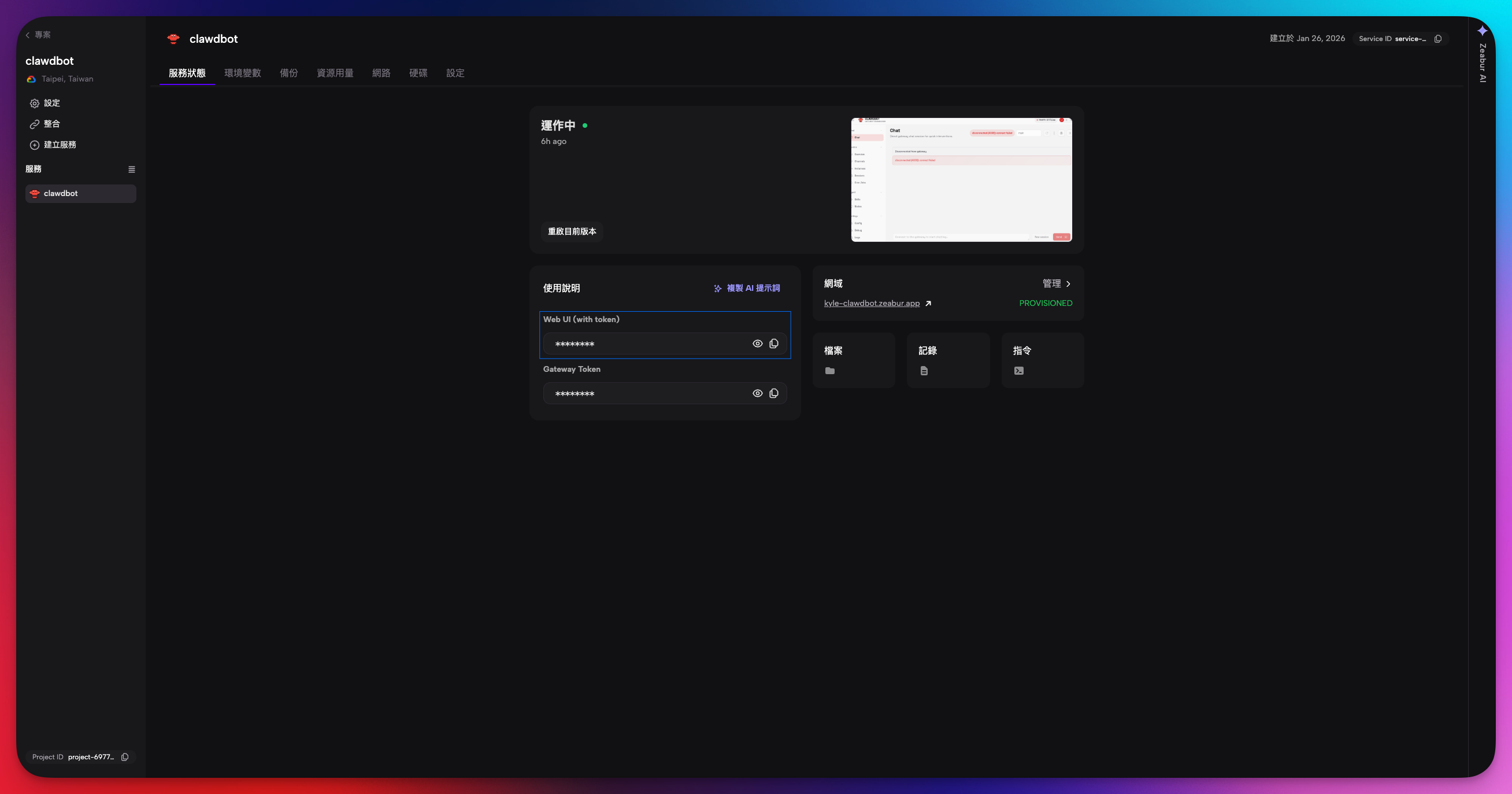
Step 2: Access the Gateway
Once deployed, security is handled automatically.
- Navigate to the Instructions tab in your Zeabur dashboard.
- Find the pre-generated Gateway URL.
- Click the link labeled "Web UI (with token)". This will log you directly into your Clawdbot control plane without needing to manually copy authentication tokens.
Step 3: Configure Your AI "Brains" (Environment Variables)
To give your bot intelligence, you need to connect it to language models. Go to the Variables tab in your service and add the following:
ZEABUR_AI_HUB_API_KEY(Recommended): Use this to access Gemini, GPT-4, and DeepSeek via the Zeabur AI Hub.ANTHROPIC_API_KEY: Essential if you want to use Claude 3.5 Sonnet or Opus (highly recommended for complex reasoning).OPENAI_API_KEY(Optional): Required if you plan to use OpenAI specific features like Memory Search or Text-to-Speech (TTS).
Access leading AI models with transparent pricing on Zeabur AI Hub.
Step 4: Connect Your Telegram Setup
The magic happens when you connect Clawdbot to your chat app. Here is how to pair Telegram in under 60 seconds:
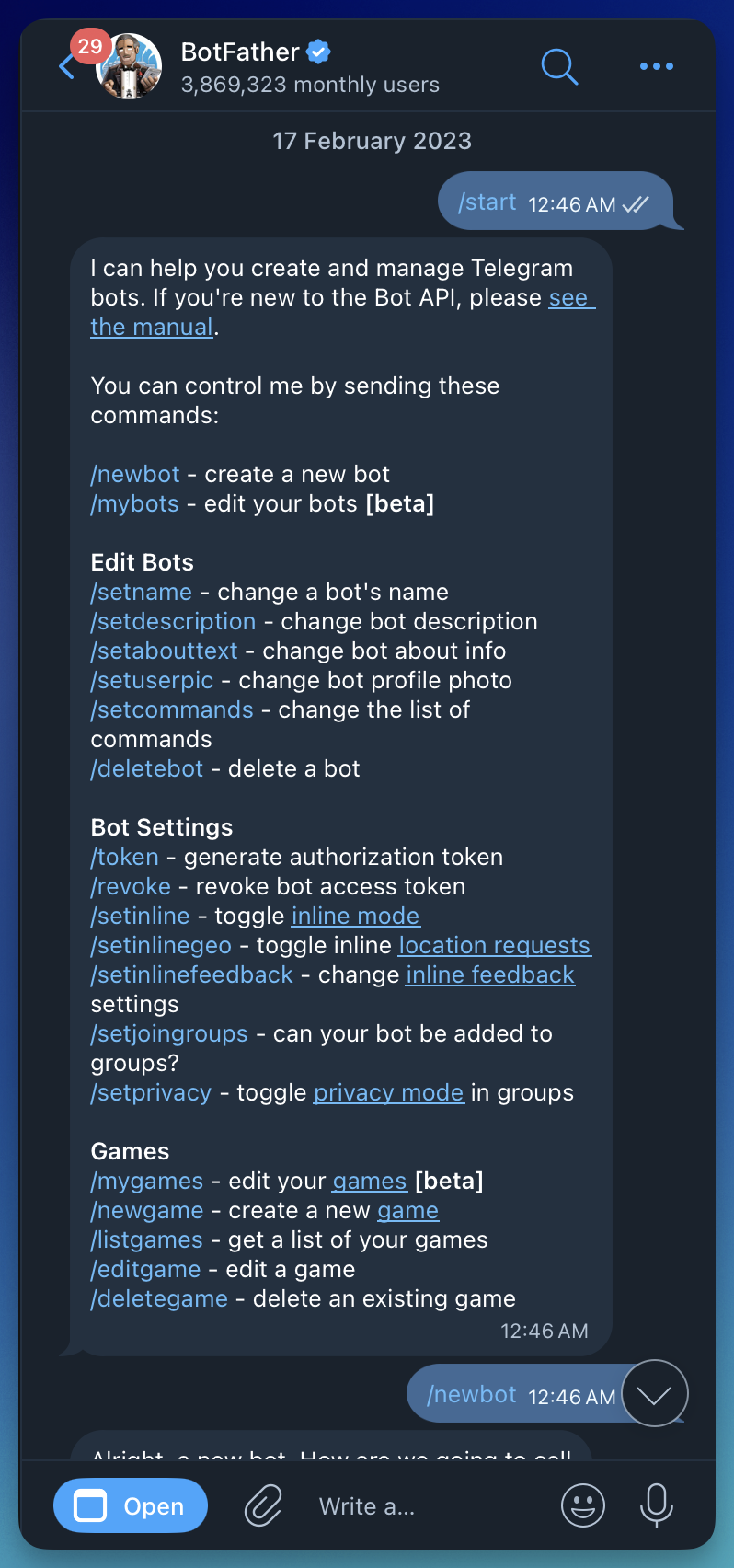
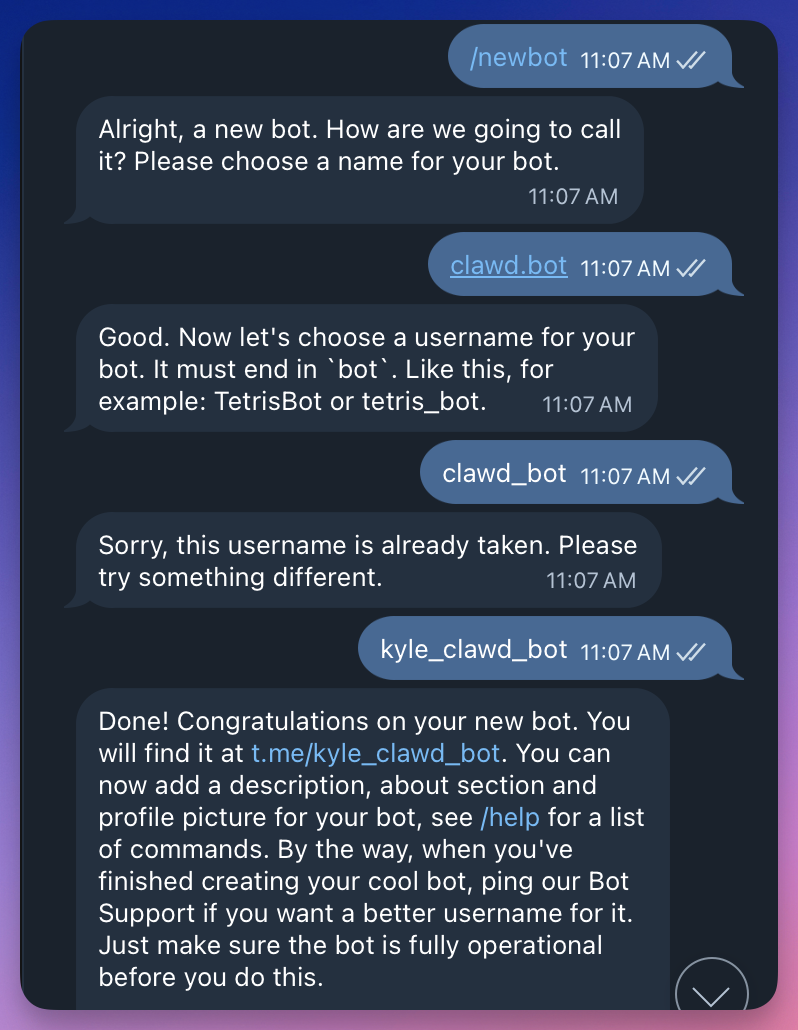
- Create the Bot: Message
@BotFatheron Telegram to create a new bot and get your HTTP API Token.
- Add Variable: In your Zeabur dashboard, add a new variable named
TELEGRAM_BOT_TOKENand paste your token. Restart the service to apply changes. - Initiate Pairing: Open Telegram and send
/startto your new bot. It will reply with a pairing code (e.g.,JN4MSY23).
- Approve Access:
-
Go to your Zeabur Dashboard.
-
Click the Command (Terminal) icon to access the container's shell.
-
Run the following command:
clawdbot pairing approve telegram <YOUR_CODE> -
You will see a success message:
Approved telegram sender <user-id>.
-
You Are Live
Your bot is now active. It lives in the cloud on Zeabur, running 24/7, but interacts with you seamlessly through Telegram. You can be at a dinner party, text your bot a command, and it will execute tasks, check emails, or manage files immediately—no laptop required.
Real-World Use Cases: Putting Clawdbot to the Test ( add crawdbot functionality, how they made it works)
To truly understand the power of this self-hosted AI agent, let’s look at three distinct workflows that demonstrate its capabilities.
1. The Autonomous Researcher
Connecting Clawdbot to project management tools like Asana and information sources like the Grok API transforms it into a research powerhouse.
In a test scenario, Clawdbot was asked to create a video outline. Because it had access to the internet and X (Twitter) via Grok, it was able to:
- Pull real-time analytics on specific tweets.
- Read current documentation on software updates.
- Format the data into a structured outline.
- Action: It then automatically populated an Asana card with this information, complete with view counts and links.
2. Intelligent File Management (The Google Drive Fix)
Uploading massive amounts of data is tedious. In one instance, a user needed to upload hundreds of gigabytes of video archives from a local hard drive to Google Drive. The browser upload failed halfway through, leaving a mess of duplicate and missing files.
Clawdbot's Solution:
- Analysis: The user asked Clawdbot to compare the local folder against the Google Drive folder.
- Coding: It wrote a script to identify the 212 missing files.
- Execution: It began uploading the missing files via the API.
- Problem Solving: When it hit Google's daily upload bandwidth limit, it recognized the API error, paused the operation, and waited for the user's command to retry once the limit reset.
This level of "agentic" behavior—encountering an error, diagnosing it, and suggesting a fix—is what separates Clawdbot from a standard chatbot.
3. The "Inbox Zero" Agent
Managing email is a productivity killer. Clawdbot enables you to reclaim your time using intelligent filtering.
You can instruct Clawdbot to: "Check my inbox every 15 minutes. Ignore newsletters and cold outreach. If a high-priority email arrives from a client or partner, summarize it and draft a response using my tone of voice."
In testing, Clawdbot correctly identified a "cold pitch" email as low priority and decided not to notify the user, demonstrating an understanding of context and nuance defined in its memory.md file.
Customizing the "Soul" of Your AI
One of the most unique aspects of Clawdbot is the soul.md file. This is a markdown file where you define the personality and boundaries of your assistant.
You can instruct it to be:
- Concise: "Don't give me fluff, just give me the answer."
- Opinionated: "You are allowed to disagree with me if my idea is bad."
- Protective: "Never reveal my private data in group chats."
This file makes the AI feel less like a corporate robot and more like a personalized extension of yourself. It evolves as you give it feedback, updating its own system files to better serve you.
Deploy Clawdbot on Zeabur with just one click.
Security Implications: Why "Cloud Sandboxing" is Safer
We must address the security risks associated with a self-hosted AI agent.
When you run Clawdbot locally on your personal laptop, you are essentially giving a non-deterministic AI capability root access to your physical machine, your family photos, your local passwords, and your entire hard drive.
- Irreversible Actions: The AI can delete files. If running on your main laptop, a mistake could wipe your
Documentsfolder. - Port Exposure Risks: Typically, self-hosting requires opening ports on your router, often leaving your service "naked" (exposed) to the public internet if not configured perfectly.
- Tool Loops: The agent may get stuck in a loop, freezing your local machine's resources.
How Zeabur Solves the "Elephant in the Room"
This is where deploying on Zeabur transforms from a convenience into a security feature. We provide an isolated, enterprise-grade environment that protects your personal data by design.
- The Ultimate Sandbox: By running Clawdbot in a Zeabur container, the "root access" is limited to that container. If the AI hallucinates and decides to delete the file system, your personal computer remains untouched. You simply restart the service, and you are back to normal.
- No "Naked" Exposure: We don't just open a port and hope for the best. Zeabur automatically handles the networking layer.
- Internal Security: Clawdbot listens on port
18789internally. - External Safety: We expose this securely via Port 443 (HTTPS). You get robust SSL encryption automatically—no manual Nginx or certificate configuration required.
- Internal Security: Clawdbot listens on port
- Automatic Gateway Token: Security isn't an afterthought. When you deploy, Zeabur automatically generates a secure Gateway Token. This ensures that only you can access your bot's control plane. Your instance is never left "unlocked" on the web.
Recommendation: For high-security users, stop running agents on your daily driver (MacBook/PC). Use Zeabur's isolated cloud infrastructure to gain all the benefits of an autonomous agent with none of the risks to your personal hardware.
Conclusion: Is Clawdbot the Future?
Clawdbot represents a massive leap forward in personal automation. It transforms the concept of an AI assistant from a passive chatbot into an active participant in your digital life.
While it creates security concerns and requires a bit of technical know-how to optimize, the ability to control your computer via text from anywhere in the world is a superpower. Whether you are a developer looking to automate coding tasks or a busy professional trying to manage a chaotic schedule, Clawdbot offers a glimpse into a future where our computers work for us, not the other way around.
If you are ready to embrace the future of the open-source AI assistant, Clawdbot is the project to watch in 2026.
Create a free Zeabur account and let AI handle the infrastructure.
