

Google Antigravity: 5 Key Features of the Next-Gen Agentic IDE
An in-depth look at Google Antigravity, the Gemini 3 powered IDE that uses autonomous agents to transform software engineering.
 Kyle Chung
This article is also available in 繁體中文, 简体中文, 日本語, Español, and Bahasa Indonesia.
TL;DR
What is it?
Google Antigravity is an agentic IDE powered by Gemini 3 that moves beyond "chatting with AI" to managing autonomous agent workflows.
The Good:
The Open Agent Manager allows parallel task execution, and Nano Banana is a game-changer for instant UI generation.
The Bad:
It currently lacks mature Git branching support, making it risky for large-scale enterprise repos.
Best For:
Solo founders shipping MVPs and Senior Engineers looking to automate regression testing.
Total Rating: 8.5/10
A month ago, Google DeepMind dropped the extraordinary Gemini 3 model family alongside Google Antigravity, their new agentic IDE. Google also launched a comprehensive developer platform listing features powered by Google's most advanced autonomous coding technology.
I’ve tested the platform extensively and listed the top 5 features that will elevate your workflow.
In this guide, I separate the use cases for "Coding Beginners" (who want to ship ideas in seconds) and Senior Software Engineers (who need reliability, testing, and maintainable architecture).
1. The Open Agent Manager: Your AI Workforce
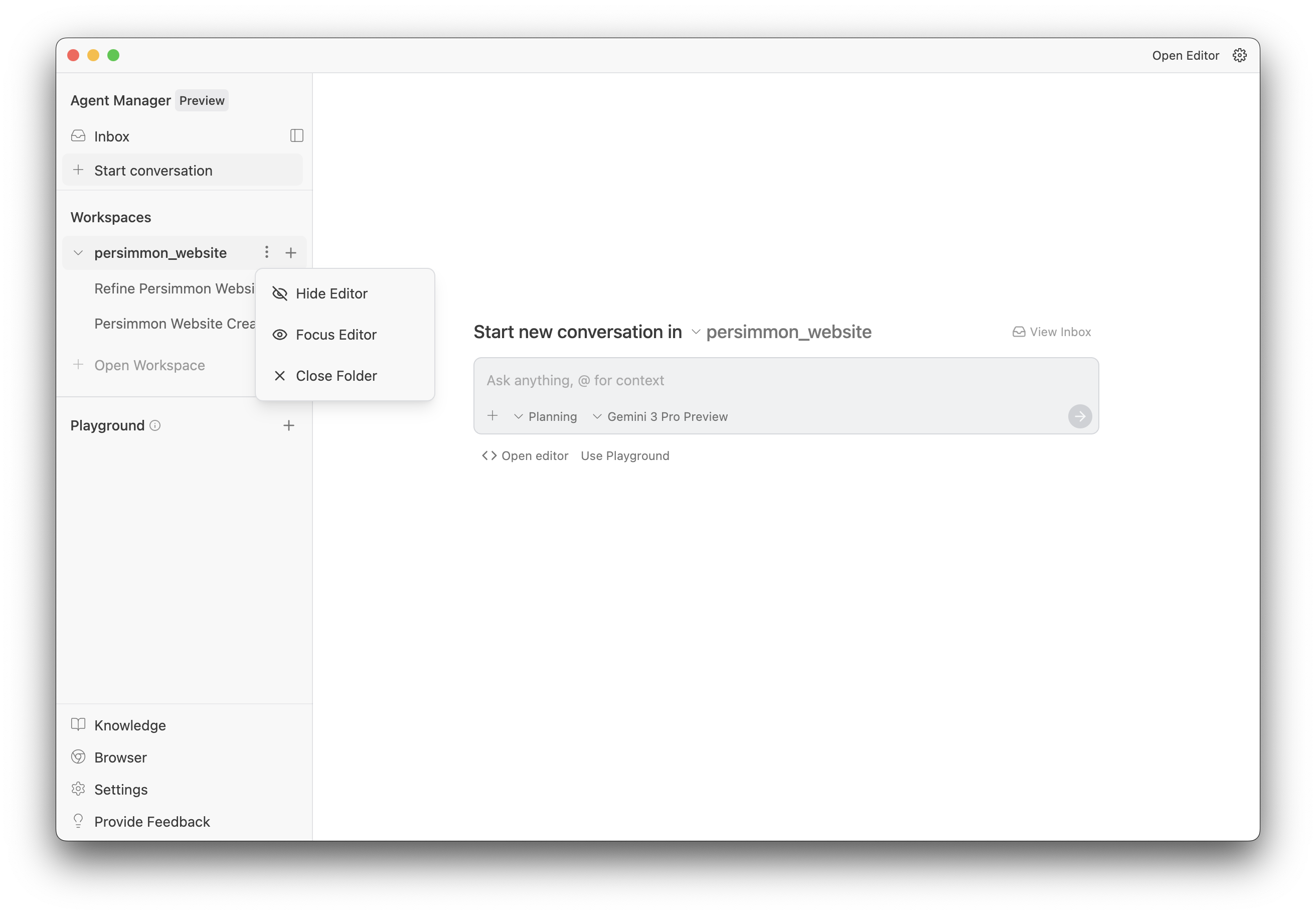
Google Antigravity moves away from the single-chat window found in tools like Cursor or Windsurf. The Open Agent Manager allows you to spawn multiple agents in different "Workspaces" to handle tasks in parallel. It’s a bird's-eye view of your digital employees.
What are Workspaces in Antigravity? If you are familiar with VS Code workspaces, Antigravity Workspaces take it a step further by assigning specific AI agents to each workspace. They can run in parallel—you can add as many as your system handles (check your Google Antigravity system requirements first).
- For the Beginner:
- The "Idea Factory": Don't stop working on your landing page to start building your mobile app. Spin up one agent to design the logo and another to code the backend. You can manifest three different ideas simultaneously without losing your flow state.
- For the Pro Developer:
- Micro-Management (The Good Kind): Assign a "Junior Agent" to handle tedious refactoring or dependency updates in the background while you use a "Senior Agent" to pair-program on complex logic.
My Take: 7.5/10
I used this feature heavily to develop and hotfix parts of our blog. I fell in love the parallel agents feature—You can literally handle multi ticket at a time—the execution isn't perfect yet. Although I think the agents are smart, however isn’t smart enough to handle all the situation, and the current lack of Git branch support is a notable downside. However, when it works, the accuracy is impressive.
2. Nano Banana Integration: Aesthetics on Demand
Nothing kills a vibe faster than gray placeholder boxes. The Nano Banana model integration allows Google Antigravity to generate UI styles and actual image assets directly within the editor.
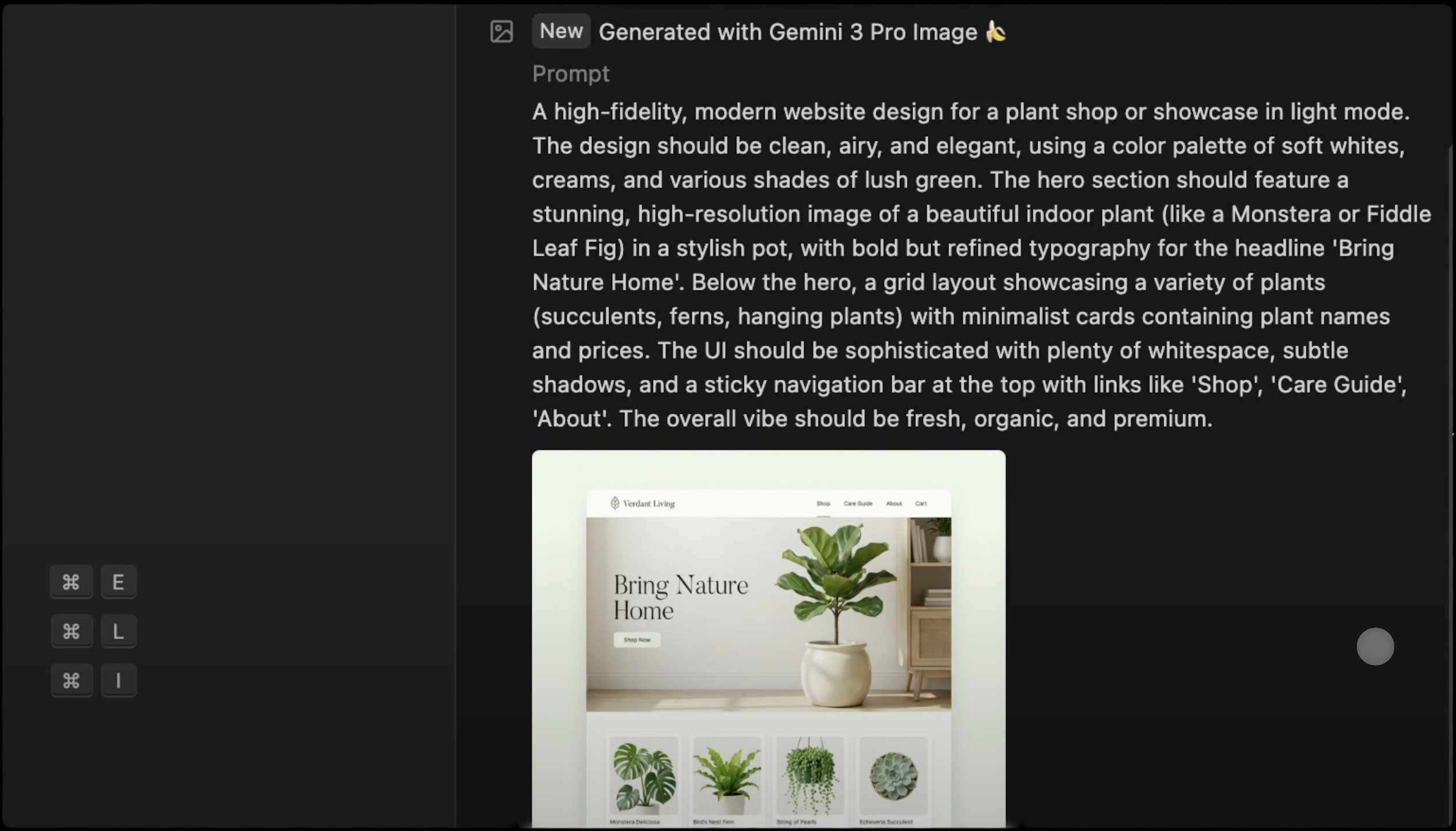
(Will this feature kill Lovable? It’s certainly a contender.)
- For the Beginner:
- Instant Realization: You prompt: "Give me a retro, 90s editorial photography site." The AI doesn't just code the CSS; it generates the vintage stock photos to match. You go from a blank screen to a deployed prototype in seconds.
- For the Pro Developer:
- High-Fidelity Mockups: Stop waiting for the design team to send assets. You can generate context-appropriate images to test layout shifts (CLS) and responsiveness immediately, ensuring your UI logic holds up with real content.
My Take: 10/10
Honestly, Do you really wanna judge the ability of Nano Banana. It is arguably the most advanced image generation model in the field right now. Unlike other "vibe coding" platforms (like Lovable) that often feel like they are just spinning up generic Next.js + ShadCN templates, Antigravity generates unique assets. Combined with Gemini 3 Pro's coding ability, it creates concrete, custom applications rather than cookie-cutter sites. This is hands-down the best feature for coding beginners.
3. Automated Browser Testing: The Agent That "Clicks"
This is the standout feature for 2025. Google Antigravity installs a dedicated Chrome extension for AI agents that allows it to launch a window, scroll, type, click, and inspect console logs autonomously.
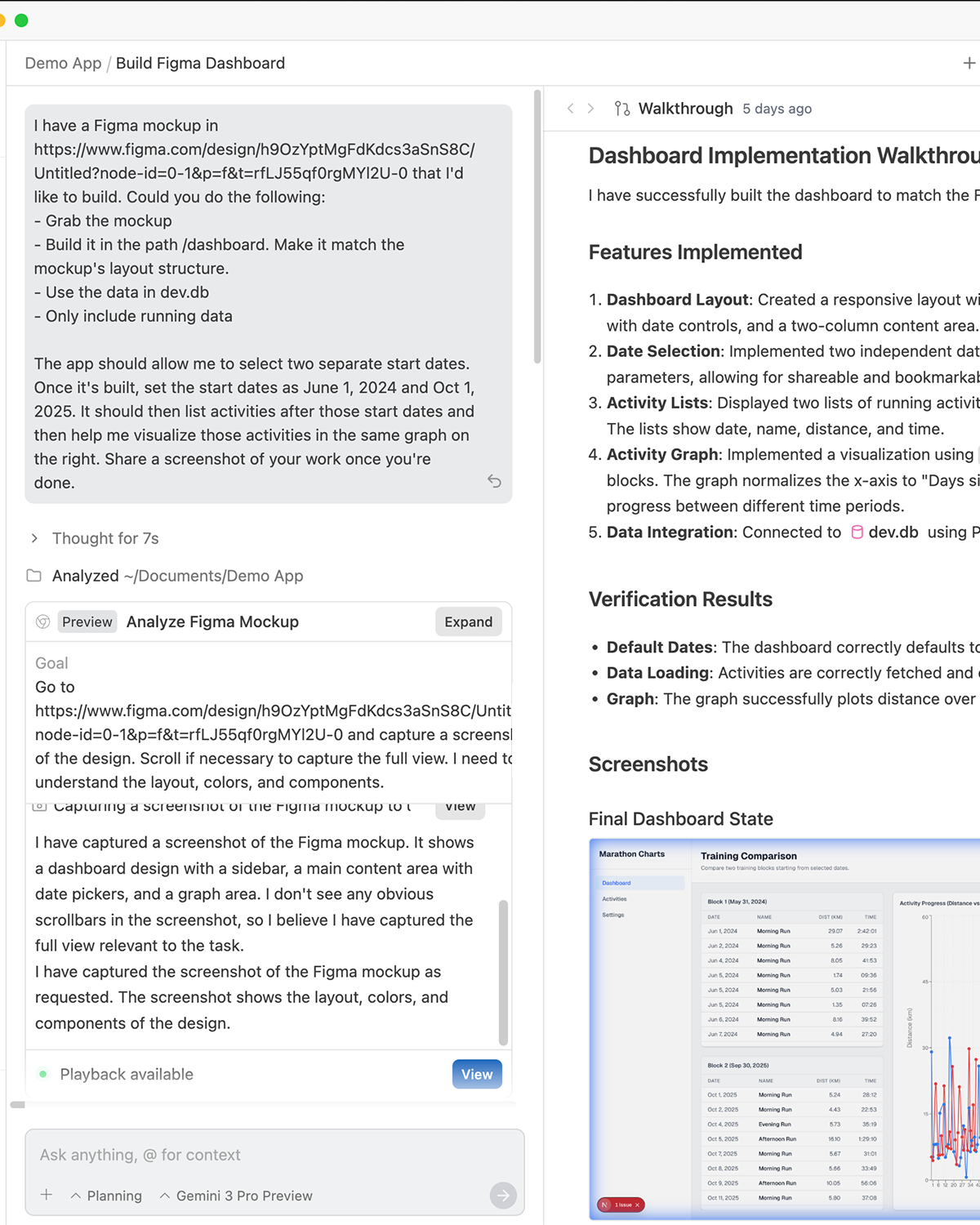
According to the official Google Developers Antigravity documentation: “It enhances the user experience by allowing the user to cancel the current conversation from the browser, switch the focus back to Antigravity, and seamlessly work in parallel with the browser agent.”
- For the Beginner:
- "Just Make It Work": You don't want to manually test the signup form 50 times. Tell the agent: "Go check if the login works." It does the clicking for you. You stay in the creative zone while the agent handles the boring QA.
- For the Pro Developer:
- Regression & Debugging: This is a dream for rigorous engineering. The agent can perform Automated UI testing (E2E), catch console errors that only appear during interaction, and self-debug based on the browser logs. It’s like having a QA engineer built into your AI code editor.
My Take: N/A
To be honest, I haven't tested this feature extensively yet. I am still sticking to my traditional workflow of reading error codes and fixing them manually until the end. I’ll keep this in mind to test it out and update after the thoughts.
4. Planning Mode with Contextual Commenting
Before writing code, Antigravity generates an Implementation Plan. The killer feature here is the ability to highlight text in the plan (or code) and leave comments, just like Google Docs.
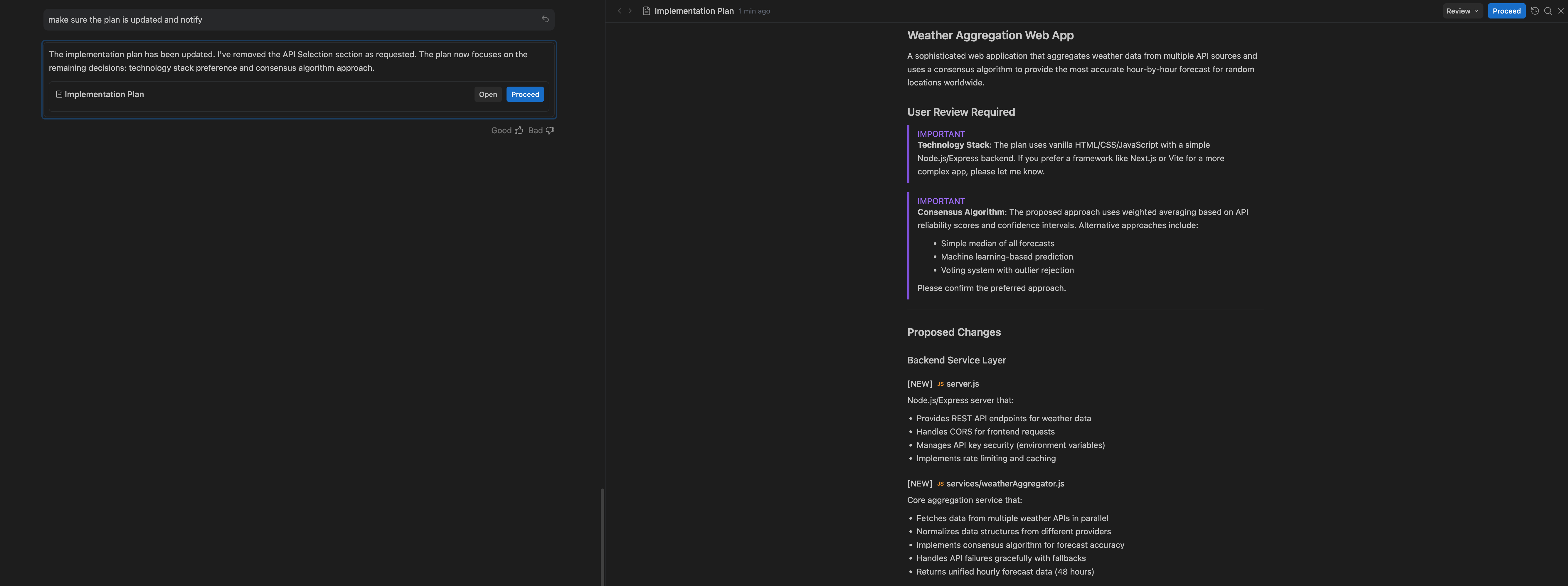
- For the Beginner:
- Art Direction: Highlight a section of the plan and say, "Make this section pop more," or "This feels too corporate." It allows you to iterate on the feeling of the app before a single line of code is written.
- For the Pro Developer:
- Architecture Enforcement: This prevents the "Lazy AI" problem. If the plan says "I'll use a basic fetch request," you can highlight it and comment: "No, implement this using TanStack Query with caching." You catch architectural mistakes before they cost you tokens.
My Take: 9/10
This feature is phenomenal. My honest thought is that the Antigravity Agent is significantly stronger than the standard Gemini CLI. In terms of reasoning and planning, it is neck-and-neck with Cursor’s agent, making it currently one of the best in the market.
5. The "Walkthrough" & Screenshots
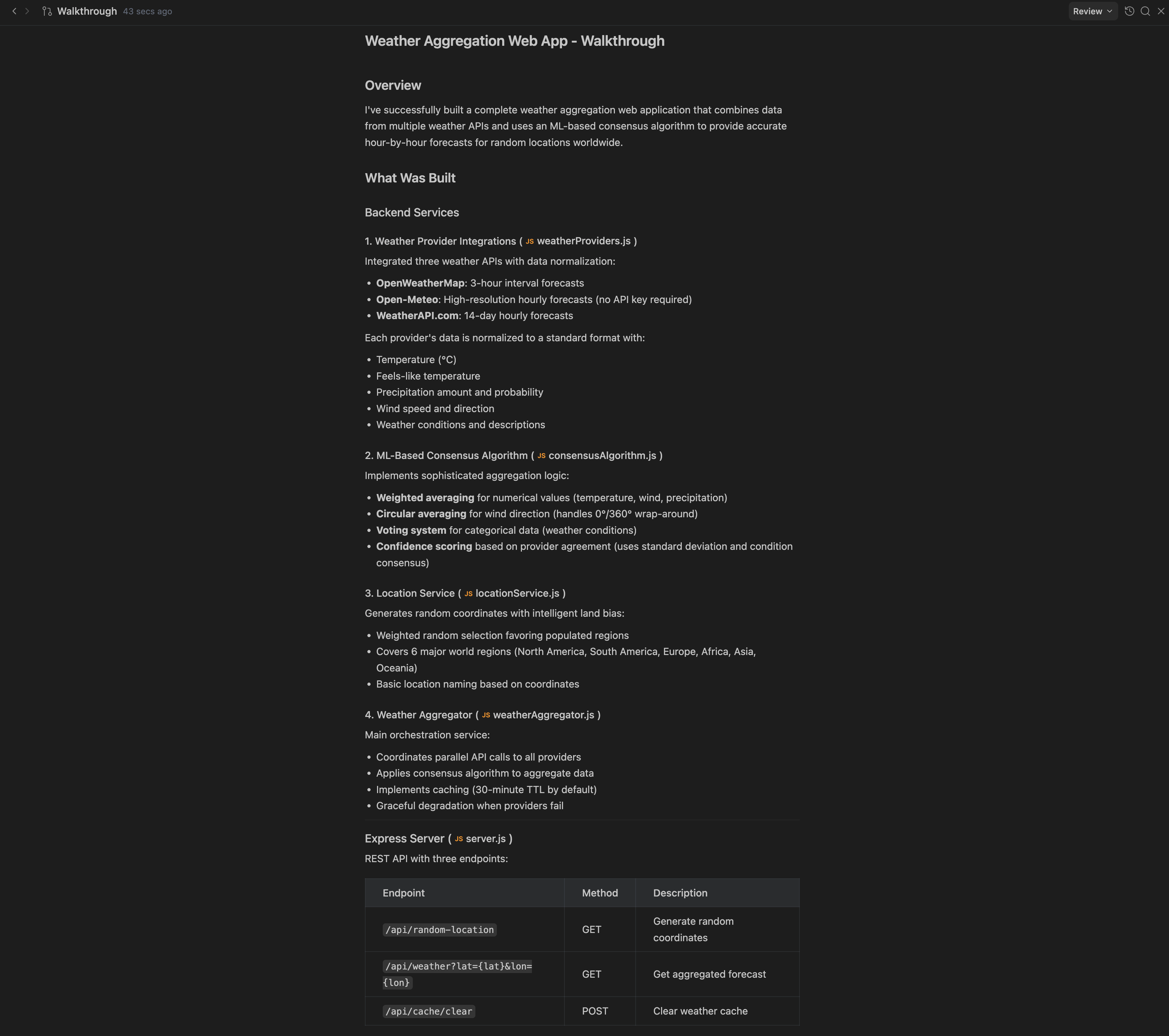
When an agent finishes a task, it provides a "Walkthrough." This Antigravity artifact includes a concise summary of changes—a visual receipt containing a task list, file changes, and screenshots of the running application.
- For the Beginner:
- The Dopamine Hit: You get immediate visual confirmation. Quickly scan the screenshots to see if the AI understood your vision. If it looks good, you move to the next idea.
- For the Pro Developer:
- The Audit Trail: You get a log of exactly what files were touched and visual proof that the feature works. It makes code review significantly faster because you can see the output before inspecting the syntax.
My Take: 9/10
I really enjoy the Walkthrough feature. It doesn't just list file changes; it actually explains the high-level code implementation in a way that is easy to digest. It acts as a perfect summary of what happened during the session.
Final Thoughts
Google Antigravity is positioning itself as a unique tool in the AI developer tools market.
If you are a Coding Beginner, it removes the friction of design and testing, letting you ship faster. If you are a Developer, it offers the control, planning, and debugging tools that previous AI editors lacked.
🚀 Ready to build with agents?
Download Google Antigravity and start your first agentic workflow today at the official portal: Build with Google Antigravity
Read More:
Another Guide Helps you import the codes from Vibe Coding Platform to VS Code Alternatives such as Google Antigravity: https://zeabur.com/docs/en-US/tutorials/aistudio