

Raycast AI Guide: Boost Mac Productivity
Master Raycast AI on Mac: instant answers, context-aware writing, chat presets, and custom models via Zeabur AI Hub
 Kyle Chung
This article is also available in 繁體中文, 简体中文, 日本語, Español, and Bahasa Indonesia.
If you are still opening a browser tab, typing "chatgpt.com," and waiting for the page to load every time you have a quick question, you are doing it the hard way. Context switching—moving from your code editor to a browser and back—is the silent killer of flow state.
Enter Raycast AI. It isn't just another chatbot; it is an intelligent layer that lives on top of your operating system. Unlike web-based tools, it controls your Mac, making it one of the most powerful AI productivity tools for Mac users today.
In this guide, we will cover how to use Raycast AI features, compare it to competitors, and dive into a pro-level tutorial on setting up custom models using Zeabur.
What Can Raycast AI Actually Do? (Core Features)
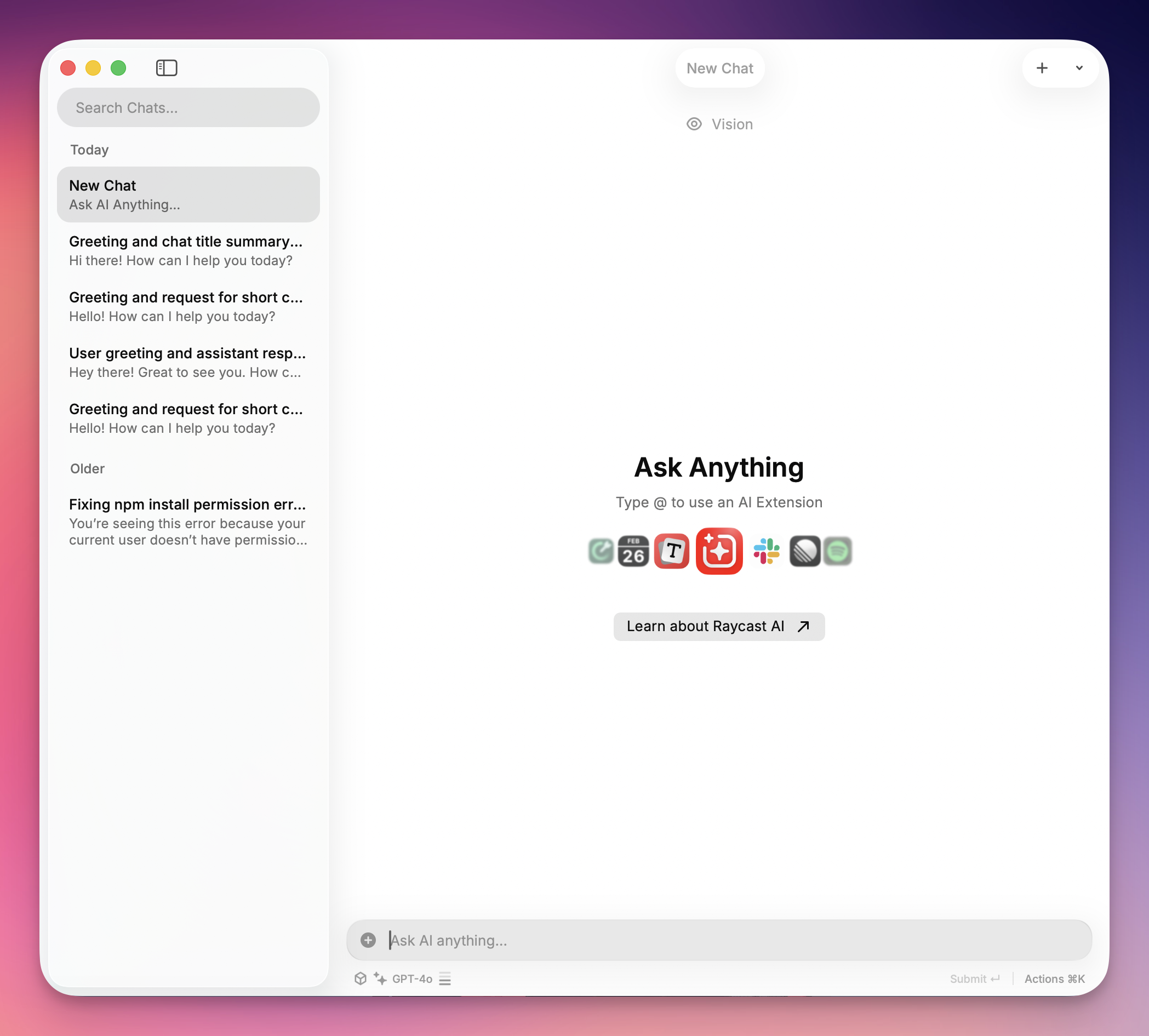
Raycast replaces the native Mac Spotlight search (⌘ + Space), but its AI integration is what makes it a powerhouse. Because it is a native app, it can "read" your current context—whether that’s a selected paragraph in an email or code in VS Code.
Here are the 4 features you should try first:
1. "Quick AI" (The Tab Key Trick)
This is the fastest way to get an answer on any computer without breaking your flow.
- The Workflow: Open Raycast, type a short question (e.g., "Excel formula for vlookup"), and press
TAB. - The Result: The answer loads instantly in the search bar. No chat window, no history clutter—just the answer ready to copy.
Model Recommendation: For reliable and stable performance, we recommend using GPT-4o when setting up your custom provider. It offers excellent response times and consistent results for quick queries.
2. AI Chat Presets
You don't need to copy-paste text into a web bot to fix grammar or rewrite emails. Writing Assistance lets you highlight text in any app and rewrite it in place.
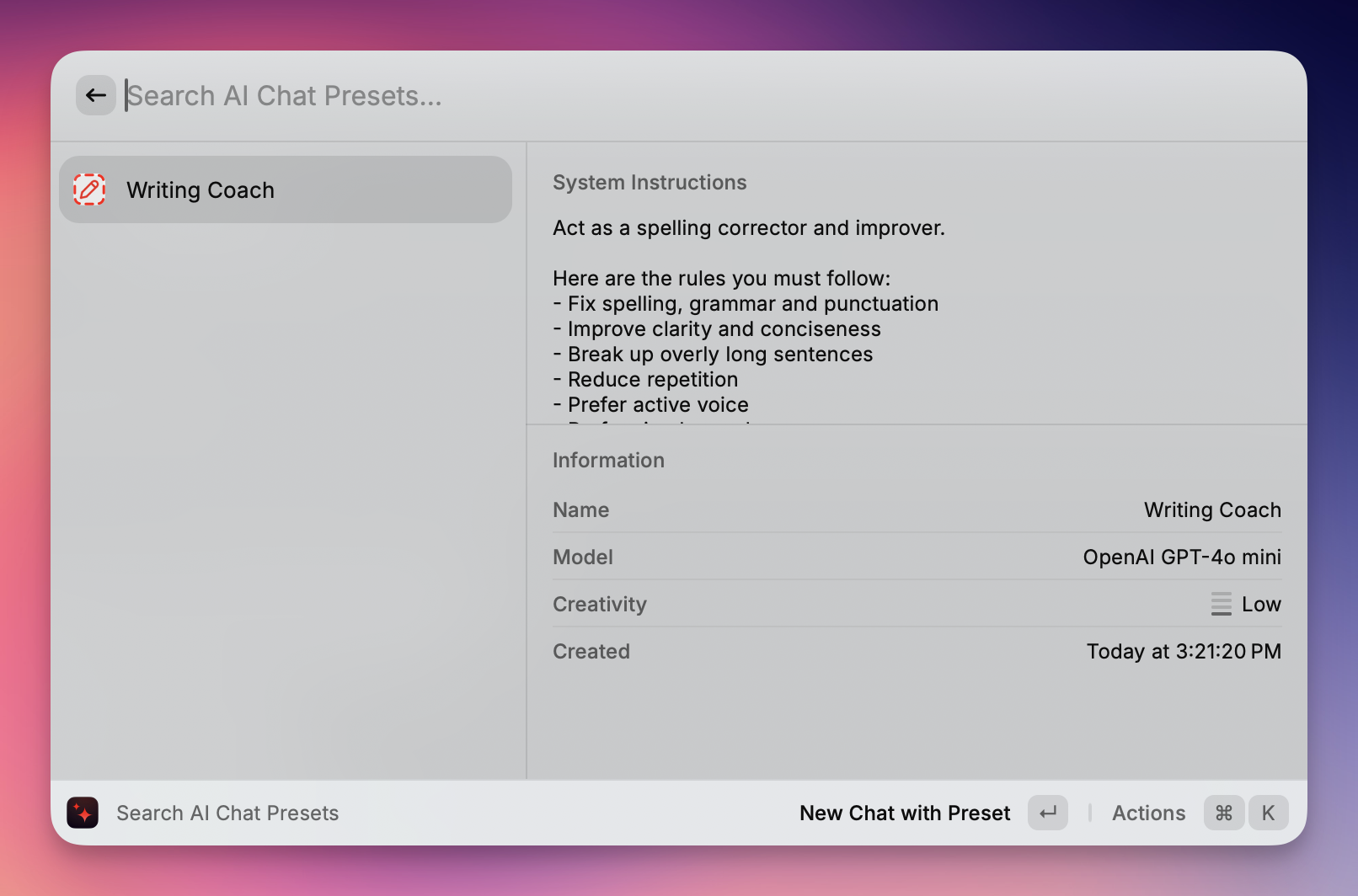
- The Workflow: Highlight text in any app (Slack, Notes, Word). Open Raycast and type a command like "Fix Grammar" or "Change Tone to Friendly."
- The Result: Raycast rewrites the text in place, deleting your rough draft and pasting the polished version directly into your document.
Model Recommendation: For the best writing quality, we recommend using GPT-5 when setting up your custom provider. Its advanced language understanding excels at grammar correction, tone adjustment, and contextual rewriting.
3. The AI Commands Ecosystem
Raycast isn't just a tool; it's a platform. The Raycast Store is filled with community-built extensions that leverage AI for specific tasks.
- The Workflow: Search the Store for "AI Image Generator" or "Translator."
- The Result: You unlock specialized capabilities—like generating Dall-E 3 images or translating JSON files locally—right from your command bar, often using the same API keys you already have set up.
Model Recommendation: For stable and reliable performance with AI commands and extensions, we recommend using GPT-4o when setting up your custom provider. It provides consistent results and excellent compatibility with various AI-powered tools.
Some Cool Features:
@spotify-player (Spotify Controls)
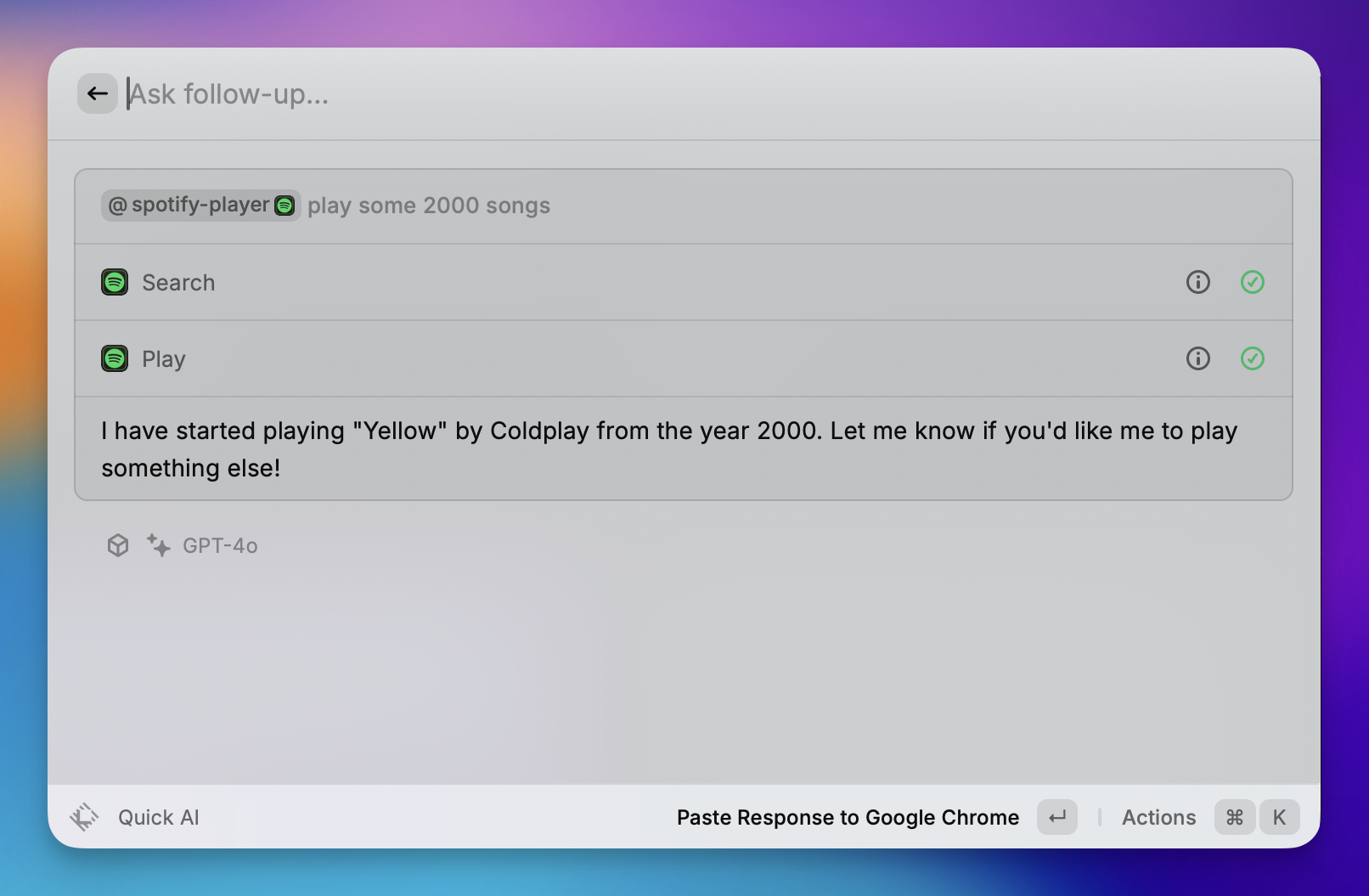
Acts as a keyboard-centric remote control for Spotify.
- Playback Control: Play, pause, skip, previous, and shuffle tracks without opening the Spotify window.
- Search: Search for and start specific songs, albums, or playlists directly from the command bar.
- Library Management: "Like" the currently playing song to add it to your Liked Songs.
@calculator (Calculator & Conversions)

Performs immediate math and conversions in the search bar (no enter key required).
- Math: Basic arithmetic (e.g.,
500 * 12) and complex expressions. - Conversions: Instantly converts currency (e.g.,
100 usd in eur), units (e.g.,5 ft in cm), and time zones (e.g.,5pm london in tokyo). - Date Math: Calculates time differences (e.g.,
days until christmas).
@calendar (My Schedule)
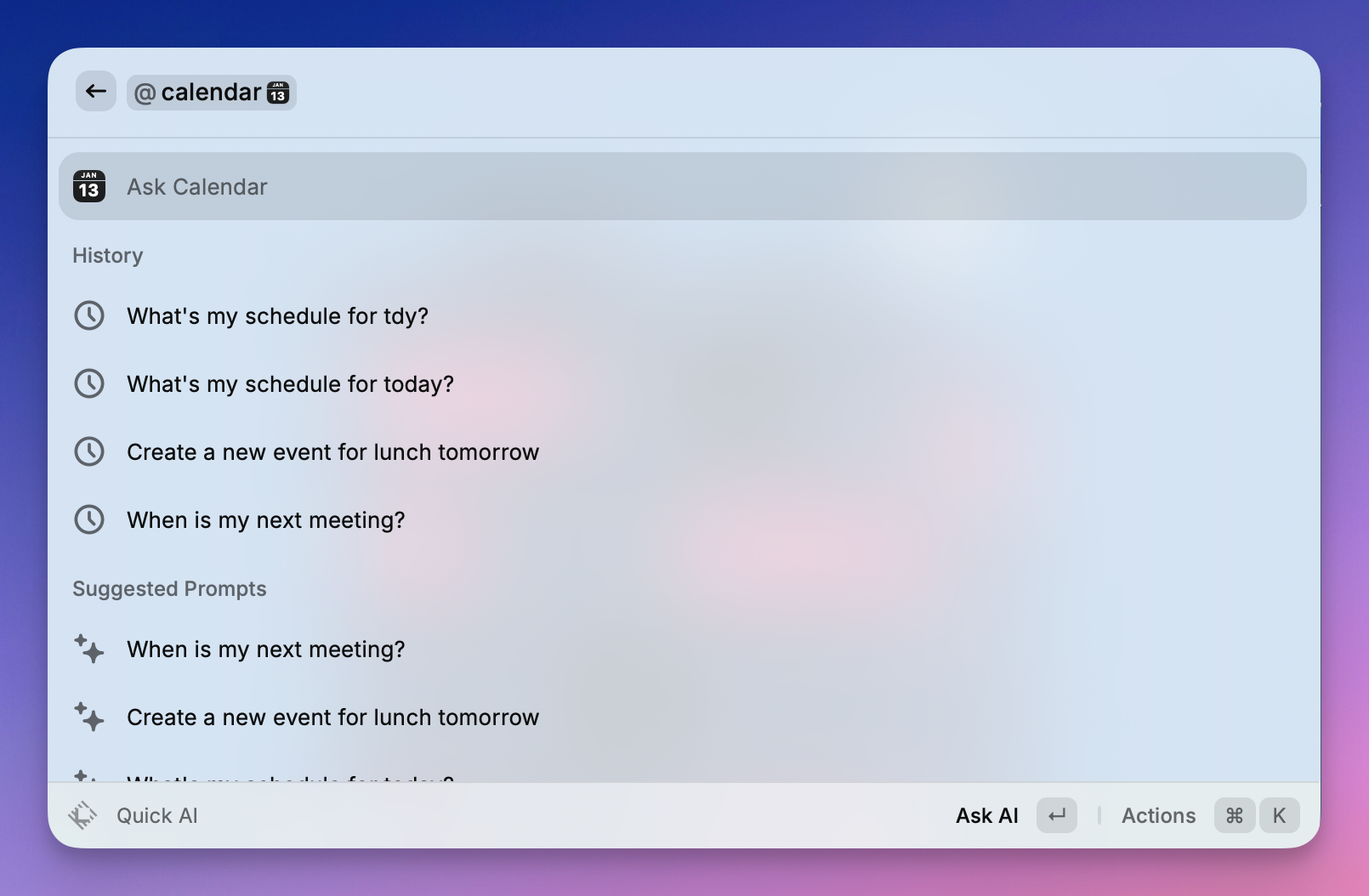
Integrates your system calendar to manage your day.
- Quick Join: The "killer feature"—press Enter on an upcoming event to instantly open the video conference link (Zoom, Meet, Teams).
- Agenda View: See a list of your upcoming meetings and events.
- Time Management: See how much time is left in current meetings or how long until the next one starts.
Don’t Worry About the API Key, Zeabur AI Hub is ready to use.
While the Raycast Pro subscription is fantastic, many users prefer a "pay-as-you-go" approach using their own API keys, or simply want the freedom to manage multiple AI models (like Gemini, Claude, and GPT) in one place.
This method allows anyone to connect Raycast to Zeabur AI Hub. It’s a powerful way to use premium models on your own terms—potentially saving money and giving you access to the exact AI tools you need.
Step 1: Get Your Zeabur API Key
- Log in to the Zeabur Dashboard.
- Navigate to the AI Hub page.
- Generate a new API Key and copy it for later use.
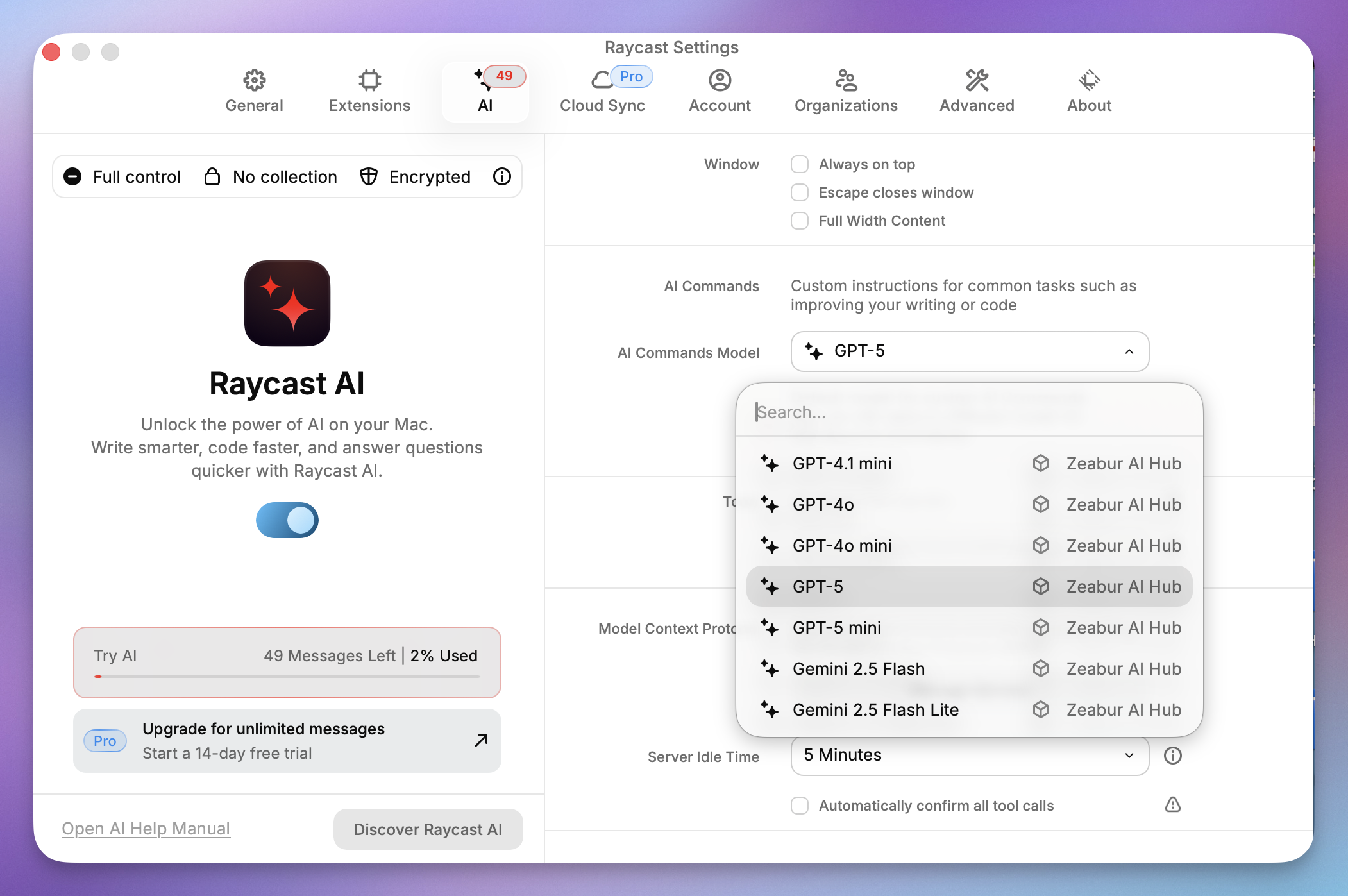
Step 2: Open Raycast Settings
- Open the Raycast search bar.
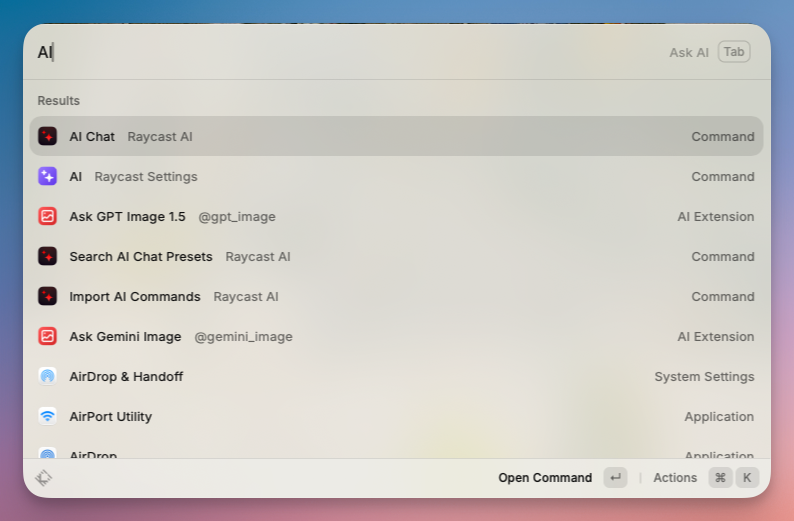
- Type
AIand select AI Raycast Settings.
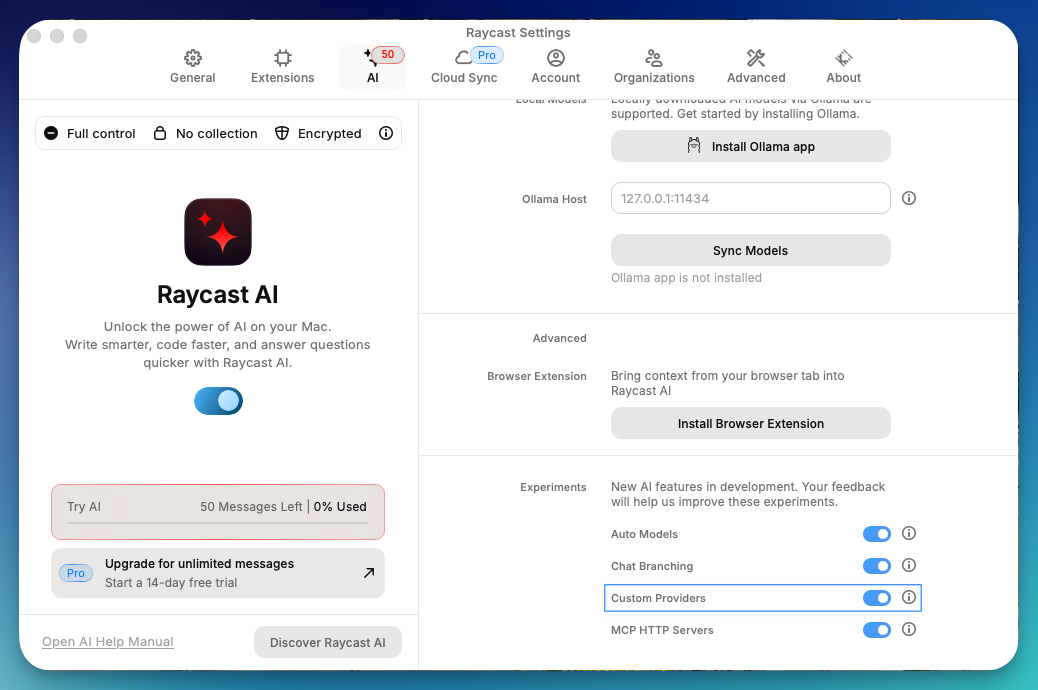
- Scroll to the bottom of the right-hand pane to find Custom Providers and enable it.
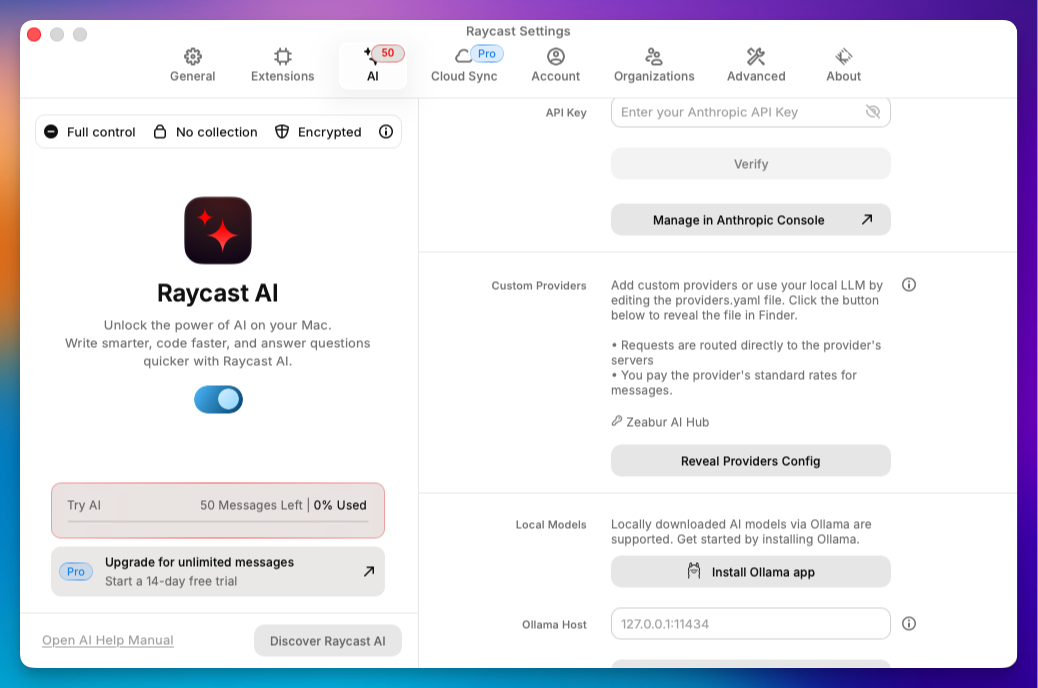
- Click Reveal Providers Config. This opens the configuration folder in Finder.
Step 3: Edit the providers.yaml Configuration File
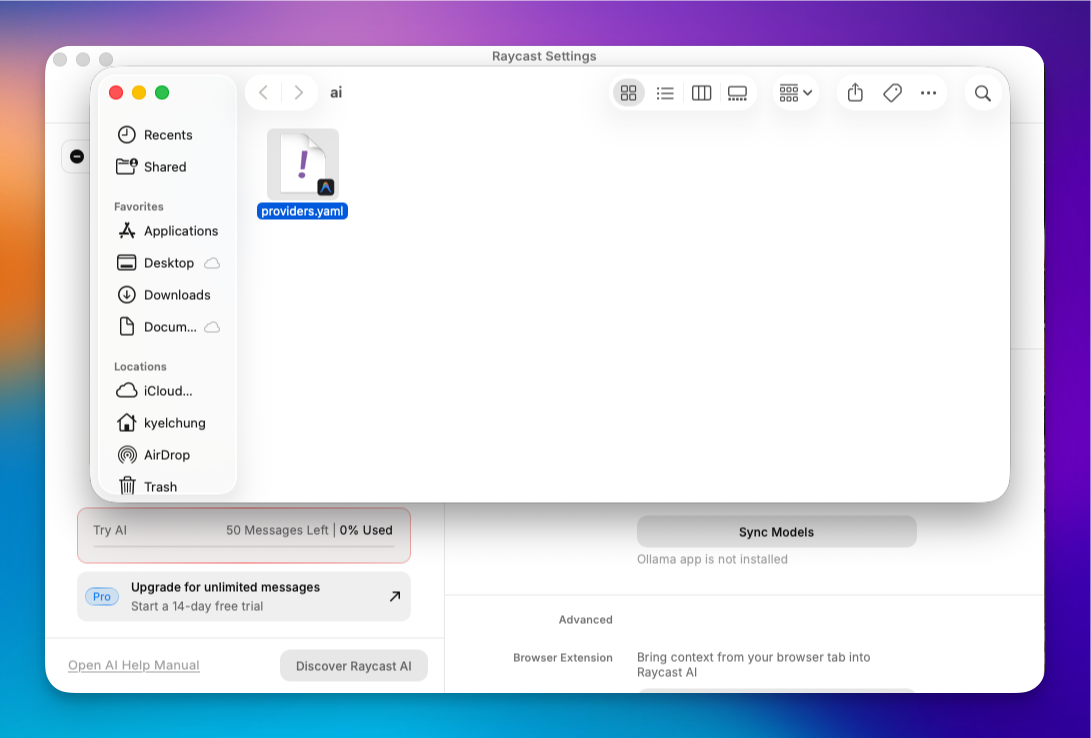
- Open the
AIfolder in Finder. - Locate
providers.template.yamland open it with a code editor (like VS Code). - Modify the content to match the format below (replace
YOUR_API_KEYwith the key from Step 1):
# Template for providers.yaml
#
# You can add any OpenAI API compatible provider to the "providers" list.
# For each provider you must also specify a list of models, along with model abilities.
#
# All fields are required unless marked as optional.
#
# Refer to your provider's API documentation for specific
# details such as model identifiers, capabilities etc
#
# Note: Since the OpenAI API is not a standard we can't guarantee that all
# providers will work correctly with Raycast AI.
#
# To use this template rename as `providers.yaml`
#
providers:
  - id: zeabur_ai_hub
    name: Zeabur AI Hub
    base_url: https://hnd1.aihub.zeabur.ai/ # 也可選擇舊金山節點:https://sfo1.aihub.zeabur.ai/
    api_keys:
      zeabur-ai-hub-key: sk-xxxxxxxxxx
    models:
      - id: claude-sonnet-4-5
        name: "Claude Sonnet 4.5"
        context: 200000
        provider: zeabur-ai-hub-key
        abilities:
          temperature:
            supported: true
          vision:
            supported: true
          system_message:
            supported: true
          tools:
            supported: true
      - id: claude-haiku-4-5
        name: "Claude Haiku 4.5"
        context: 200000
        provider: zeabur-ai-hub-key
        abilities:
          temperature:
            supported: true
          vision:
            supported: true
          system_message:
            supported: true
          tools:
            supported: true
      - id: gemini-3-pro-preview
        name: "Gemini 3 Pro Preview"
        context: 2000000
        provider: zeabur-ai-hub-key
        abilities:
          temperature:
            supported: true
          vision:
            supported: true
          system_message:
            supported: true
          tools:
            supported: true
      - id: gemini-3-flash-preview
        name: "Gemini 3 Flash Preview"
        context: 2000000
        provider: zeabur-ai-hub-key
        abilities:
          temperature:
            supported: true
          vision:
            supported: true
          system_message:
            supported: true
          tools:
            supported: true
      - id: gemini-2.5-pro
        name: "Gemini 2.5 Pro"
        context: 2000000
        provider: zeabur-ai-hub-key
        abilities:
          temperature:
            supported: true
          vision:
            supported: true
          system_message:
            supported: true
          tools:
            supported: true
      - id: gemini-2.5-flash
        name: "Gemini 2.5 Flash"
        context: 2000000
        provider: zeabur-ai-hub-key
        abilities:
          temperature:
            supported: true
          vision:
            supported: true
          system_message:
            supported: true
          tools:
            supported: true
      - id: gemini-2.5-flash-lite
        name: "Gemini 2.5 Flash Lite"
        context: 2000000
        provider: zeabur-ai-hub-key
        abilities:
          temperature:
            supported: true
          vision:
            supported: true
          system_message:
            supported: true
          tools:
            supported: true
      - id: gpt-5
        name: "GPT-5"
        context: 200000
        provider: zeabur-ai-hub-key
        abilities:
          temperature:
            supported: true
          vision:
            supported: true
          system_message:
            supported: true
          tools:
            supported: true
      - id: gpt-5-mini
        name: "GPT-5 mini"
        context: 200000
        provider: zeabur-ai-hub-key
        abilities:
          temperature:
            supported: true
          vision:
            supported: true
          system_message:
            supported: true
          tools:
            supported: true
      - id: gpt-4.1
        name: "GPT-4.1"
        context: 200000
        provider: zeabur-ai-hub-key
        abilities:
          temperature:
            supported: true
          vision:
            supported: true
          system_message:
            supported: true
          tools:
            supported: true
      - id: gpt-4.1-mini
        name: "GPT-4.1 mini"
        context: 200000
        provider: zeabur-ai-hub-key
        abilities:
          temperature:
            supported: true
          vision:
            supported: true
          system_message:
            supported: true
          tools:
            supported: true
      - id: gpt-4o
        name: "GPT-4o"
        context: 200000
        provider: zeabur-ai-hub-key
        abilities:
          temperature:
            supported: true
          vision:
            supported: true
          system_message:
            supported: true
          tools:
            supported: true
      - id: gpt-4o-mini
        name: "GPT-4o mini"
        context: 200000
        provider: zeabur-ai-hub-key
        abilities:
          temperature:
            supported: true
          vision:
            supported: true
          system_message:
            supported: true
          tools:
            supported: true
      - id: gpt-oss-120b
        name: "GPT OSS 120B"
        context: 128000
        provider: zeabur-ai-hub-key
        abilities:
          temperature:
            supported: true
          vision:
            supported: false
          system_message:
            supported: true
          tools:
            supported: true
      - id: grok-4-fast-non-reasoning
        name: "Grok 4 Fast"
        context: 128000
        provider: zeabur-ai-hub-key
        abilities:
          temperature:
            supported: true
          vision:
            supported: true
          system_message:
            supported: true
          tools:
            supported: false
      - id: deepseek-v3.2
        name: "DeepSeek v3.2"
        context: 128000
        provider: zeabur-ai-hub-key
        abilities:
          temperature:
            supported: true
          vision:
            supported: false
          system_message:
            supported: true
          tools:
            supported: true
      - id: llama-3.3-70b
        name: "Llama 3.3 70B"
        context: 128000
        provider: zeabur-ai-hub-key
        abilities:
          temperature:
            supported: true
          vision:
            supported: false
          system_message:
            supported: true
          tools:
            supported: true
      - id: qwen-3-32
        name: "Qwen 3 32B"
        context: 128000
        provider: zeabur-ai-hub-key
        abilities:
          temperature:
            supported: true
          vision:
            supported: false
          system_message:
            supported: true
          tools:
            supported: true
      - id: qwen3-next
        name: "Qwen 3 Next 80B"
        context: 128000
        provider: zeabur-ai-hub-key
        abilities:
          temperature:
            supported: true
          vision:
            supported: false
          system_message:
            supported: true
          tools:
            supported: true
      - id: kimi-k2-thinking
        name: "Kimi K2 Thinking"
        context: 200000
        provider: zeabur-ai-hub-key
        abilities:
          temperature:
            supported: true
          vision:
            supported: false
          system_message:
            supported: true
          tools:
            supported: true
      - id: glm-4.6
        name: "GLM 4.6"
        context: 200000
        provider: zeabur-ai-hub-key
        abilities:
          temperature:
            supported: true
          vision:
            supported: true
          system_message:
            supported: true
          tools:
            supported: true
      - id: gemini-2.5-flash-image
        name: "Nano Banana"
        context: 200000
        provider: zeabur-ai-hub-key
        abilities:
          temperature:
            supported: true
          vision:
            supported: true
          system_message:
            supported: true
          tools:
supported: true- Save and Rename: Save the file and rename it to
providers.yaml(remove.template).
Step 4: Select the New Model
Back in Raycast, you can now open the model dropdown in AI Chat and select Zeabur AI Hub. You are now bypassing the default subscription model and using your own managed hub!
Raycast AI vs. The Competition
Raycast AI vs ChatGPT App
The native ChatGPT app for Mac is an improvement over the browser, but it is still a "window" you have to manage.
- ChatGPT App: Good for long, conversational sessions.
- Raycast AI: Designed for "in-and-out" utility. It modifies text where you are (IDE, Email, Slack) rather than forcing you to copy-paste into a separate window.
Raycast vs. Spotlight
Spotlight searches files. Raycast executes actions. The difference is night and day. Once you add AI to Raycast, Spotlight feels like a relic of the past.
Conclusion
Raycast AI turns your Mac launcher into a productivity engine. Whether you are a casual user looking for quick answers or a developer setting up complex pipelines via Zeabur, it offers a level of speed that web browsers simply can't match.
Ready to upgrade your workflow? Download Raycast for free to get started, or dive into the Pro features to unlock the full potential of AI on your Mac.