

Why you should use Open Web UI with Zeabur AI Hub
A self-hosted, ChatGPT-style UI to chat with multiple AI models (local or API) while keeping control of your data and costs.
 Kyle Chung
This article is also available in 繁體中文, 简体中文, 日本語, Español, and Bahasa Indonesia.
Open Web UI is a powerful, self-hosted web interface that gives you a unified platform to interact with multiple AI models—both local and API-based—through a clean, ChatGPT-style interface. Think of it as your personal AI command center: one interface to rule them all, with full control over your data, costs, and model selection.
TL;DR:
Why should you use it?
- Privacy & Data Ownership: The biggest selling point. If you run local models, your data never leaves your network(Under Your Control). If you use APIs, you still control the interface and chat history database locally.
- Model Agnostic (All-in-One): You aren't locked into one provider. You can have a dropdown menu that lets you switch instantly between GPT-4o, Claude 3.5 Sonnet, Llama 3, and DeepSeek without changing tabs or logging into different websites.
- Cost Control: You can use free, open-source models (like Llama 3 or Mistral) for simple tasks and only pay for "smart" API models (like GPT-4) when you really need them.
- Powerful Features: It includes advanced features often locked behind enterprise plans elsewhere, such as RAG (uploading documents to chat with them), web search capabilities, and image generation integration.
Few weeks ago, we rolled out our brand new feature, Zeabur AI Hub, amazing tool with many extraordinary Models from the top AI Vendors all around the world. It is not a another OpenRouter/LiteLLM Alternative, It is strengthen our Zeabur functionality, Open Web UI will be a great explanation. When these two combine together, Open Web UI will be the face of AI, AI Hub Will be the engine of More than 20 AI Models, And Zeabur will become the backbone of everything, not hear enough? Here is the specific power of this stack:
1. The "Universal Translator": Unified Access for Multi-Model Testing
Although Open Web UI is compatible with various different top AI vendors, the setup process of everything is still cost certain amount of time and process-go to different AI API platform, fill in credit card credentials, acquire AI API keys, paste into Open Web UI, repeat multiple times.
-
Without Zeabur AI Hub: Even you set up everything correctly, the next headache you may encounter which when the invoices finally arrive, you’re left with scattered costs and no clear visibility into how much you’re spending on each model, sounds pretty chaotic?
-
With Zeabur AI Hub: This is your all-in-one solution. Zeabur AI Hub acts as a managed LiteLLM layer, instantly offering you more than 20 top-tier AI models ready to plug directly into Open Web UI. Best of all, it consolidates everything into your existing Zeabur billing.
-
The Power: Simultaneous Model Comparison.
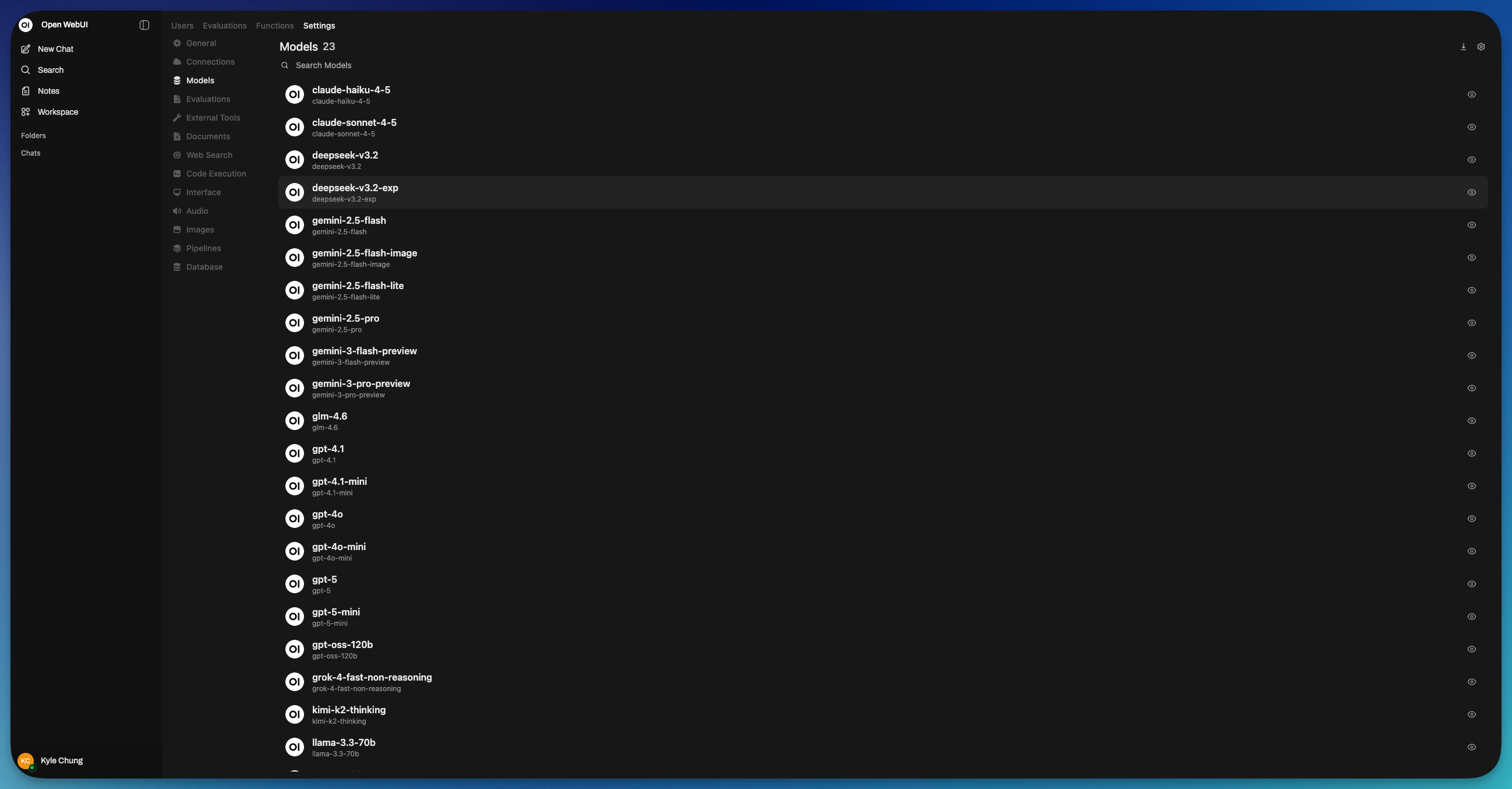
Because Zeabur AI Hub gives you instant access to the entire model ecosystem, you maximize Open Web UI’s "Model Agnostic" strength. You can toggle between GPT-5, Claude 3.5 Sonnet, and Gemini 3 pro in the same chat window to compare answers side-by-side. You get the flexibility of BYO (Bring Your Own) models without the fatigue of managing BYO accounts.
2. Privacy Sovereignty & "Unkillable" Redundancy
This setup grants you two critical advantages: total isolation of the database and with other AI vendors, other AI vendors won’t acquire previous chat data like you used to, you won’t feel why it knows me so well anymore. Another problem is What if major cloud provider failed again? Just like we’ve cover before the outage of cloudflare and AWS, it also caused the major outage of tons AI vendors, don’t worry, we also have a solution for you.
- The Privacy Shield: Unlike free public web interfaces where your conversations are often used to train the models, connecting via APIs through Zeabur AI Hub ensures enterprise-grade privacy. Your chat history, sensitive documents, and context are securely stored within your own Zeabur project database—not on a vendor's server. You own your data, and it stays isolated from the AI providers.
- The Scenario: You are working on a deadline using GPT-4o, and OpenAI suffers a global outage. On a standard web interface, you would be stuck staring at an error screen.
- The Solution: With Zeabur AI Hub, you are never left stranded. Because we offer more than 20 different AI models, if one giant falls, you have an army of backups ready. You can simply switch to Claude 3.5, Gemini, or Llama 3 within Open Web UI and keep working instantly. You never have to worry about having "no AI to use."
3. The "Split View" (Chat with Two Models at Once)
This is the single best feature for showing off the power the combination of Zeabur AI hub and Open Web UI.
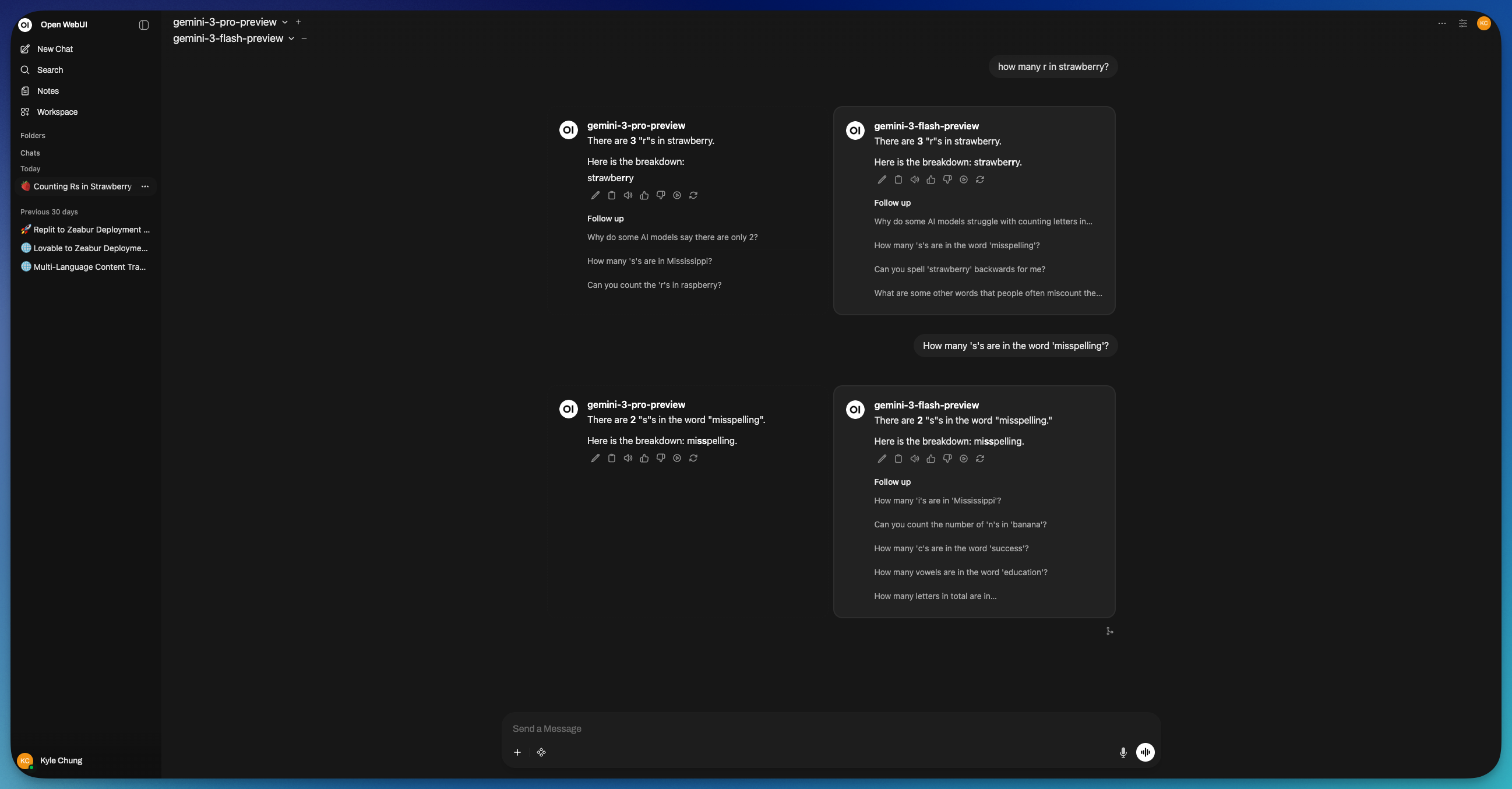
- What it is: You can split your screen and ask the same prompt to few different models simultaneously.
- Why try it: Set the left side to Gemini 3 Pro Preview and the right side to GPT-5. Ask them to write a piece of code or a marketing email. They would run parallel You will instantly see which "brain" is better for your specific task. It turns you from a user into a judge.
How to Setup Open Web UI with Zeabur AI Hub
Integrating Open Web UI with Zeabur AI Hub allows you to manage your local LLMs and chat interfaces seamlessly. Follow this guide to get your instance running and connected in minutes.
Step 1: Deploy Open Web UI
First, you need a running instance of Open Web UI. You can deploy this instantly using Zeabur's pre-configured template.
- Click the Deploy button on the Open Web UI Template page.
- Wait for the deployment to finish, then open the domain provided by Zeabur.
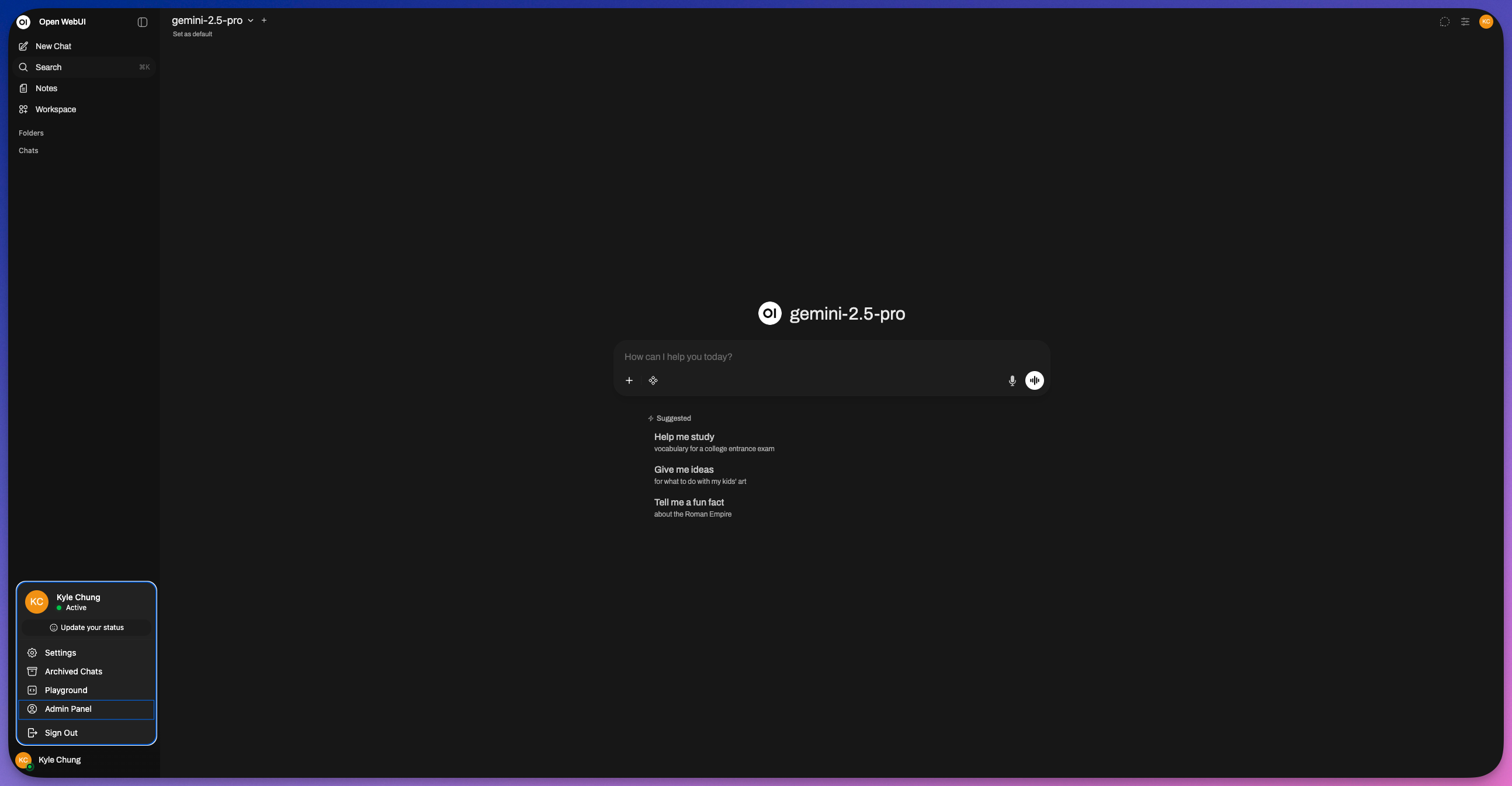
Step 2: Access the Admin Panel
Once your site is live, open the URL. If this is your first time accessing the instance, you will be prompted to create an administrator account.
- Sign up/Log in to your Open Web UI instance.
- Click on your Profile Icon in the bottom-left or top-right corner (depending on your version).
- Select Admin Panel from the menu.
Step 3: Navigate to Settings
Inside the Admin Panel dashboard:
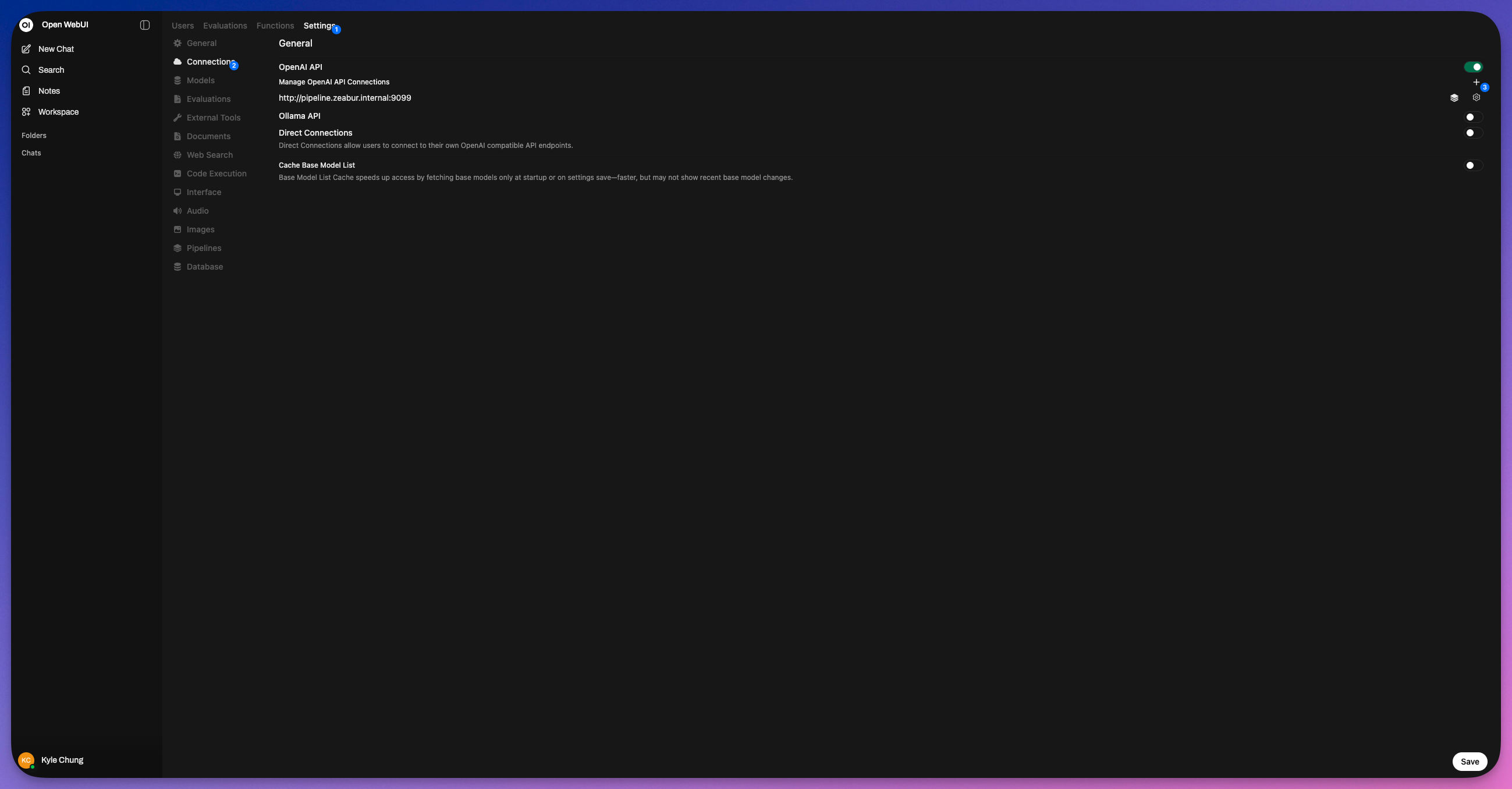
- Look for the Settings button (usually represented by a gear icon) in the navigation bar.
- Click it to open the configuration menu.
Step 4: Configure Connections
To connect to Zeabur AI Hub, we need to modify the external connection settings.
- Click on the Connections tab within the Settings menu.
- Locate the OpenAI-compatible section.
- Click the + (Plus) sign or the toggle switch to add a new API connection source.
Step 5: Generate Zeabur AI Hub Credentials
You need an API key to allow Open Web UI to talk to Zeabur's models.
- Open a new browser tab and go to your Zeabur Dashboard.
- Navigate to the AI Hub section.
- Create a new API Key (if you haven't already) and copy both the API Key and the API Endpoint (Base URL).
Step 6: Embed the Credentials
Return to your Open Web UI Connections tab and paste the credentials you just generated into the corresponding fields:
- Base URL: Paste the Zeabur AI Hub Endpoint URL here (e.g.,
https://hnd1.aihub.zeabur.ai/). - API Key: Paste your unique Zeabur AI Hub API Key here.

Step 7: Save and Verify
- Click the Save button at the bottom of the screen.
- To verify the connection, click the Verify button (if available) or return to the main chat interface.
- Select a model from the dropdown menu; you should now see the models available via Zeabur AI Hub.
You are now ready to chat using Open Web UI powered by Zeabur AI Hub
Summary: The Stack
- Open Web UI provides the Experience (Chat, RAG, History, Voice, Image Gen).
- Zeabur AI Hub provides the Infrastructure (Standardization, Reliability, Cost Control, Security).
In short: Using Open Web UI without Zeabur AI Hub is like having a nice dish with limited condiments. Using them together is like having a great steak with various confiments, switches taste automatically whenever you want, and all manage by you.
Open Web UI is an open-source, self-hosted user interface designed to let you interact with Large Language Models (LLMs) entirely on your own terms. Here’s Zeabur comes in, one click and you good to go.
Think of it as a "BYO" (Bring Your Own) model platform. Instead of going to chatgpt.com to use OpenAI's models or claude.ai for Anthropic's, you install Open Web UI on your own computer or server. You then connect it to any AI model you want—whether it's running locally on your machine (via tools like Ollama) or hosted in the cloud (via APIs from OpenAI, Anthropic, Groq, etc.).
Comparison: Open Web UI vs. ChatGPT/Claude Web Versions
| Feature | Open Web UI | Official Web UIs (ChatGPT / Claude) |
|---|---|---|
| Privacy | High. Chat history is stored locally on your device. | Low/Medium. Your chats are stored on their servers and may be used for training (unless opted out). |
| Models | Unlimited. Mix & match local models (Ollama) and cloud APIs (OpenAI, Anthropic, Google). | Locked. You can only use the models that specific company provides. |
| Cost | Free Software. You pay only for your own hardware or API usage tokens. | Subscription. Usually ~$20/month for access to the best models. |
| Experience | Customizable. Can feel "techy." You manage the connections. Great for power users. | Polished. "It just works." Extremely smooth, zero setup required. |
| Unique Tech | Pipelines. You can write scripts to alter how the AI responds (e.g., "always translate to French"). | Native Features. Claude's "Artifacts" (live coding previews) or ChatGPT's "Voice Mode" are often smoother than open-source equivalents. |
The Verdict:
Use Open Web UI if you are a developer, privacy enthusiast, or power user who wants total control. Use ChatGPT/Claude Web if you want a zero-friction, easy experience and don't mind the subscription fee.