

Zeabur Agent Skills: Your Coding Agent Can Now Manage Your Servers
From Vibe Coding to Vibe Deploying — install one Claude Code plugin and Claude Code can rent servers, deploy apps, manage databases, and bind domains from your terminal.
 Ling Wu
This article is also available in 繁體中文, 简体中文, 日本語, Español, and Bahasa Indonesia.
TL;DR: Zeabur Agent Skills is a collection of Claude Code skills (markdown instruction files) — once installed, your Claude Code can rent servers, deploy projects, enable AI models, manage databases, and register domains, all without leaving the terminal or opening a single dashboard.
Quick glossary:
- Claude Code: Anthropic's coding agent
- Agent Skills: Anthropic's feature — markdown instruction files that teach Claude Code new capabilities
- Zeabur Agent Skills: our set of Agent Skills that teach Claude Code how to operate Zeabur
Why can't your coding agent deploy for you yet?
Cursor, Claude Code, and GitHub Copilot have pushed the barrier to writing code lower than ever before. A solo developer paired with a coding agent can now produce in hours what used to take a team weeks. Vibe coding — building with natural language, iterating by feel — has become the daily workflow for a growing number of developers.
But once the code is written, things get stuck just as fast as they always did. As of early 2026, 10,000+ developers on Zeabur are already handing deployment and operations to AI agents, and the number keeps climbing.
Your agent can write an entire ticketing system but it can't spin up a server for you — you still have to open the AWS Console to pick an instance type, paste environment variables into a dashboard, configure DNS in yet another panel, then switch back to the terminal to check if the service is actually alive. The gap AI hasn't closed isn't in coding, it's in everything that comes after.
Zeabur isn't another deployment platform — it's your AI DevOps Engineer, the role on every team that's responsible for getting infra, deployment, and day-to-day ops sorted, except this time it's AI doing the work. Not a deploy button. Something that judges, debugs, decides, and acts on your infra directly.
Agent Skills is the first step in that direction — a set of skills built on Anthropic's Agent Skills feature (markdown instruction files) that teach your coding agent how to operate Zeabur's CLI: renting servers, deploying apps, managing databases, configuring domains, all through natural language conversation.
How do you install Zeabur Agent Skills?
It's one Claude Code plugin (installed once via claude plugin) that bundles 30+ individual skills — each a SKILL.md file teaching Claude Code a specific Zeabur operation. No API key to register, no config file to babysit, a few seconds to give your coding agent the know-how to operate Zeabur. The Zeabur Claude Code Skills docs cover every CLI flag and plugin option; here are the install paths you'll actually use day to day:
Claude Code (recommended):
claude plugin marketplace add zeabur/agent-skills
claude plugin install zeabur@zeabur
You can also run this from inside Claude Code via the /plugin slash command.
Already installed? Update to the latest version:
claude plugin update zeabur@zeabur
Once installed, Claude Code auto-detects when a task matches one of these skills and loads the right SKILL.md on demand — you don't invoke them manually. Skills are the know-how layer: they tell Claude which npx zeabur command fits your request, and your existing Zeabur CLI still does the actual execution.
What can Zeabur Agent Skills do?
Once installed, Claude Code gains 30+ skills it reads on demand — that's where vibe deploying (the same natural-language flow extended from writing code through deployment, ops, and debugging) starts. Here's a quick look at how wide the gap is between vibe coding and vibe deploying:
| Task | Traditional approach | With Agent Skills |
|---|---|---|
| Rent a server | 5 tabs comparing prices, manual setup, 15 min | One sentence, 30 sec |
| Deploy an app | Write Dockerfile + configure CI/CD, 30+ min | One sentence, 38 sec |
| Connect AI API | Register OpenAI + add card + manage keys | One sentence, auto-configured |
| Manage database | Open pgAdmin, connect, write queries | One sentence, run directly in terminal |
| Buy + bind domain | Switch between 4 interfaces, 20 min | One sentence, 2 min |
| Debug | SSH + read logs + edit config + restart | One sentence, auto-diagnose and fix |
Each scenario below is a slice of the same arc — Claude Code shifting from coding agent to AI DevOps Engineer, from vibe coding to vibe deploying.
How do you compare and rent a server right from your terminal?
The traditional way involves opening five browser tabs — AWS, Hetzner, Linode, DigitalOcean — comparing specs and pricing across all of them, then manually provisioning the instance and setting up SSH, the whole process taking at least fifteen minutes.
Now you just say:
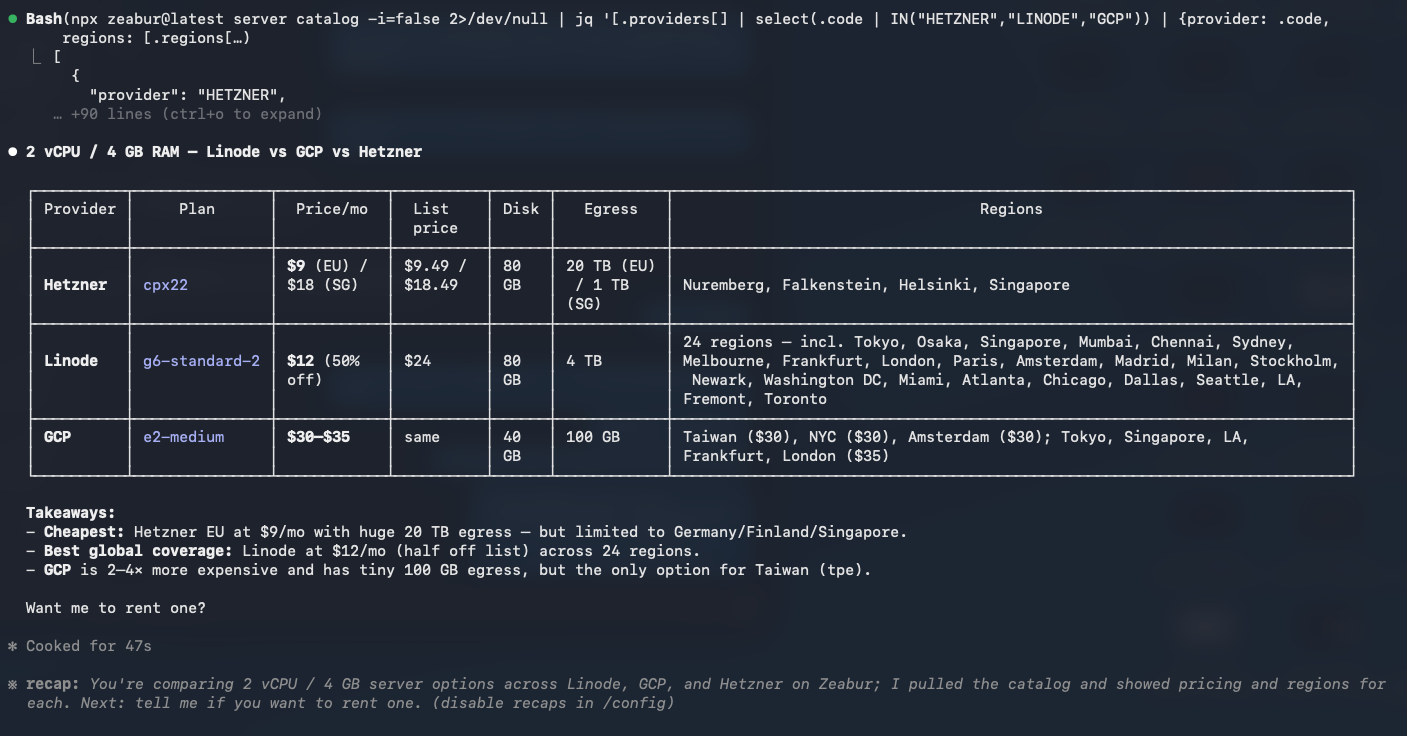
"Show me 2 vCPU / 4 GB RAM server options from Linode, GCP, and Hetzner — compare pricing and available regions"
Claude Code queries each provider's plans, regions, pricing, and egress in real time and lays them out for you. When you see one that fits, another sentence like "rent the Hetzner one in Helsinki" provisions it — no dashboards, no tab-switching, just the terminal.
How do you deploy a Claude Code project in one sentence?
You spent an afternoon building a complete Next.js app with Claude Code, and now you're at the deployment step where you'd traditionally need to learn Docker, set up a CI/CD pipeline, and figure out the right build commands — easily half an hour of setup before anything actually goes live.
Now you just say:
"Deploy this project to my Hetzner server"
Claude Code auto-detects the framework, handles the build and upload, and 38 seconds later your app is live at https://my-app.zeabur.app. If there's a Dockerfile issue, Agent Skills auto-generates or fixes it. For a full vibe-coding-to-production case study, this Next.js + Ghost SEO build walks it end to end.
How do you use GPT-4o and Claude without signing up for API keys?
Your app needs AI capabilities but you'd rather not register yet another OpenAI account, add a credit card, and manage one more set of API keys — all of which adds up to another interruption in your workflow.
You just say:
"My app needs AI features, set up the API for me"
Claude Code activates Zeabur AI Hub and auto-configures the OPENAI_API_KEY and OPENAI_BASE_URL environment variables, so your app can use the standard OpenAI SDK to call GPT-4o, Claude, Gemini, DeepSeek and more — no code changes needed, billed directly to your Zeabur account. The reverse works too: point Claude Code itself at AI Hub for pay-as-you-go token usage, no wasted spend.
How do you query your database directly from the terminal?
The traditional approach means finding the connection string, opening pgAdmin or DBeaver, connecting, and then finally writing your query — just getting the environment ready takes several minutes on its own.
Now you just say:
"What's in my database? Add a test user"
Claude Code enters your PostgreSQL container, lists the tables, runs the INSERT, and reports the results. More complex queries work in natural language too — "list users who signed up last week but never paid", "group events with duration over 5 seconds" — Claude assembles the SQL, runs it, and hands back a clean table. mongosh, redis-cli, and mysql all follow the same pattern — your terminal is your database management tool.
What happens when your app throws errors — can the agent debug it?
It's midnight, the notification lands, your app keeps returning 500s. The traditional response involves SSHing into the container, reading logs, finding the root cause, editing config, and restarting — the whole cycle takes at least half an hour, assuming you remember all the right commands.
You just say:
"App keeps returning 500, help me check"
Claude Code automatically pulls the runtime logs, pinpoints the error (say, JWT_SECRET is empty), sets the correct value, restarts the service, and runs a test to confirm — the entire debugging flow handled in one conversation.
How do you buy a domain, set up DNS, and bind it all at once?
The traditional way is buying the domain on Namecheap, adding an A record in the DNS panel, going back to the deployment platform to bind it, and waiting for the SSL certificate to issue — four steps scattered across at least four different interfaces.
You just say:
"Buy myapp.dev and point it to my app"
Claude Code searches available domains, completes registration ($8.99/year), sets up the DNS records, binds to your service, and enables SSL — one conversation, all four steps done.
What happens when things go wrong? How capable is the agent at debugging?
The scenarios above all look smooth, but real-world deployments always involve stumbling blocks, and Agent Skills' real value isn't just saving time when things work — it's finding answers when they don't.
Three of the most common deployment pitfalls:
Port Mismatch — deployed successfully but can't connect
Your app listens on 8080 but the proxy defaults to 3000, resulting in dial tcp: connection refused — this is the single most common trap for deployment newcomers. Agent Skills' port-mismatch diagnostic automatically compares the app's listening port against the proxy config, finds the mismatch, and fixes it. You just say "my service won't connect."
Startup order — database isn't ready when the app starts
Your app tries to connect to PostgreSQL on startup but the database container is still initializing, throwing connection refused. Restarting might fix it once, but you'll hit the same issue on the next deploy. Agent Skills' startup-order capability recognizes this pattern and configures the correct service dependency order, solving the problem at its root rather than just working around it.
Migration stuck — service shows "waiting" indefinitely
Your app expects a separate migrator service to complete database migrations before starting, but Zeabur doesn't know about this dependency, so the service stays stuck in a waiting state. Agent Skills detects the migration-waiting pattern and either guides you to configure the migrator service correctly or runs the migration command directly inside the container.
These aren't hypothetical problems — they're real cases the Zeabur support team handles every day, and Agent Skills turns that accumulated troubleshooting experience into automated diagnostic workflows.
What's in Zeabur Agent Skills? The full 30+ skill capability map
| Category | Skills | Description |
|---|---|---|
| Deployment | deploy, dockerfile, template-deploy, deployment-logs, template-backup, database, object-storage | Deploy local projects or GitHub repos, auto-generate Dockerfiles, deploy marketplace templates, deploy databases / object storage, view logs |
| Servers | server-catalog, server-rent, server-list | Browse provider plans and pricing, provision servers, check status / reboot / SSH |
| Service Mgmt | service-list, service-delete, service-exec, service-metric, restart, update-service | List services, exec into containers, check CPU/Memory, restart, update config |
| Domains & DNS | domain-url, domain-register, domain-dns, email | Bind domains, search and register domains, manage DNS records, configure Zeabur Email (ZSend) |
| Env Variables | variables | CRUD for environment variables |
| AI Services | ai-hub | Manage AI Hub tenants, API keys, balance top-up, usage queries |
| Projects | project-create, project-delete | Create or delete projects |
| Templates | template, template-publish | Write and validate template YAML, publish to marketplace |
| Debugging | port-mismatch, startup-order, migration, auth | Fix port mismatches, service startup order, stuck migrations, auth issues |
All 30+ skills are open source at github.com/zeabur/agent-skills (MIT). Missing a skill you need, or think one could work better? PRs welcome.
What does Zeabur Agent Skills mean for you?
Different team shapes, different entry points — the two paths below are parallel, not an upgrade ladder.
Self-Serve Builder: your team has engineers and just wants deployment handled
You might be a solo full-stack developer or a small AI startup of three to five people — either way, someone on your team can write code, but nobody should be spending their time on DevOps.
You're running multiple projects at once, each requiring its own "provision → configure → deploy → bind domain" cycle, and every minute spent on infra is a minute not spent on product. Agent Skills lets you hand the entire thing off to AI — one conversation per project, and a Team Plan subscription covers the whole team.
Run the math: a Hetzner server at $9/month, a domain at $8.99/year, AI Hub on pay-as-you-go — an MVP's full infra bill stays comfortably under $15/month. A junior DevOps engineer runs several thousand a month. The hours you personally lose inside dashboards don't show up on any invoice, but you already know the number isn't small.
Enterprise Client: the pain is specific, but no engineers on the team
You can name the problem in one sentence — automate the customer service flow, replace the internal reporting spreadsheet, turn sales data into a live dashboard — but nobody on your team runs npx or reads terminal output. Until now that kind of need had two routes: queue behind IT, or outsource it as a six-figure project.
The 30+ skills above? You don't have to learn them. Agent Skills didn't just change the engineering workflow — it changed how Zeabur delivers Enterprise. Once a month, you sit down for a half-day workshop with a Forward Deployed Engineer (FDE — the Palantir-origin role where an engineer ships in the client's own environment). You bring the ask. The FDE drives the terminal with Agent Skills live. The product is on your domain by end of day. Not "hand us a spec, wait three months" — a working first cut inside half a day.
This isn't project outsourcing — the infrastructure, the repo, the accounts all stay on your side. The FDE's job is wiring the agent to your business language, not writing code for you. After a cycle or two, your ops team drives the agent themselves for day-to-day iterations, so you don't get stuck waiting for someone to change a line of code.
How does Zeabur Agent Skills take you from zero to production in one conversation?
Copy this directly into your Claude Code:
Rent me a 2 vCPU / 4 GB server on Hetzner Helsinki, then deploy my current project to it.
After deployment, enable AI Hub for API access, add email sending capability, buy myapp.dev
and bind it to the service, and finally deploy a PostgreSQL database linked to my app.
Claude Code executes in order: provision server ($9/month) → detect framework and deploy → activate AI Hub and set environment variables → create Zeabur Email and inject SMTP credentials → register domain, configure DNS and SSL → deploy database and auto-link DATABASE_URL.
Total cost: Server $9/month + domain $8.99/year. One message, zero dashboards.
How do you get started with Zeabur Agent Skills?
claude plugin marketplace add zeabur/agent-skills && claude plugin install zeabur@zeaburOnce installed, open Claude Code and start talking to your infrastructure. The full capability demo and example library live at zeabur.com/skills.
One conversation rents a server, deploys, manages a database — Free Plan to start, Team Plan when your team grows.