

Introducing Wonder Mesh
Bring Your Own Machine to Zeabur — no public IP required
 Ian
Ian
Wonder Mesh seamlessly turns any device around you into a Zeabur-managed cloud server — no public IP, no port forwarding required.
Deploy services like OpenClaw to any spare device you have at home — no networking setup required.
How It Works
Wonder Mesh provisions a secure mesh network between your device and Zeabur.
Quick Start
Create a Wonder Mesh server in the dashboard, run the install script on your machine, and you're done. Your home machine shows up as a full Zeabur server — ready to deploy anything.
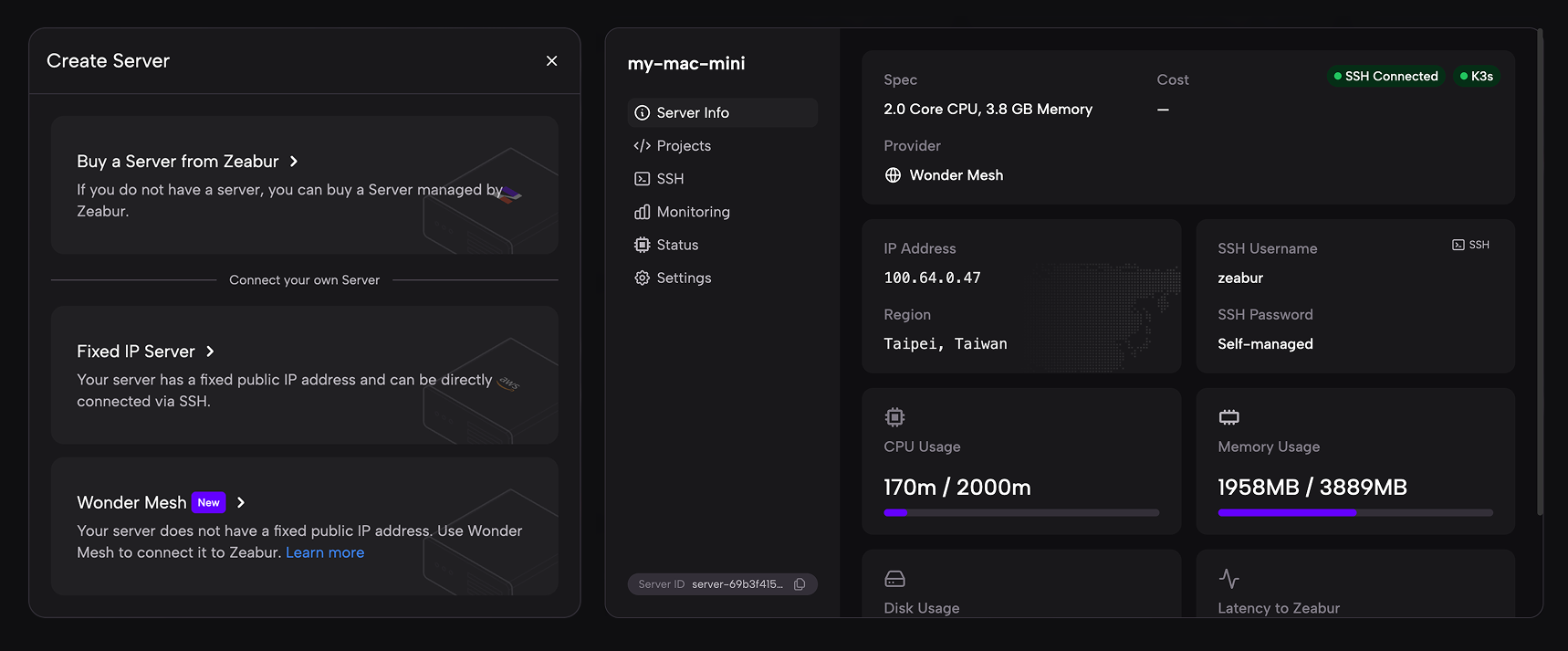
Both macOS and Linux are supported. Whether it's a Mac mini, an old laptop, or a Raspberry Pi — if it runs macOS or Linux, it can join the mesh.
What You Can Do Today
With Wonder Mesh, your home machine is a full Zeabur server. Here's what's available right now:
- Deploy any Zeabur template — The entire template marketplace works on your home machine with one-click deploy.
- Deploy your own services — Push your code and deploy it to your home server through Zeabur's standard workflow.
- LAN access — Deployed services are accessible within your local network.
- Full server management — Monitor CPU, memory, and disk usage. Access SSH directly from the dashboard. View real-time server status.
What's Coming Next
We're actively working on Phase 2 — enabling public internet access to services running on your home machine. Stay tuned!
Perfect For
- Homelab enthusiasts who want cloud-grade deployment UX on their own hardware
- Developers who want to test and run services on local machines with real orchestration
- Self-hosting advocates who want full data sovereignty without giving up convenience
Apply for Beta
Wonder Mesh is now open for Beta applications. Head to the Servers page in the Zeabur dashboard, click Create Server, and submit your Beta application. We'll begin approving applications after March 20.
Have questions or feedback? Visit the Zeabur Forum.