


Sshwifty
Sshwifty is a web-based SSH and Telnet client that lets you connect to remote servers directly from your browser. Built as a single Go binary with no database required — just deploy and start connecting. Supports SSH and Telnet protocols with a clean terminal interface.
Services
Sshwifty
A web-based SSH and Telnet client built in Go. Connect to remote servers directly from your browser with a clean, responsive terminal interface. Single binary, no database, no external dependencies.
What You Can Do After Deployment
Open your domain and you'll see the Sshwifty interface — start a new SSH or Telnet connection immediately.
SSH Connections: Connect to any SSH server by entering the host, port, username, and authentication method (password or key). Full terminal emulation in the browser.
Telnet Connections: Connect to Telnet servers for legacy system management or network device configuration.
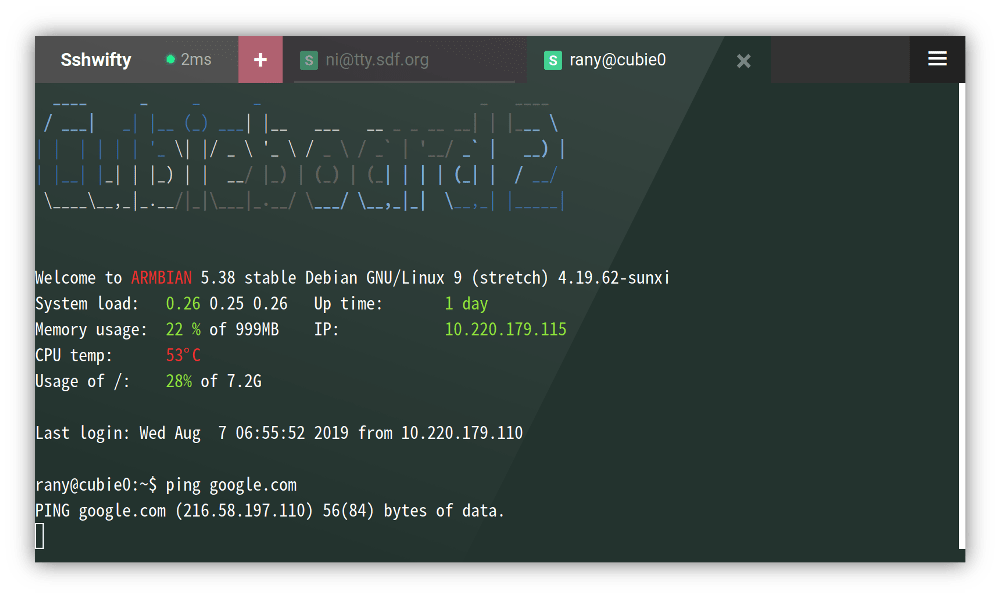
Multiple Sessions: Run multiple SSH and Telnet sessions simultaneously in tabbed windows within the same browser tab.
No Client Software Needed: Access your servers from any device with a web browser — desktop, tablet, or phone. No SSH client installation required on the local machine.
Secure by Default: All traffic between your browser and the Sshwifty instance is encrypted via HTTPS (provided by Zeabur). SSH connections from Sshwifty to target servers use standard SSH encryption.
Configuration
Sshwifty works out of the box with default settings. For advanced configuration (shared passwords, preset hosts, etc.), see the official documentation.
License
AGPL-3.0 — GitHub