


Kanboard
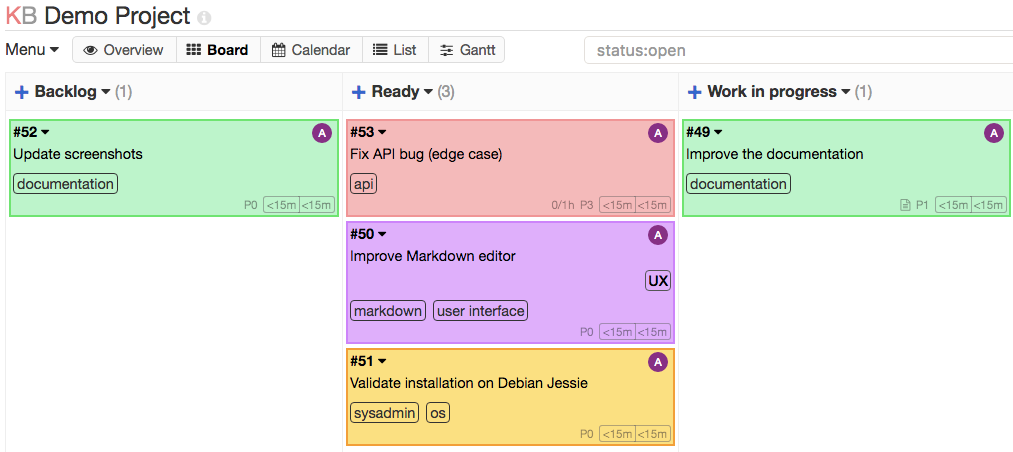
Kanboard is a free and open-source kanban project management tool. It focuses on simplicity with a clean drag-and-drop board interface. Features include swimlanes, task limits per column, subtasks, time tracking, and analytics.
Services
kanboard
kanboard/kanboard:v1.2.51Kanboard
A minimalist kanban board for project management. Kanboard helps you visualize your work with a simple drag-and-drop interface. No bloat, no unnecessary features — just the essentials to manage your projects effectively.
What You Can Do After Deployment
- Log in — open your domain and sign in with the default credentials:
admin/admin - Change the admin password — go to User Profile to update it immediately
- Create a project — set up your first board with custom columns (e.g. Backlog, In Progress, Done)
- Add tasks — create cards, assign them, set due dates, add subtasks and attachments
- Install plugins — extend Kanboard with community plugins (calendar view, Slack notifications, etc.)
Key Features
- Drag-and-drop kanban board with swimlanes
- WIP limits per column to enforce workflow discipline
- Subtasks, comments, and file attachments
- Time tracking built into each task
- Automatic actions and triggers (move tasks, assign users, send emails)
- Multiple project support with role-based access
- Analytics and cumulative flow diagrams
- Plugin system for extensibility
- REST and JSON-RPC API
Default Credentials
- Username:
admin - Password:
admin
Change the password immediately after your first login.
License
Services