


HAProxy
The Reliable, High Performance TCP/HTTP Load Balancer

 Zeabur
Services
haproxy
haproxy:3.3HAProxy is a free, open source high availability solution, providing load balancing and proxying for TCP and HTTP-based applications by spreading requests across multiple servers. It is written in C and has a reputation for being fast and efficient (in terms of processor and memory usage).
Learn more about HAProxy on the official website.
Usage
If the configuration is not working, HAProxy will crashed. Therefore, you should configure the HAProxy in the Config Editor, and restart the service to apply the changes.
Please refer to the configuration guide in the HAProxy configuration tutorials document.
Examples:
Load Balancing to Multiple Zeabur Services
global
    log stdout format raw local0
    maxconn 16384

defaults
    log     global
    mode    http
    option  httplog
    option  dontlognull
    timeout connect 5000ms
    timeout client  50000ms
    timeout server  50000ms
    retries 3

frontend http_front
    bind *:8080
    option forwardfor
    default_backend service_backend

backend service_backend
    balance roundrobin
    option httpchk GET /health
    http-check expect status 200

    server replica1 service-1-replica-1.zeabur.internal:80 check
    server replica2 service-1-replica-2.zeabur.internal:80 check
    server replica3 service-1-replica-3.zeabur.internal:80 check
This example:
- Binds to port
8080. - Trust proxy's
X-Forwarded-Forheader by using theforwardforoption. It is required since Zeabur services are behind a proxy. - Redirects all requests to the
service_backendservice group, which is a group of servers that are running the same service. - Utilizes the
roundrobinalgorithm to balance the requests. - Checks the health of the servers by sending a GET request to the
/healthendpoint. - If the server is not healthy, it will be removed from the pool.
- If the server is healthy, it will be added to the pool.
You should expose the port 8080 to the public in the Networking tab.
HTTP Basic Auth
global
    log stdout format raw local0
    maxconn 16834

defaults
    log     global
    mode    http
    option  httplog
    option  dontlognull
    timeout connect 5000ms
    timeout client  50000ms
    timeout server  50000ms
    retries 3

# Defining user list and password
userlist basic_auth_users
    # Format: user <username> password <password>
    user admin password $6$rounds=100000$saltvalue$hashedpassword
    # Or using plain text password (not recommended for production environment)
    user developer insecure-password mypassword123
    user viewer insecure-password viewonly

frontend http_front
    bind *:8080
    option forwardfor

    # Require HTTP Basic Authentication
    acl auth_ok http_auth(basic_auth_users)
    http-request auth realm "Protected Area" unless auth_ok

    default_backend service_backend

backend service_backend
    server service1 service-1.zeabur.internal:80
Generate the password hash using the following command:
mkpasswd -m sha-512 mypassword
Then, replace the $6$rounds=100000$saltvalue$hashedpassword with the generated hash.
If you want to exclude certain paths from HTTP Basic Auth protection, you can add the acl rule to the frontend section. For example:
frontend http_front
    bind *:8080

    # Define paths that do not require authentication
    acl public_path path_beg /health /public
    acl auth_ok http_auth(basic_auth_users)

    # Only require authentication for non-public paths
    http-request auth realm "Protected Area" unless public_path or auth_ok

    default_backend service_backend
TCP Proxying (e.g., PostgreSQL HA)
global
    log stdout format raw local0
    maxconn 4096

defaults
    log     global
    mode    tcp
    option  tcplog
    option  dontlognull
    timeout connect 10s
    timeout client  1h
    timeout server  1h
    retries 3

# PostgreSQL primary (write operations)
frontend postgres_write
    bind *:5432
    default_backend postgres_primary

# PostgreSQL replicas (read operations)
frontend postgres_read
    bind *:5433
    default_backend postgres_replicas

# Primary backend
backend postgres_primary
    mode tcp
    option tcp-check

    # PostgreSQL health check
    tcp-check connect
    tcp-check send-binary 00000008 # Length
    tcp-check send-binary 04d2162f # SSL request

    server primary postgres-primary.zeabur.internal:5432 check

# Replicas backend (load balancing)
backend postgres_replicas
    mode tcp
    balance leastconn
    option tcp-check

    # PostgreSQL health check
    tcp-check connect
    tcp-check send-binary 00000008
    tcp-check send-binary 04d2162f

    server replica1 postgres-replica-1.zeabur.internal:5432 check
    server replica2 postgres-replica-2.zeabur.internal:5432 check
    server replica3 postgres-replica-3.zeabur.internal:5432 check
Make sure to expose ports 5432 and 5433 in the Networking tab.
Web UI
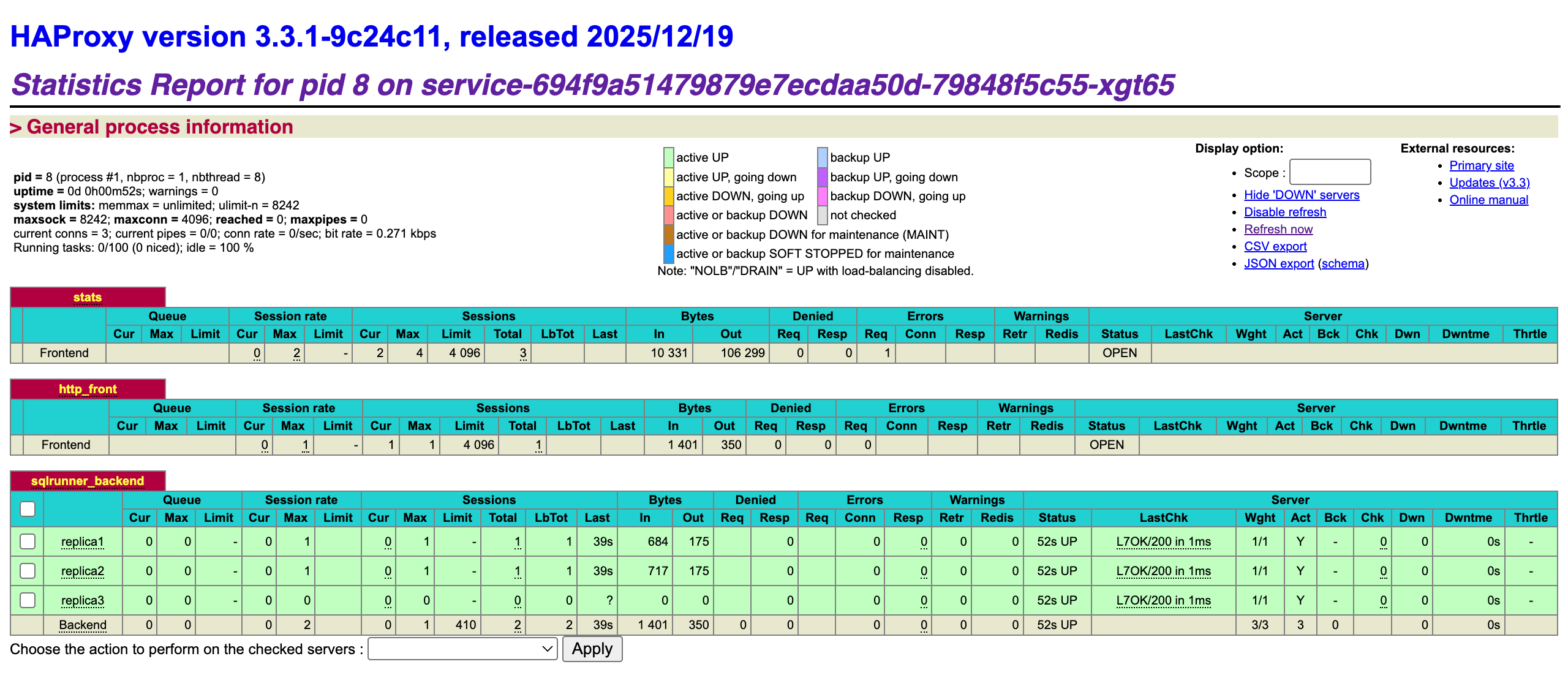
Add this frontend section to your configuration file:
frontend stats
    bind *:8404
    mode http
    stats enable
    stats uri /stats
    stats refresh 10s
    stats realm HAProxy\ Statistics
    stats auth admin:admin123
    stats admin if TRUE
    stats show-legends
    stats show-node
Remember to expose port 8404 to the public in the Networking tab, and you can access the stats page at http://your-domain:8404/stats, with the username admin and password admin123.
Services