

Raycast AI 指南:提升 Mac 生产力
在 Mac 上玩转 Raycast AI:快速解答、语境化写作、预设与 Zeabur AI Hub 自定义模型
 Kyle Chung
本文亦提供 English、繁體中文、日本語、Español和Bahasa Indonesia。
如果你还在每次有快速问题时打开浏览器标签页,输入 "chatgpt.com",然后等待页面加载,那你就是在用最麻烦的方式。上下文切换——从代码编辑器切换到浏览器再回来——是工作流状态的无声杀手。
进入 Raycast AI。它不仅仅是另一个聊天机器人;它是一个智能层,位于你的操作系统之上。与基于 Web 的工具不同,它控制你的 Mac,使其成为当今最强大的 Mac AI 生产力工具之一。
在本指南中,我们将介绍如何使用 Raycast AI 功能,将其与竞争对手进行比较,并深入探讨使用 Zeabur 设置自定义模型的专业级教程。
Raycast AI 实际能做什么?(核心功能)
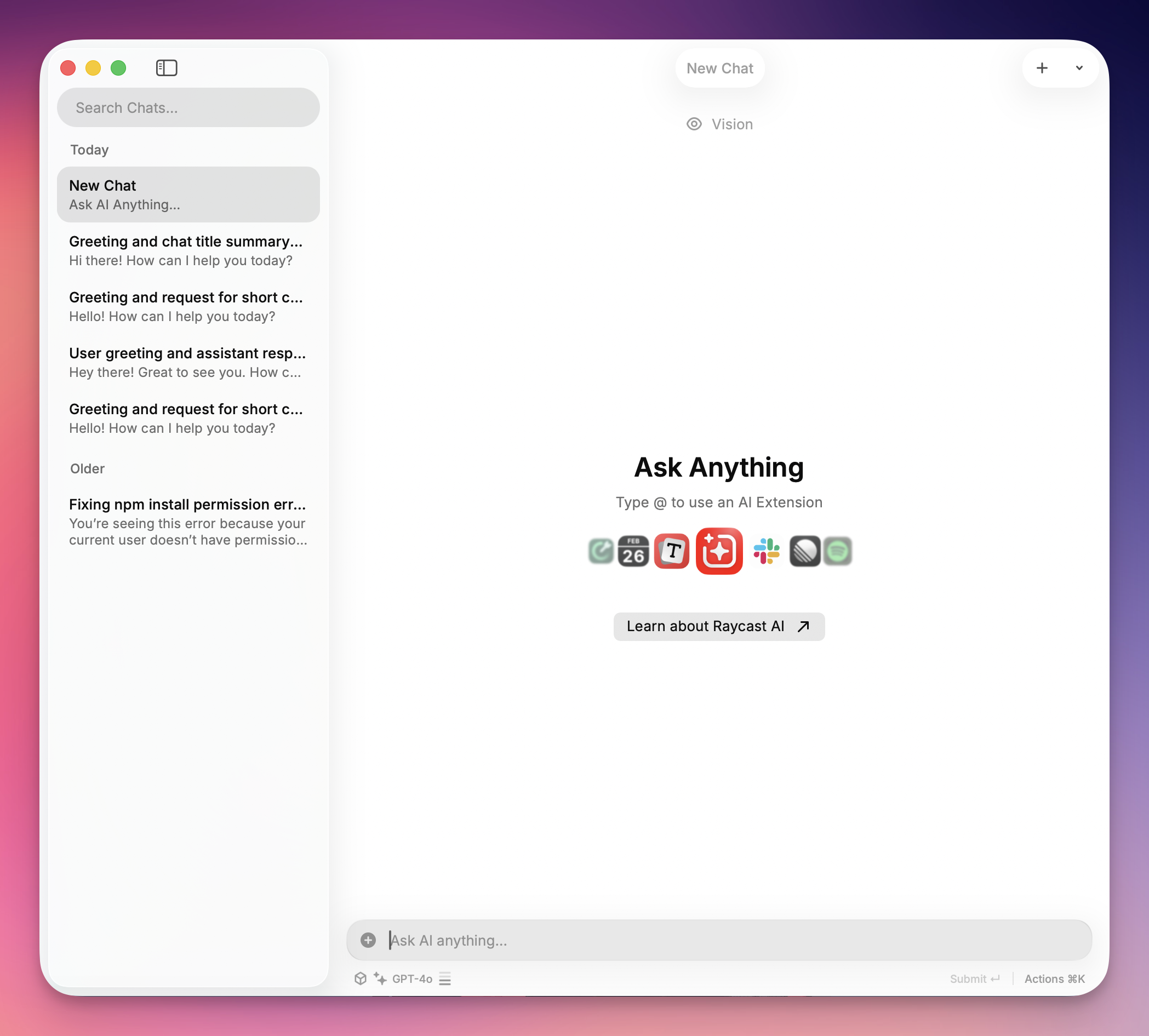
Raycast 取代了原生 Mac Spotlight 搜索(⌘ + 空格),但其 AI 集成才是它的强大之处。由于它是原生应用,它可以"读取"你当前的上下文——无论是邮件中选中的段落还是 VS Code 中的代码。
以下是你应该首先尝试的 4 个功能:
1. "Quick AI"(Tab 键技巧)
这是在任何计算机上获得答案的最快方式,不会打断你的工作流。
- 工作流程: 打开 Raycast,输入简短问题(例如,"Excel vlookup 公式"),然后按
TAB。 - 结果: 答案立即加载到搜索栏中。没有聊天窗口,没有历史记录混乱——只有准备好复制的答案。
模型推荐: 为了获得可靠且稳定的性能,我们建议在设置自定义提供商时使用 GPT-4o。它提供出色的响应时间和一致的快速查询结果。
2. AI 聊天预设
你不需要将文本复制粘贴到 Web 机器人中来修复语法或重写邮件。写作助手让你可以在任何应用中高亮显示文本并在原地重写。
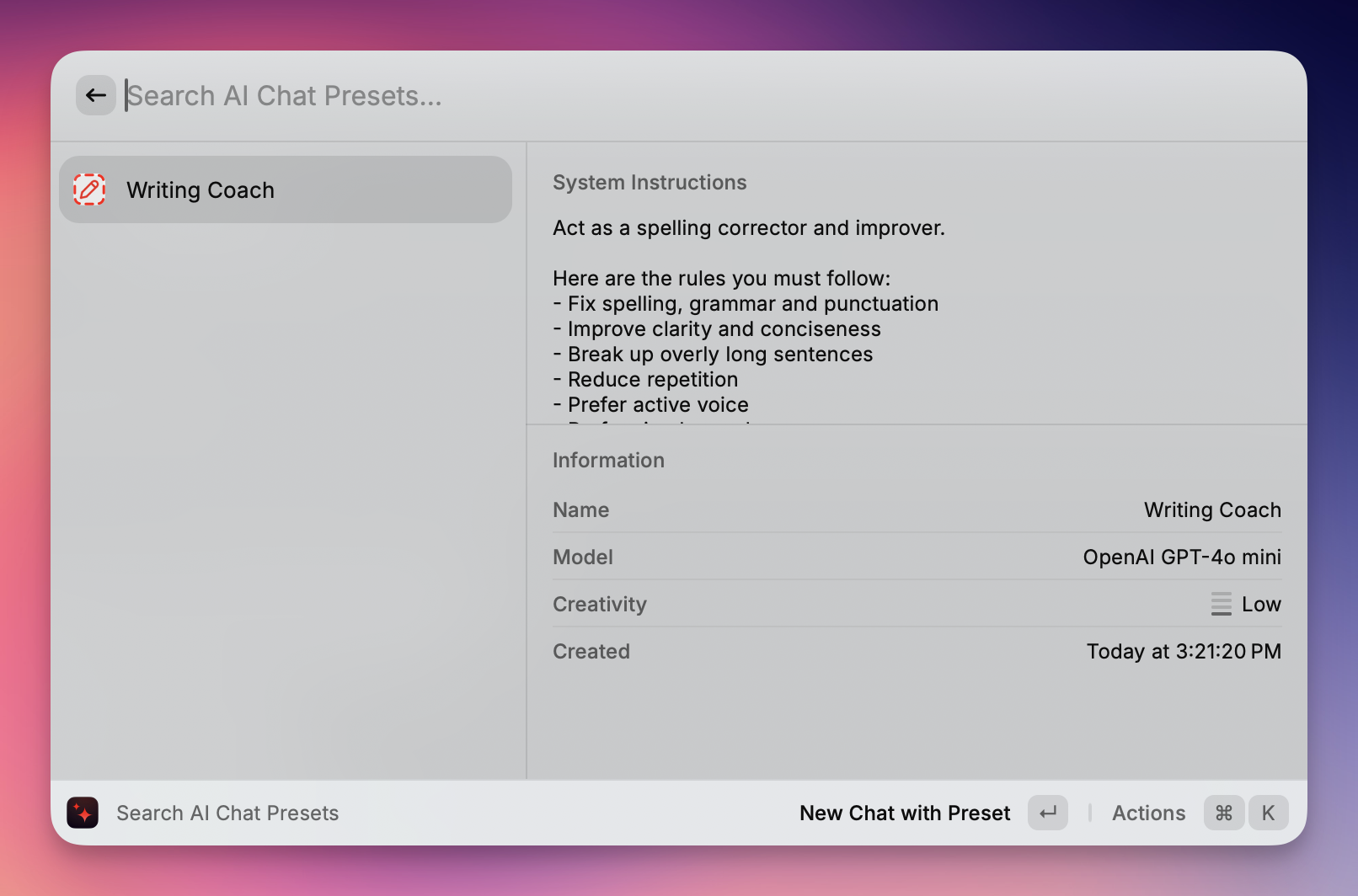
- 工作流程:在任何应用(Slack、Notes、Word)中高亮显示文本。打开 Raycast 并输入命令,如"修复语法"或"将语气改为友好"。
- 结果:Raycast 在原地重写文本,删除你的草稿,并将润色后的版本直接粘贴到你的文档中。
模型推荐: 为了获得最佳的写作质量,我们建议在设置自定义提供商时使用 GPT-5。其先进的语言理解能力在语法纠正、语气调整和上下文重写方面表现出色。
3. AI 命令生态系统
Raycast 不仅仅是一个工具;它是一个平台。Raycast Store 充满了社区构建的扩展,这些扩展利用 AI 来完成特定任务。
- 工作流程: 在 Store 中搜索 "AI 图像生成器" 或 "翻译器"。
- 结果: 你解锁了专业功能——如生成 Dall-E 3 图像或在本地翻译 JSON 文件——直接从你的命令栏,通常使用你已经设置的相同 API 密钥。
模型推荐: 为了在 AI 命令和扩展中获得稳定可靠的性能,我们建议在设置自定义提供商时使用 GPT-4o。它提供一致的结果,并与各种 AI 驱动的工具具有出色的兼容性。
一些很酷的功能:
@spotify-player(Spotify 控制)
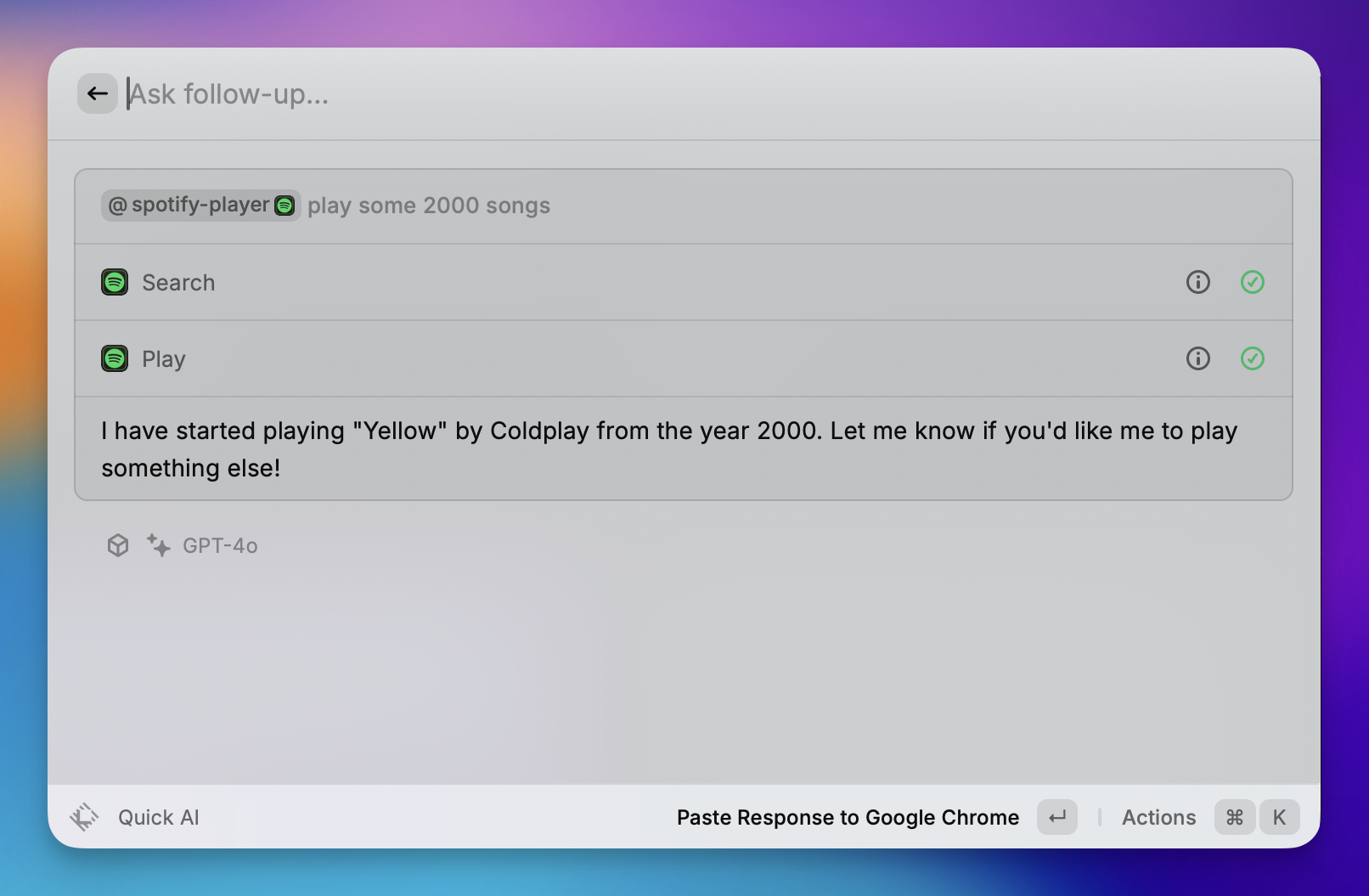
作为 Spotify 的键盘中心遥控器。
- 播放控制: 播放、暂停、跳过、上一首和随机播放曲目,无需打开 Spotify 窗口。
- 搜索: 直接从命令栏搜索并开始播放特定歌曲、专辑或播放列表。
- 库管理: "喜欢"当前播放的歌曲,将其添加到你的"喜欢的歌曲"中。
@calculator(计算器和转换)

在搜索栏中立即执行数学计算和转换(无需按 Enter 键)。
- 数学: 基本算术(例如,
500 * 12)和复杂表达式。 - 转换: 即时转换货币(例如,
100 usd in eur)、单位(例如,5 ft in cm)和时区(例如,5pm london in tokyo)。 - 日期计算: 计算时间差(例如,
days until christmas)。
@calendar(我的日程)
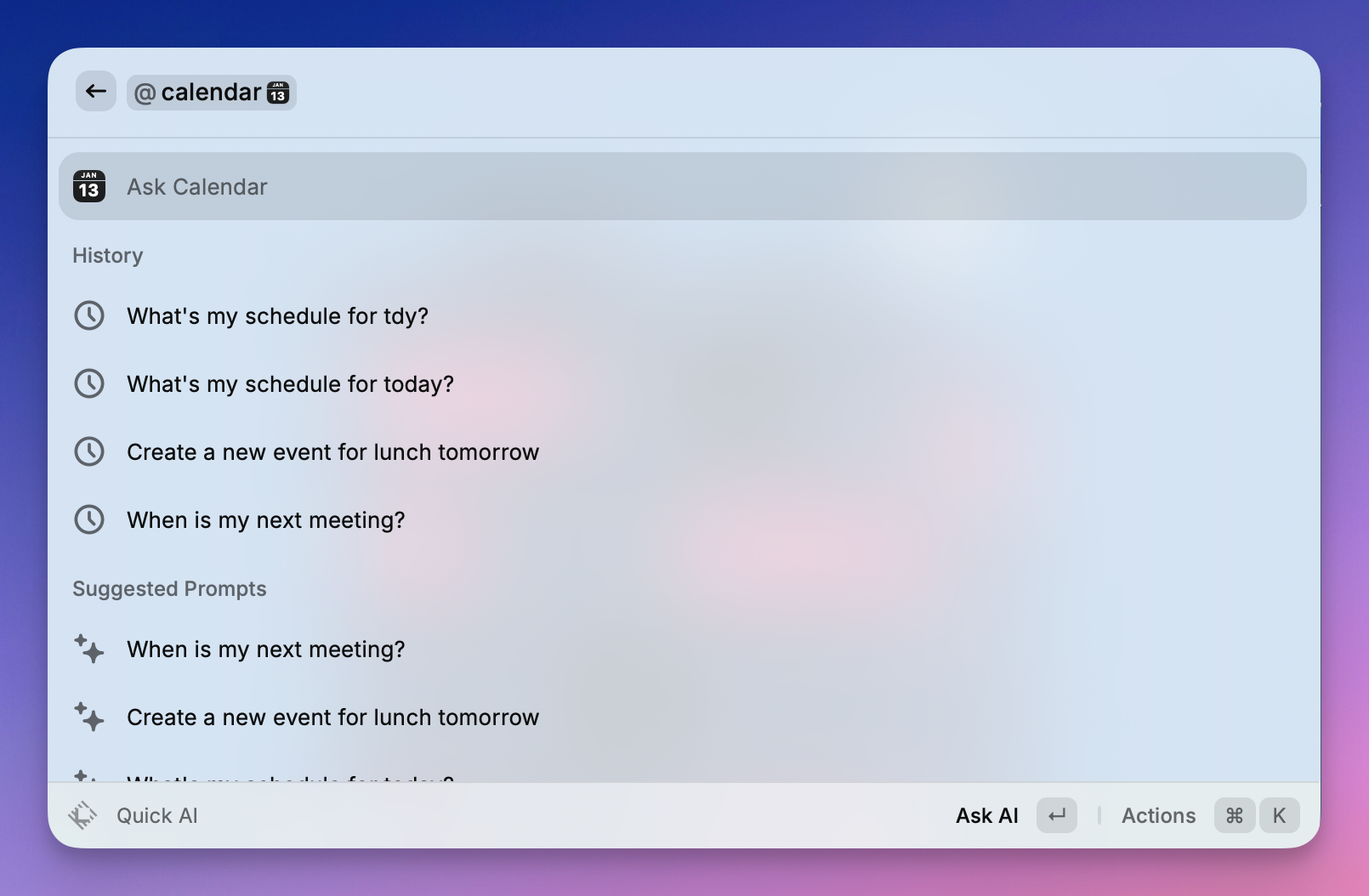
集成你的系统日历来管理你的一天。
- 快速加入: "杀手级功能"—在即将到来的活动上按 Enter 键,立即打开视频会议链接(Zoom、Meet、Teams)。
- 日程视图: 查看你即将举行的会议和活动列表。
- 时间管理: 查看当前会议还剩多少时间,或距离下一个会议开始还有多长时间。
不用担心 API 密钥,Zeabur AI Hub 已准备就绪。
虽然 Raycast Pro 订阅很棒,但许多用户更喜欢使用自己的 API 密钥的"按需付费"方法,或者只是想要在一个地方管理多个 AI 模型(如 Gemini、Claude 和 GPT)的自由。
此方法允许任何人将 Raycast 连接到 Zeabur AI Hub。这是一种强大的方式,可以按自己的条件使用高级模型——可能节省资金,并让你访问所需的确切 AI 工具。
步骤 1:获取你的 Zeabur API 密钥
- 登录 Zeabur 仪表板。
- 导航到 AI Hub 页面。
- 生成新的 API 密钥并复制以供以后使用。
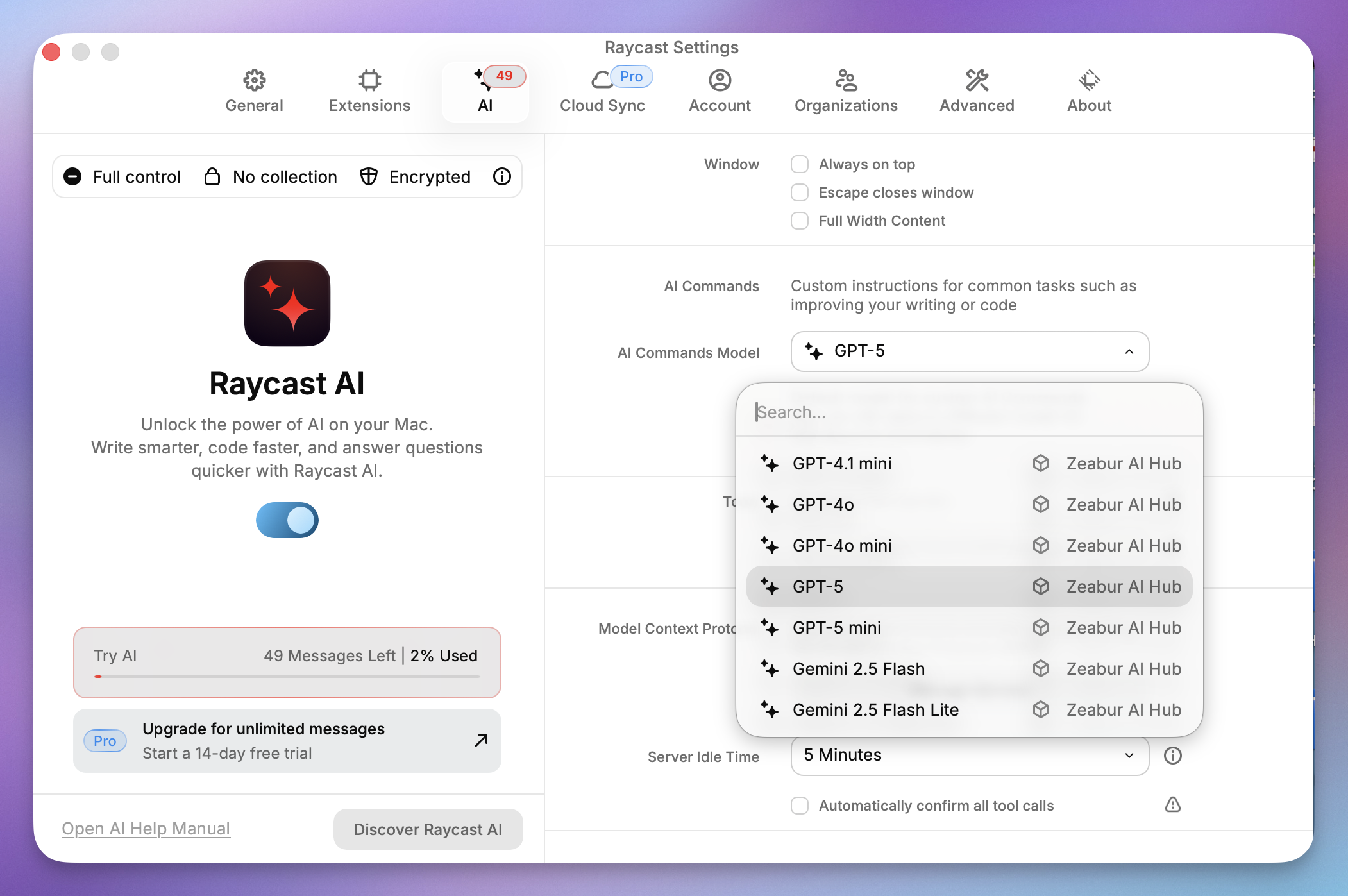
步骤 2:打开 Raycast 设置
- 打开 Raycast 搜索栏。
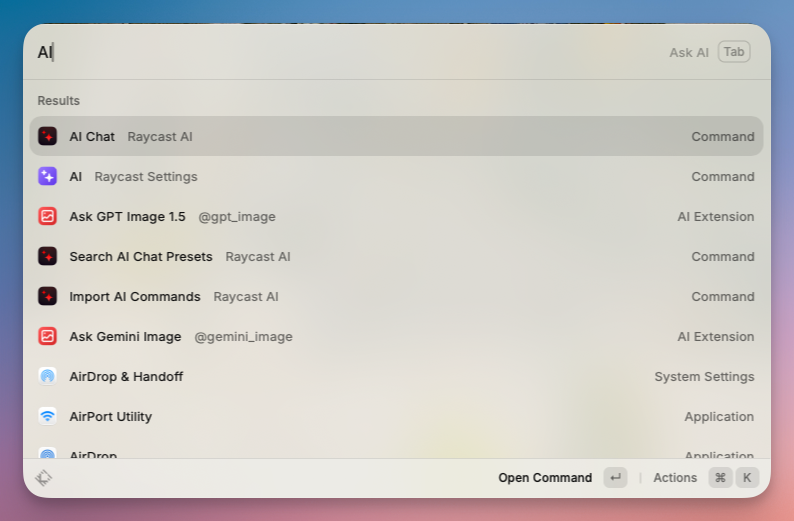
- 输入
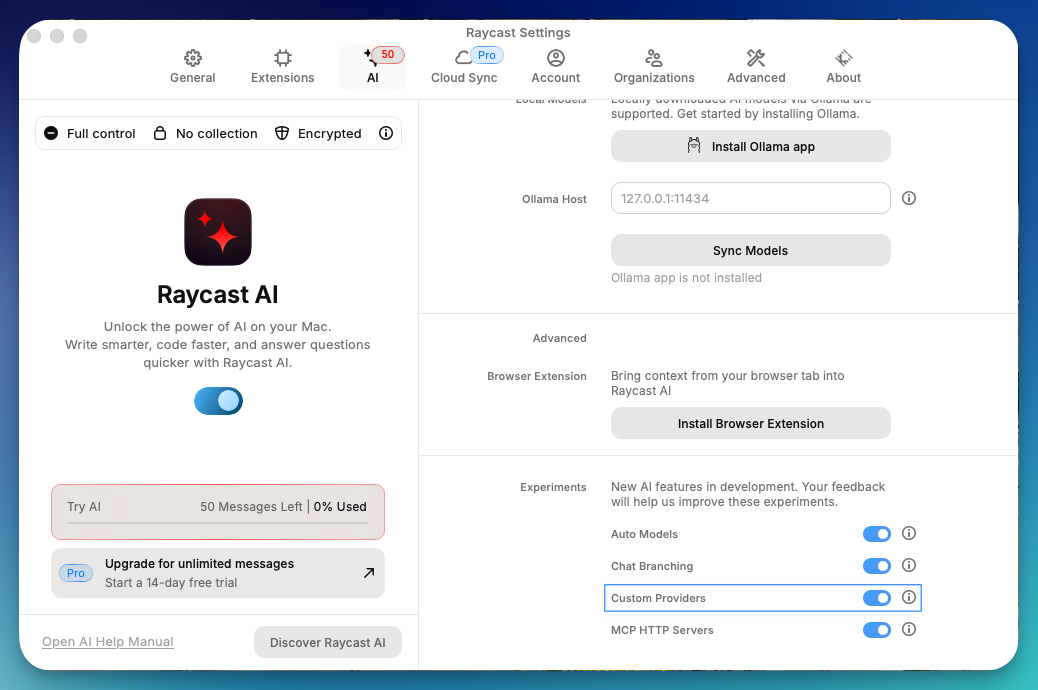
AI并选择 AI Raycast 设置。 - 滚动到右侧面板的底部,找到 自定义提供商 并启用它。
- 单击 显示提供商配置。这会在 Finder 中打开配置文件夹。
步骤 3:编辑 providers.yaml 配置文件
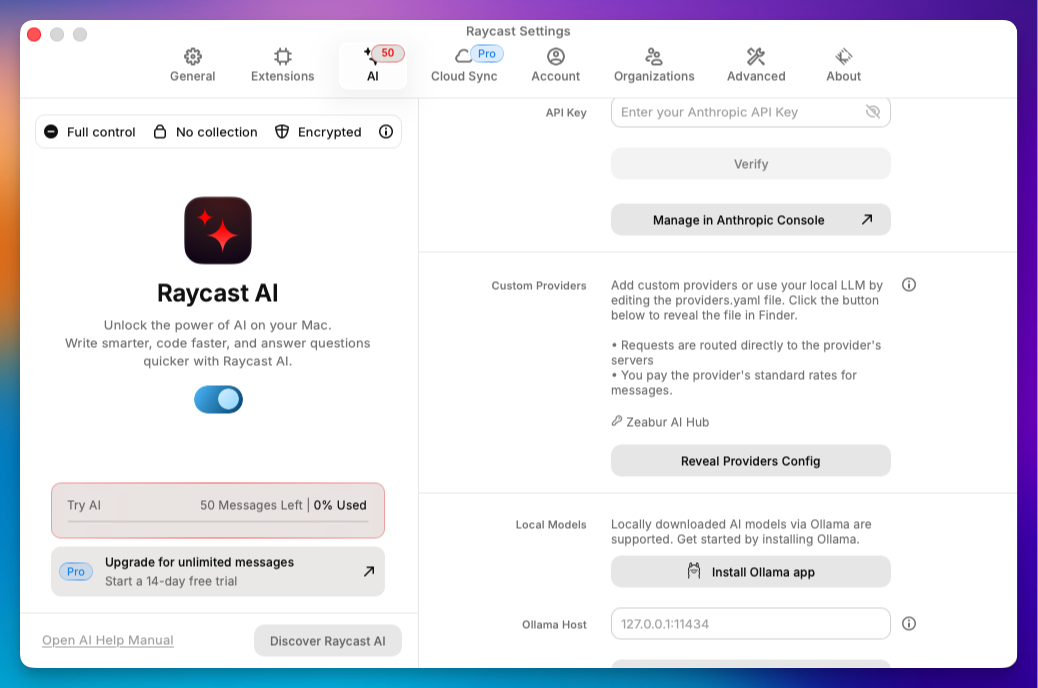
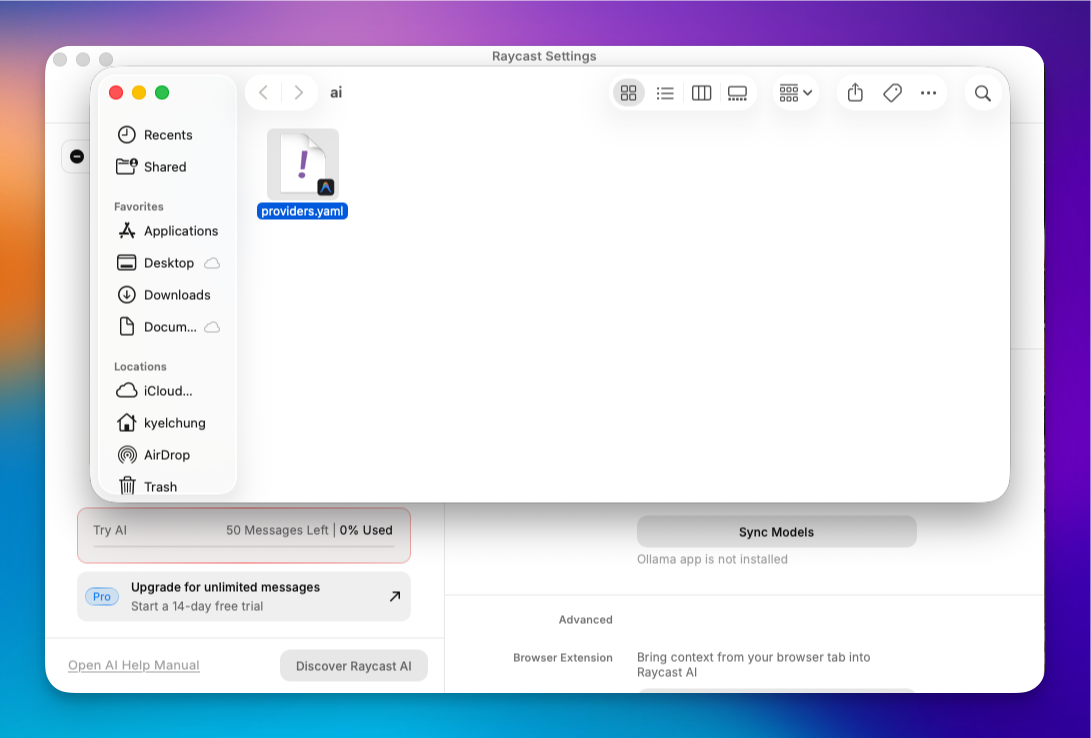
- 在 Finder 中打开
AI文件夹。 - 找到
providers.template.yaml并使用代码编辑器(如 VS Code)打开它。 - 修改内容以匹配以下格式(将
YOUR_API_KEY替换为步骤 1 中的密钥):
# Template for providers.yaml
#
# You can add any OpenAI API compatible provider to the "providers" list.
# For each provider you must also specify a list of models, along with model abilities.
#
# All fields are required unless marked as optional.
#
# Refer to your provider's API documentation for specific
# details such as model identifiers, capabilities etc
#
# Note: Since the OpenAI API is not a standard we can't guarantee that all
# providers will work correctly with Raycast AI.
#
# To use this template rename as `providers.yaml`
#
providers:
  - id: zeabur_ai_hub
    name: Zeabur AI Hub
    base_url: https://hnd1.aihub.zeabur.ai/ # 也可選擇舊金山節點:https://sfo1.aihub.zeabur.ai/
    api_keys:
      zeabur-ai-hub-key: sk-xxxxxxxxxx
    models:
      - id: claude-sonnet-4-5
        name: "Claude Sonnet 4.5"
        context: 200000
        provider: zeabur-ai-hub-key
        abilities:
          temperature:
            supported: true
          vision:
            supported: true
          system_message:
            supported: true
          tools:
            supported: true
      - id: claude-haiku-4-5
        name: "Claude Haiku 4.5"
        context: 200000
        provider: zeabur-ai-hub-key
        abilities:
          temperature:
            supported: true
          vision:
            supported: true
          system_message:
            supported: true
          tools:
            supported: true
      - id: gemini-3-pro-preview
        name: "Gemini 3 Pro Preview"
        context: 2000000
        provider: zeabur-ai-hub-key
        abilities:
          temperature:
            supported: true
          vision:
            supported: true
          system_message:
            supported: true
          tools:
            supported: true
      - id: gemini-3-flash-preview
        name: "Gemini 3 Flash Preview"
        context: 2000000
        provider: zeabur-ai-hub-key
        abilities:
          temperature:
            supported: true
          vision:
            supported: true
          system_message:
            supported: true
          tools:
            supported: true
      - id: gemini-2.5-pro
        name: "Gemini 2.5 Pro"
        context: 2000000
        provider: zeabur-ai-hub-key
        abilities:
          temperature:
            supported: true
          vision:
            supported: true
          system_message:
            supported: true
          tools:
            supported: true
      - id: gemini-2.5-flash
        name: "Gemini 2.5 Flash"
        context: 2000000
        provider: zeabur-ai-hub-key
        abilities:
          temperature:
            supported: true
          vision:
            supported: true
          system_message:
            supported: true
          tools:
            supported: true
      - id: gemini-2.5-flash-lite
        name: "Gemini 2.5 Flash Lite"
        context: 2000000
        provider: zeabur-ai-hub-key
        abilities:
          temperature:
            supported: true
          vision:
            supported: true
          system_message:
            supported: true
          tools:
            supported: true
      - id: gpt-5
        name: "GPT-5"
        context: 200000
        provider: zeabur-ai-hub-key
        abilities:
          temperature:
            supported: true
          vision:
            supported: true
          system_message:
            supported: true
          tools:
            supported: true
      - id: gpt-5-mini
        name: "GPT-5 mini"
        context: 200000
        provider: zeabur-ai-hub-key
        abilities:
          temperature:
            supported: true
          vision:
            supported: true
          system_message:
            supported: true
          tools:
            supported: true
      - id: gpt-4.1
        name: "GPT-4.1"
        context: 200000
        provider: zeabur-ai-hub-key
        abilities:
          temperature:
            supported: true
          vision:
            supported: true
          system_message:
            supported: true
          tools:
            supported: true
      - id: gpt-4.1-mini
        name: "GPT-4.1 mini"
        context: 200000
        provider: zeabur-ai-hub-key
        abilities:
          temperature:
            supported: true
          vision:
            supported: true
          system_message:
            supported: true
          tools:
            supported: true
      - id: gpt-4o
        name: "GPT-4o"
        context: 200000
        provider: zeabur-ai-hub-key
        abilities:
          temperature:
            supported: true
          vision:
            supported: true
          system_message:
            supported: true
          tools:
            supported: true
      - id: gpt-4o-mini
        name: "GPT-4o mini"
        context: 200000
        provider: zeabur-ai-hub-key
        abilities:
          temperature:
            supported: true
          vision:
            supported: true
          system_message:
            supported: true
          tools:
            supported: true
      - id: gpt-oss-120b
        name: "GPT OSS 120B"
        context: 128000
        provider: zeabur-ai-hub-key
        abilities:
          temperature:
            supported: true
          vision:
            supported: false
          system_message:
            supported: true
          tools:
            supported: true
      - id: grok-4-fast-non-reasoning
        name: "Grok 4 Fast"
        context: 128000
        provider: zeabur-ai-hub-key
        abilities:
          temperature:
            supported: true
          vision:
            supported: true
          system_message:
            supported: true
          tools:
            supported: false
      - id: deepseek-v3.2
        name: "DeepSeek v3.2"
        context: 128000
        provider: zeabur-ai-hub-key
        abilities:
          temperature:
            supported: true
          vision:
            supported: false
          system_message:
            supported: true
          tools:
            supported: true
      - id: llama-3.3-70b
        name: "Llama 3.3 70B"
        context: 128000
        provider: zeabur-ai-hub-key
        abilities:
          temperature:
            supported: true
          vision:
            supported: false
          system_message:
            supported: true
          tools:
            supported: true
      - id: qwen-3-32
        name: "Qwen 3 32B"
        context: 128000
        provider: zeabur-ai-hub-key
        abilities:
          temperature:
            supported: true
          vision:
            supported: false
          system_message:
            supported: true
          tools:
            supported: true
      - id: qwen3-next
        name: "Qwen 3 Next 80B"
        context: 128000
        provider: zeabur-ai-hub-key
        abilities:
          temperature:
            supported: true
          vision:
            supported: false
          system_message:
            supported: true
          tools:
            supported: true
      - id: kimi-k2-thinking
        name: "Kimi K2 Thinking"
        context: 200000
        provider: zeabur-ai-hub-key
        abilities:
          temperature:
            supported: true
          vision:
            supported: false
          system_message:
            supported: true
          tools:
            supported: true
      - id: glm-4.6
        name: "GLM 4.6"
        context: 200000
        provider: zeabur-ai-hub-key
        abilities:
          temperature:
            supported: true
          vision:
            supported: true
          system_message:
            supported: true
          tools:
            supported: true
      - id: gemini-2.5-flash-image
        name: "Nano Banana"
        context: 200000
        provider: zeabur-ai-hub-key
        abilities:
          temperature:
            supported: true
          vision:
            supported: true
          system_message:
            supported: true
          tools:
supported: true- 保存并重命名: 保存文件并将其重命名为
providers.yaml(删除.template)。
步骤 4:选择新模型
回到 Raycast,你现在可以在 AI 聊天中打开模型下拉菜单并选择 Zeabur AI Hub。你现在绕过了默认的订阅模型,使用你自己管理的中心!
Raycast AI vs. 竞争对手
Raycast AI vs ChatGPT 应用
Mac 的原生 ChatGPT 应用比浏览器有所改进,但它仍然是一个需要管理的"窗口"。
- ChatGPT 应用: 适合长时间对话会话。
- Raycast AI: 专为"进出"实用工具而设计。它在你所在的位置(IDE、邮件、Slack)修改文本,而不是强迫你复制粘贴到单独的窗口中。
Raycast vs. Spotlight
Spotlight 搜索文件。Raycast 执行操作。差异是巨大的。一旦你将 AI 添加到 Raycast,Spotlight 就会感觉像是过去的遗物。
结论
Raycast AI 将你的 Mac 启动器转变为生产力引擎。无论你是寻找快速答案的普通用户,还是通过 Zeabur 设置复杂管道的开发人员,它都提供了 Web 浏览器根本无法匹配的速度水平。
准备好升级你的工作流程了吗? 免费下载 Raycast 开始使用,或深入了解 Pro 功能,释放 Mac 上 AI 的全部潜力。