


Nanobot
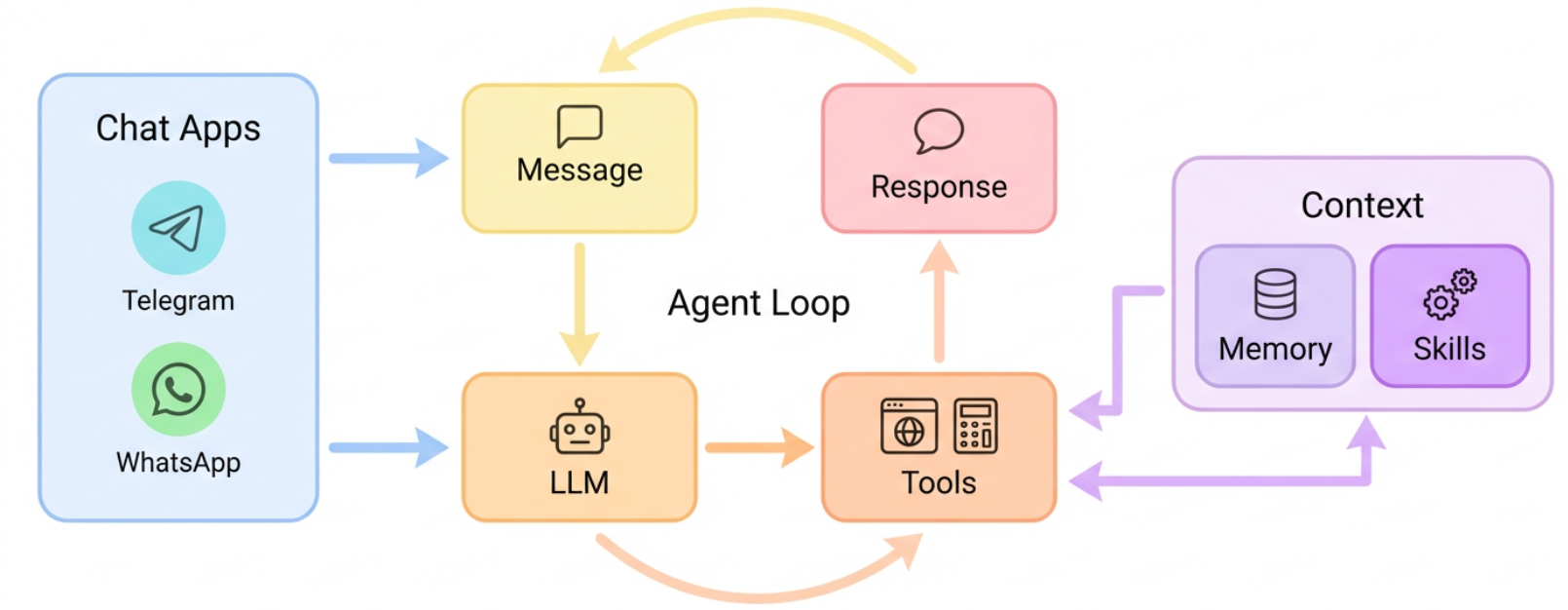
Nanobot is an ultra-lightweight personal AI assistant (~4K lines core code) supporting multiple LLM providers and chat platforms including Telegram, Discord, WhatsApp, Slack, DingTalk, Feishu, QQ, and Email.
 Zeabur
 Zeabur
Services
Nanobot
⚠️ This template requires a Dedicated Server on Zeabur and cannot run on shared clusters.
Recommended resources: 1 vCPU / 2 GB RAM (minimum: 0.5 vCPU / 256 MB RAM)
Nanobot is an ultra-lightweight personal AI assistant framework (~4K lines of core agent code) from HKUDS. It supports multiple LLM providers and connects to various messaging platforms via a unified Gateway architecture.
Official documentation: github.com/HKUDS/nanobot
Supported Chat Platforms
Telegram, Discord, WhatsApp, Slack, DingTalk, Feishu, QQ, and Email.
Quick Start
- After deployment, the Nanobot gateway starts automatically
- If you entered an API key during deployment (your own OpenAI-compatible provider or OpenRouter), a chat model is already configured
- If you entered a Telegram bot token, the bot is ready — send it a message to start chatting
- To add more platforms or change settings, edit
/root/.nanobot/config.jsonvia the Files tab
Skipped a field during deployment? You can add it later by editing /root/.nanobot/config.json in the Files tab, or by adding the corresponding environment variable in the Zeabur dashboard and restarting the service.
Default model: When you bring your own OpenAI-compatible provider, the default model is the LLM Model you set (e.g. gpt-4o-mini). When using OpenRouter, the default model is openrouter/anthropic/claude-sonnet-4. If you set no key, the default is anthropic/claude-opus-4-5. You can change this in the config file at any time.
LLM Providers
Nanobot supports many providers. You can switch at any time by editing /root/.nanobot/config.json via the Files tab and restarting the service.
| Provider | How to get API key | providers config | Model ID example |
|---|---|---|---|
| OpenAI-compatible (BYO) | your provider's dashboard | "openai": {"api_key":"...","api_base":"https://api.openai.com/v1"} | gpt-4o-mini |
| OpenRouter | openrouter.ai/keys | "openrouter": {"api_key":"sk-or-..."} | openrouter/anthropic/claude-sonnet-4 |
| Anthropic | console.anthropic.com | "anthropic": {"api_key":"sk-ant-..."} | anthropic/claude-sonnet-4-5 |
| OpenAI | platform.openai.com | "openai": {"api_key":"sk-..."} | openai/gpt-4o |
| DeepSeek | platform.deepseek.com | "deepseek": {"api_key":"..."} | deepseek/deepseek-chat |
To switch provider:
- Open
/root/.nanobot/config.jsonin the Files tab - Add or update the provider entry under
"providers" - Change
"agents" > "defaults" > "model"to the new model ID - Restart the service for changes to take effect
Example — switch to OpenRouter:
{
  "providers": {
    "openrouter": { "api_key": "sk-or-your-key" }
  },
  "agents": {
    "defaults": { "model": "openrouter/anthropic/claude-sonnet-4" }
  }
}
Chat Platforms
Supported: Telegram, Discord, WhatsApp, Slack, DingTalk, Feishu, QQ, and Email. See the official documentation for the full list and setup guides.
Telegram setup:
- Search for
@BotFatheron Telegram and send/newbot - Follow the prompts to set the bot name and username
- Copy the bot token you receive
- Enter it during deployment, or add it to config later
If you entered the bot token during deployment, it's already active. Otherwise, add it to config:
"channels": {
  "telegram": { "enabled": true, "token": "BOT_TOKEN", "allow_from": [] }
}
Other platforms — add the corresponding channel in config and restart:
"channels": {
  "discord": { "enabled": true, "token": "BOT_TOKEN", "allow_from": [] },
  "slack": { "enabled": true, "bot_token": "xoxb-...", "app_token": "xapp-...", "allow_from": [] }
}
allow_from — controls who can talk to the bot. Empty list [] = anyone can use it. To restrict access, add user IDs (for Telegram, send a message to @userinfobot to find your user ID):
"allow_from": ["123456789", "987654321"]
Restart the service after any config changes.
CLI Commands
Access the terminal via Command in Zeabur dashboard:
nanobot agent -m "query"- Send a single messagenanobot agent- Interactive chatnanobot status- View provider configuration
Data Persistence
All data is stored under /root/.nanobot (mounted as a persistent volume):
config.json- Configurationworkspace/- Agent workspace and memory
It is recommended to use Zeabur's backup feature to regularly back up your data.
Troubleshooting
Service won't start?
- Check Logs for error messages
- Edit config via Files tab to fix issues
- Restart the service
Update version: Modify the startup script to install a specific version: uv pip install --system nanobot-ai==0.1.3.post6
More help: See the official documentation for detailed configuration and usage guides.
Zeabur